
Screenshots

About this Mod

Welcome to my first mod! This is my vanilla approach to adding light runescape spellcasting that cost runes to cast spells.
Mine some rune ore from spires in the Overworld and find magical elemental stones scattered around the world to toss runes onto. With your trusty Rune Staff, go out and shoot bad guys using elemental runes as ammunition. Cast a spell of the 4 elements Fire, Air, Water, and Earth. You can even turn bones in your offhand into bananas for a snack. If you want to upgrade your spells you must venture into the nether and right click a nether quartz in your hand.

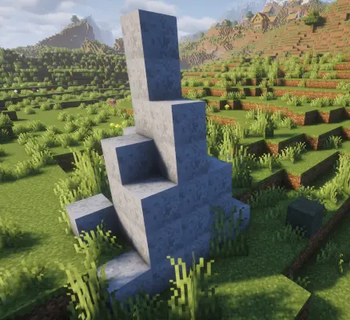
First find rune ore spires in the overworld to mine rune chunks.

At a stonecutter you can cut rune chunks into blank runes, and in a furnace/blast furnace both can be smelted into pure runes. That means cutting them first doubles your runes.


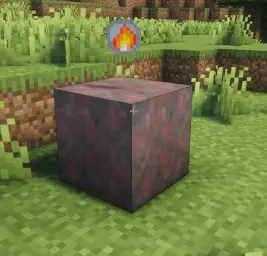
To craft elemental runes you must find elemental stones in their environments. Water runes will be underwater in rivers or oceans, fire runes in deserts/badlands, Air runes are in higher elevation stony areas where as Earth are closer to the surface, and Nature runes are typically in forests. Sometimes they spawn by rune ore spires if you are lucky. Throw runes on top of the stones to get runes of that type, or twice as many if you threw pure runes. If you want to bring them home, they require a diamond tool or better to mine.

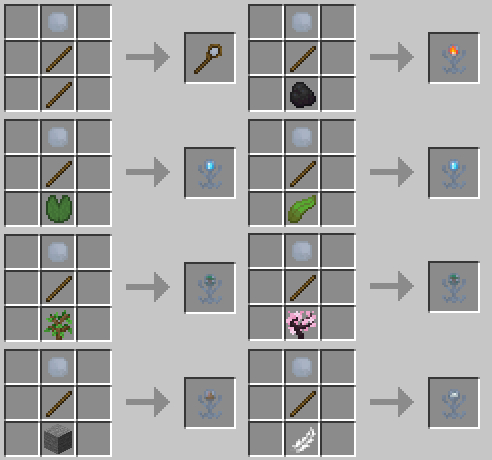
Craft a rune staff to cast spells. Talismans are useful if you are having trouble finding elemental stones. Right clicking a talisman will search a short distance away and alert you if it finds a matching elemental stone of it's type. (Both nature and water talismans have multiple crafting recipes)

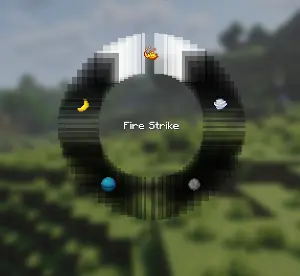
Pressing R (the default hotkey) will open up a radial menu. Select the spell you want to cast and release. Ducking + the radial menu hotkey unequips the current spell. Spells will require matching elemental runes to cast. Then right click with a rune staff equipped to blast your enemies!

The current equipped spell is displayed on the bottom left of the screen.

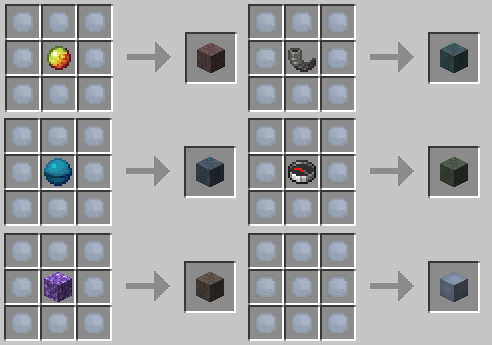
If you are struggling to find elemental stones you can also craft them! (psst you can even cut them in a stonecutter for 18 elemental runes of their type) The rune block is just cosmetic.
Available Versions
How to Install Runescuffed on Your Server
Order Server
Order a Minecraft Java server with at least 3 GB RAM (4 GB recommended).
Set fabric Loader
In the panel under "Egg", select the fabric loader and matching Minecraft version (1.21.11).
Install Mod
Open the mod browser in the dashboard and search for "Runescuffed". Click "Install" – done! Alternatively, upload the .jar via SFTP to the /mods folder.
Compatibility
Mod Loaders
Minecraft Versions
1.21.11
Server-side
✓ RequiredRecommended RAM
4 GB(min. 3 GB)Frequently Asked Questions
Runescuffed server crashes on startup – what to do?
Most common cause: wrong fabric version or insufficient RAM. Check the server log (latest.log) for "OutOfMemoryError" or "Mixin" errors. With Mado Hosting: ensure at least 3 GB RAM is allocated and the loader matches the mod version (1.21.11). You can switch loaders with one click in the panel.
Is Runescuffed compatible with fabric?
Runescuffed officially supports fabric for Minecraft 1.21.11. The Mado dashboard automatically detects incompatible loader combinations.
Server lagging with Runescuffed – how to optimize performance?
Recommended RAM: 4 GB (per 8 players). Use /spark profiler to check if Runescuffed consumes the most tick time. Common fixes: reduce server view-distance to 8-10, install "performant" or "starlight" as supplementary mods on Forge. With Mado Hosting, your server runs on NVMe SSDs with dedicated CPU cores for minimal latency.
Rent Modded Server
Install Runescuffed with just one click on your server.