
RUNIC: Enchants
Find vanilla's Enchantment system to be boring and too OP? This Mod solves that in an RPG like way completely redefining what upgrading gear is like in Minecraft!
Screenshots
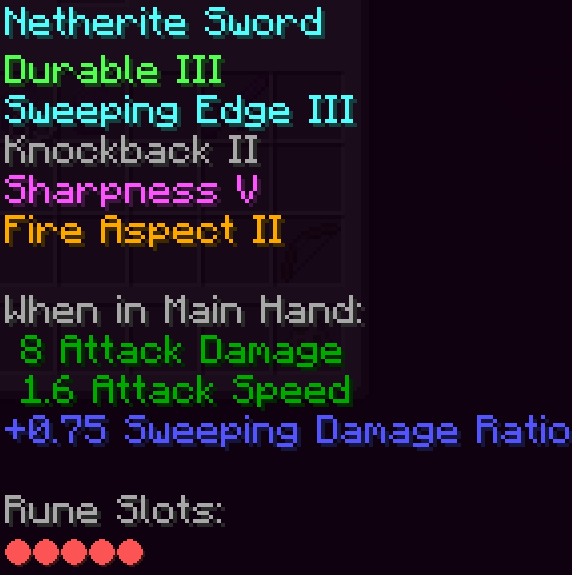
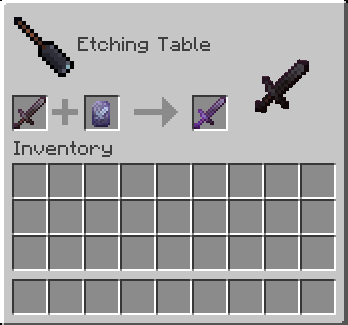
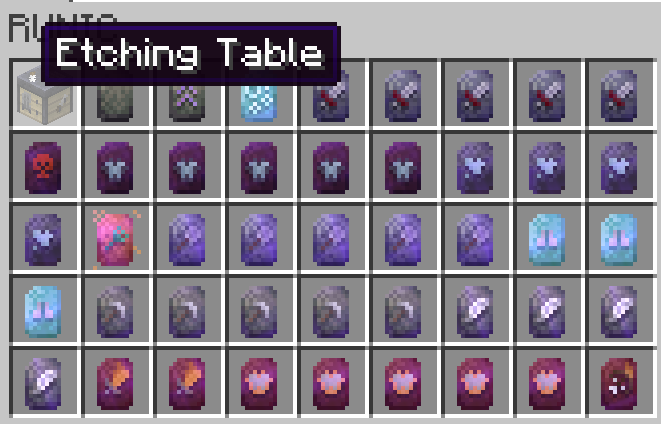
About this Mod

Runic is a progression-focused overhaul designed to make combat, upgrading, and exploration feel more meaningful. Instead of stacking one “best” enchant across everything, players now build gear intentionally over time. Enhancements exist on runes, found through exploration, boss fights, and structure loot. Etchings offer weaker, craftable upgrades for early progress, while powerful end-game runes are earned. Workstations, armor trims, and combat mechanics have been redesigned to support long-term item progression where every upgrade matters.
Below are the core systems and how they work:
Enhancement Slots:
Gear pieces contain enhancement slots. Runes and Etchings are applied into these slots. Stronger gear tends to have more slots.
Runes:
Runes replace enchanted books. Each rune holds a single enhancement and can stack in your inventory. Runes come in rarity tiers and are found in structures and on mobs. Rarity increases with difficulty, encouraging exploration rather than farming.
Etchings:
Etchings are weaker, craftable versions of runes. They allow players to upgrade early and mid-game gear safely. Many effects exist in two levels: Etching versions for early progression and full Rune versions for late game.
Etching Table:
Etchings are created here using blank etchings and materials. This table also produces inscriptions tied to gear progression. It provides affordable upgrades without trivializing the system.
Artisan Workbench:
This workstation applies runes and etchings onto gear. Players preview the final stats before committing upgrades, reducing mistakes and making upgrading deliberate rather than random.
Stat Enhancements:
Stat enhancements roll a random % buff on a gear piece. Their values can be rerolled using specific items, allowing players to refine a build without infinite power creep.
Effect Enhancements:
Effect enhancements work like vanilla enchants, but now only have 2 levels per enchant, level one obtained from etchings and level 2 from runes
Loot Progression:
Naturally generated gear often spawns fully enhanced but sealed. Stronger dungeons reward stronger upgrades. Progressing your character now means exploring the world, not AFK farming.
Inscriptions:
They allow repairing, slot expansion, removing enhancements, rerolling values, and increasing stats — always with trade-offs. These create real decision-making instead of automatic upgrades.
Special Inscriptions:
Cursed, Wild, and Extraction runes introduce high-risk mechanics. They can push gear beyond normal limits or permanently alter it. Powerful items now come with history and consequences.
Gear Attributes:
Items gain attributes such as Sealed, Cursed, Instable, or Negative. These do not occupy enhancement slots. Instead, they stack and permanently shape the attributes of the item.
Compatibility:
Runic is built with modded environments in mind. Most mod armor and enchant systems integrate cleanly
JEI Support:
Every enhancement can be viewed, searched, and understood directly in JEI, including where it comes from and what it does.
Supported Mods
Supported mods include:
- create
- aqua culture
- simply swords
- the aether
- twilight forest
- deeper and darker
- enders cataclysm
- mystical agriculture


Available Versions
How to Install RUNIC: Enchants on Your Server
Order Server
Order a Minecraft Java server with at least 3 GB RAM (4 GB recommended).
Set forge Loader
In the panel under "Egg", select the forge loader and matching Minecraft version (1.21.10).
Install Mod
Open the mod browser in the dashboard and search for "RUNIC: Enchants". Click "Install" – done! Alternatively, upload the .jar via SFTP to the /mods folder.
Compatibility
Mod Loaders
Minecraft Versions
1.21.10, 1.21.9, 1.21.8 (+7 more)
Server-side
✓ RequiredRecommended RAM
4 GB(min. 3 GB)Frequently Asked Questions
RUNIC: Enchants server crashes on startup – what to do?
Most common cause: wrong forge version or insufficient RAM. Check the server log (latest.log) for "OutOfMemoryError" or "Mixin" errors. With Mado Hosting: ensure at least 3 GB RAM is allocated and the loader matches the mod version (1.21.10). You can switch loaders with one click in the panel.
Is RUNIC: Enchants compatible with forge and neoforge?
RUNIC: Enchants officially supports forge, neoforge for Minecraft 1.21.10, 1.21.9, 1.21.8. The Mado dashboard automatically detects incompatible loader combinations.
Server lagging with RUNIC: Enchants – how to optimize performance?
Recommended RAM: 4 GB (per 8 players). Use /spark profiler to check if RUNIC: Enchants consumes the most tick time. Common fixes: reduce server view-distance to 8-10, install "performant" or "starlight" as supplementary mods on Forge. With Mado Hosting, your server runs on NVMe SSDs with dedicated CPU cores for minimal latency.
Similar Mods




![[TaCZ] Timeless and Classics Zero](https://cdn.modrinth.com/data/SzzJttH8/fd27766d2bb8390d284696b1dbd358f87e081439_96.webp)

Rent Modded Server
Install RUNIC: Enchants with just one click on your server.