
Salonicraft
Adds various Thessalonian delicacies to Μinecraft
Screenshots
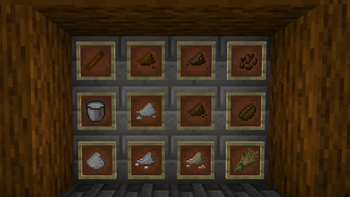
About this Mod
Salonicraft (1.20.4)
Welcome to Salonicraft, a Minecraft mod that brings the flavors and essence of Thessaloniki to your Minecraft world! From delicious foods like Mpougatsa and Koulouri to refreshing beverages like Frappes and Kakao, immerse yourself in the culinary delights of Thessaloniki.
Installation
Salonicraft is a Fabric-only mod. To install it follow these steps:
- Download and install the Fabric Loader for Minecraft.
- Download the Fabric API mod and place it into the mods folder of your Minecraft directory.
- Download the latest version of Salonicraft from the Releases section.
- Place the downloaded .jar file into the mods folder of your Minecraft directory.
- Launch Minecraft with the Fabric loader profile.
Features
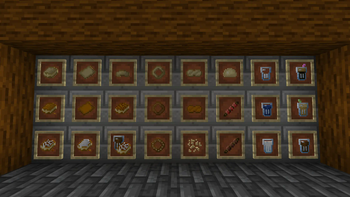
- Adds a variety of Thessaloniki-inspired foods to Minecraft.
- Introducing Beverages: Discover a new category of consumables, adding depth and enjoyment to your gameplay.
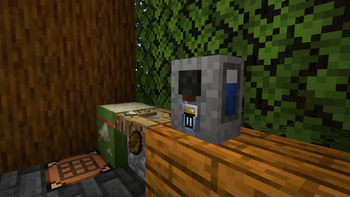
- Beverage Brewer: Unleash your inner barista with a novel crafting block designed to craft a diverse range of tantalizing beverages.
- Powder Station: Dive into the world of powders with the Powder Station, allowing you to craft various spices and flavorings to enhance your culinary creations.
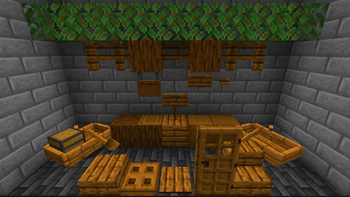
- Cinnamon Tree: Immerse yourself in the allure of a new tree, bringing exotic flavor and aesthetic charm to your Minecraft world.
- Coffea: Cultivate this new, unique plant, and enhance your agricultural endeavors and introducing a flavorful addition to your virtual garden.
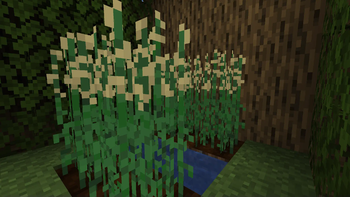
- Sesame Crop: Plant and harvest sesame, a versatile 2 block high crop that can be used in cooking and crafting to add depth to your culinary adventures.
Usage
Simply craft or obtain these items in-game and enjoy them as you would any other food or beverage item. Place them in your inventory and consume them to experience the taste of Thessaloniki within Minecraft.
Contributions
Contributions to Salonicraft are welcome! If you have any suggestions, bug reports, or would like to contribute to the development of the mod, feel free to open an issue or submit a pull request on GitHub.
License
Salonicraft is licensed under the GPL-3.0-only License. See the LICENSE file for more information.
Credits
Salonicraft is created and maintained by Oktavios (Selivanof). Special thanks to Antonaros, BillyTall and Savv2001 for being incredible companions throughout our ever-expanding Minecraft journey.
Available Versions
How to Install Salonicraft on Your Server
Order Server
Order a Minecraft Java server with at least 3 GB RAM (4 GB recommended).
Set fabric Loader
In the panel under "Egg", select the fabric loader and matching Minecraft version (1.20.4).
Install Mod
Open the mod browser in the dashboard and search for "Salonicraft". Click "Install" – done! Alternatively, upload the .jar via SFTP to the /mods folder.
Compatibility
Mod Loaders
Minecraft Versions
1.20.4
Server-side
✓ RequiredRecommended RAM
4 GB(min. 3 GB)Frequently Asked Questions
Salonicraft server crashes on startup – what to do?
Most common cause: wrong fabric version or insufficient RAM. Check the server log (latest.log) for "OutOfMemoryError" or "Mixin" errors. With Mado Hosting: ensure at least 3 GB RAM is allocated and the loader matches the mod version (1.20.4). You can switch loaders with one click in the panel.
Is Salonicraft compatible with fabric?
Salonicraft officially supports fabric for Minecraft 1.20.4. The Mado dashboard automatically detects incompatible loader combinations.
Server lagging with Salonicraft – how to optimize performance?
Recommended RAM: 4 GB (per 8 players). Use /spark profiler to check if Salonicraft consumes the most tick time. Common fixes: reduce server view-distance to 8-10, install "performant" or "starlight" as supplementary mods on Forge. With Mado Hosting, your server runs on NVMe SSDs with dedicated CPU cores for minimal latency.
Similar Mods



Rent Modded Server
Install Salonicraft with just one click on your server.