Sandscapes
Adding desert-related additions, including blocks, items and more; including glass. (ALPHA)
Screenshots
About this Mod
⚠️ Important Note:
This mod is currently in ALPHA. Features and additions are still in development, and some items listed may not be fully implemented yet or could change as the mod evolves.
🌵 Sandscapes - The Ultimate Desert Expansion
Let's all face it, in vanilla Minecraft, you really do not care about deserts. Its sand is mostly used for crafting glass, making mediocre bases with the limited sand blocks readily available. Sandscapes is here to completely reimagine deserts as we know them. This mod introduces a wide variety of new blocks, items, and mechanics that make sand a valuable resource, offering so much more than before.
Features (Available or Planned):
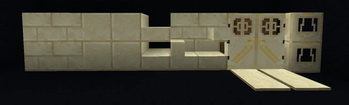
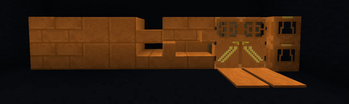
- Enhanced Sand Blocks & Items: Slabs, Stairs, (Trap)Doors, Bricks, Polished versions of all sand variants (regular and red sandstone).
- Glass Tools: Craft tools made from glass, giving a new use to glass other than purely visual.
- New Structures: Locate a desert structure like the Oasis, offering new loot.
- Advanced Sand Items: (Quicksand, Mob Repellent Grains)
- And more to come: Expect further expansions as new sand-related mechanics and features are added in future updates.
Note: Since this mod is still in its alpha stage, many features are still being added and tested. If a feature isn't in the current version, don't worry; it'll make an appearance eventually.
Available Versions
How to Install Sandscapes on Your Server
Order Server
Order a Minecraft Java server with at least 3 GB RAM (4 GB recommended).
Set fabric Loader
In the panel under "Egg", select the fabric loader and matching Minecraft version (1.21.1).
Install Mod
Open the mod browser in the dashboard and search for "Sandscapes". Click "Install" – done! Alternatively, upload the .jar via SFTP to the /mods folder.
Compatibility
Mod Loaders
Minecraft Versions
1.21.1, 1.21
Server-side
✓ RequiredRecommended RAM
4 GB(min. 3 GB)Frequently Asked Questions
Sandscapes server crashes on startup – what to do?
Most common cause: wrong fabric version or insufficient RAM. Check the server log (latest.log) for "OutOfMemoryError" or "Mixin" errors. With Mado Hosting: ensure at least 3 GB RAM is allocated and the loader matches the mod version (1.21.1). You can switch loaders with one click in the panel.
Is Sandscapes compatible with fabric?
Sandscapes officially supports fabric for Minecraft 1.21.1, 1.21. The Mado dashboard automatically detects incompatible loader combinations.
Server lagging with Sandscapes – how to optimize performance?
Recommended RAM: 4 GB (per 8 players). Use /spark profiler to check if Sandscapes consumes the most tick time. Common fixes: reduce server view-distance to 8-10, install "performant" or "starlight" as supplementary mods on Forge. With Mado Hosting, your server runs on NVMe SSDs with dedicated CPU cores for minimal latency.
Similar Mods




Rent Modded Server
Install Sandscapes with just one click on your server.