
Sanity And Insanity
Vanilla styled balanced sanity.
Screenshots

About this Mod
 Description
-
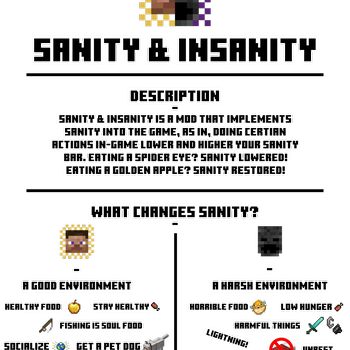
Sanity and Insanity is a mod that implements sanity into the game, as in, doing certian actions in-game lower and higher your sanity bar. Eating a spider eye? SANITY LOWERED! Eating a golden apple? SANITY RESTORED!
Description
-
Sanity and Insanity is a mod that implements sanity into the game, as in, doing certian actions in-game lower and higher your sanity bar. Eating a spider eye? SANITY LOWERED! Eating a golden apple? SANITY RESTORED!
 What changes Sanity?
Fixing sanity:
- A Good environment
- Healthy Food
- Stay Healthy
- Fishing is soul food
- Socialize
- Get a pet dog
- Rest
- Advancements
Ruining sanity:
- A harsh environment
- Horrible food
- Low hunger
- LIGHTNING!
- Harmful things
- Trample farmland
- Unrest
Sanity Bar - This image above your health and hunger bar is your sanity, keep it at the best levels possible!

 Effects Of Insanity - If your sanity goes low enough you will get "Insanity" a new effect, you will slowly die while seeing visions, you are also blind.
 Sanity Commands - You can use the command "/sanity" to check or set the sanity of target players
Keybinds - Press "G" to reposition the sanity bar.
Press "U" to toggle the sanity bar visibility.
Extra -
Post imbedded links for showcase videos in the comments.
NEVER EVER republish my mod on another website without my permission!
Feel free to use in your mod-packs, credit would be appreciated but it is not necessary.
I'm not making any fabric versions of this mod so don't ask.
Report any and all issues exclusively in the issues tab on my Curseforge page.
Link to Curseforge: https://curseforge.com/minecraft/mc-mods/sanity-and-insanity
Available Versions
How to Install Sanity And Insanity on Your Server
Order Server
Order a Minecraft Java server with at least 3 GB RAM (4 GB recommended).
Set forge Loader
In the panel under "Egg", select the forge loader and matching Minecraft version (1.17.1).
Install Mod
Open the mod browser in the dashboard and search for "Sanity And Insanity". Click "Install" – done! Alternatively, upload the .jar via SFTP to the /mods folder.
Compatibility
Mod Loaders
Minecraft Versions
1.17.1
Server-side
✓ RequiredRecommended RAM
4 GB(min. 3 GB)Frequently Asked Questions
Sanity And Insanity server crashes on startup – what to do?
Most common cause: wrong forge version or insufficient RAM. Check the server log (latest.log) for "OutOfMemoryError" or "Mixin" errors. With Mado Hosting: ensure at least 3 GB RAM is allocated and the loader matches the mod version (1.17.1). You can switch loaders with one click in the panel.
Is Sanity And Insanity compatible with forge?
Sanity And Insanity officially supports forge for Minecraft 1.17.1. The Mado dashboard automatically detects incompatible loader combinations.
Server lagging with Sanity And Insanity – how to optimize performance?
Recommended RAM: 4 GB (per 8 players). Use /spark profiler to check if Sanity And Insanity consumes the most tick time. Common fixes: reduce server view-distance to 8-10, install "performant" or "starlight" as supplementary mods on Forge. With Mado Hosting, your server runs on NVMe SSDs with dedicated CPU cores for minimal latency.
Similar Mods




Rent Modded Server
Install Sanity And Insanity with just one click on your server.