
Saro´s Creative Tab
You can add All Items you want to your own Custom Creative Tabs
Screenshots
About this Mod
!
!
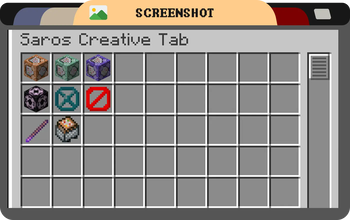
The Saros Creative Tab mod adds a custom creative tab to Minecraft, allowing players to easily access essential vanilla items like the Command Block and Barrier, which are not available in the default creative inventory.
For version 1.20.1 and above, this mod features a powerful Dynamic Custom Tab Management System that allows server administrators to create, manage, and configure multiple custom creative tabs through in-game commands!
!
Features (Version 1.19.4 and earlier)
- Custom Creative Tab: A new tab named "Saros Creative Tab" is added to the creative inventory, this tab adds Vanilla Items like Command blocks and more.
Features (Version 1.20.1+)
- Dynamic Tab Creation: Create unlimited custom creative tabs with unique names and icons
- Command-Based Management: Full control through intuitive in-game commands
- Item Organization: Add, remove, and organize items in your custom tabs
- Permission System: Configurable permission levels for tab management (per-tab and global)
- Server Synchronization: All players see the same custom tabs configured by administrators
- Persistent Storage: Custom tabs are saved and persist across server restarts
- Flexible Configuration: Configure default permissions and behavior through config files
Commands (1.20.1+)
/customtab create <id> <displayName> <icon>- Create a new custom tab/customtab delete <id>- Delete a custom tab/customtab list- List all custom tabs/customtab add <tabId> <item>- Add an item to a tab/customtab remove <tabId> <item>- Remove an item from a tab/customtab items <tabId>- List all items in a tab/customtab rename <tabId> <newName>- Rename a tab/customtab seticon <tabId> <icon>- Change a tab's icon/customtab setpermission <tabId> <permission>- Set tab-specific permissions/customtab reload- Reload tabs and configuration from files/customtab help- Display command help
Permission Levels (1.20.1+)
- EVERYONE - All players can manage the tab (default for tab modification)
- OP_LEVEL_2 - Only operators with level 2+ (default for tab creation/deletion)
- OP_LEVEL_3 - Only operators with level 3+
- OP_LEVEL_4 - Only operators with level 4 (server owner)
Permissions can be configured globally in the config file or per-tab using commands.
Note: Changes to tabs require rejoining the world to take effect in the creative inventory.
!
!
- 1.21.1 Forge/Fabric/NeoForge (New Dynamic Tab Management System)
- 1.20.1 Forge/Fabric/NeoForge (New Dynamic Tab Management System)
- 1.19.4
- 1.19.2
- 1.18.2
- 1.16.5
Port wishes welcome
!
Connect with us on Discord and be part of the Saro's Mod community!
](https://server.sarocesch.de/refersaro.php)
Project Support & Usage
Hosting: For the best performance, I recommend using BisectHosting linked in the banner.
Modpacks: You are free to include my work in any modpack. Please ensure proper credit is given by providing a link to this project page.
Available Versions
How to Install Saro´s Creative Tab on Your Server
Order Server
Order a Minecraft Java server with at least 3 GB RAM (4 GB recommended).
Set fabric Loader
In the panel under "Egg", select the fabric loader and matching Minecraft version (1.21.1).
Install Mod
Open the mod browser in the dashboard and search for "Saro´s Creative Tab". Click "Install" – done! Alternatively, upload the .jar via SFTP to the /mods folder.
Compatibility
Mod Loaders
Minecraft Versions
1.21.1, 1.20.6, 1.20.5 (+8 more)
Server-side
✗ UnsupportedRecommended RAM
4 GB(min. 3 GB)Frequently Asked Questions
Saro´s Creative Tab server crashes on startup – what to do?
Most common cause: wrong fabric version or insufficient RAM. Check the server log (latest.log) for "OutOfMemoryError" or "Mixin" errors. With Mado Hosting: ensure at least 3 GB RAM is allocated and the loader matches the mod version (1.21.1). You can switch loaders with one click in the panel.
Is Saro´s Creative Tab compatible with fabric and forge and neoforge?
Saro´s Creative Tab officially supports fabric, forge, neoforge for Minecraft 1.21.1, 1.20.6, 1.20.5. Note: Forge and Fabric mods are NOT cross-compatible – pick one loader and stick with it. The Mado dashboard automatically detects incompatible loader combinations.
Server lagging with Saro´s Creative Tab – how to optimize performance?
Recommended RAM: 4 GB (per 8 players). Use /spark profiler to check if Saro´s Creative Tab consumes the most tick time. Common fixes: reduce server view-distance to 8-10, install "performant" or "starlight" as supplementary mods on Forge. With Mado Hosting, your server runs on NVMe SSDs with dedicated CPU cores for minimal latency.
Similar Mods




![[TaCZ] Timeless and Classics Zero](https://cdn.modrinth.com/data/SzzJttH8/fd27766d2bb8390d284696b1dbd358f87e081439_96.webp)

Rent Modded Server
Install Saro´s Creative Tab with just one click on your server.