
Save Minecraft (Save The Game)
A Forge mod that enrolls you into an adventure that makes Minecraft worth playing by rewarding you with the power to rule over the world.
Screenshots
About this Mod

Save The Game
Are you bored of Minecraft? Is Minecraft not as fun as before? What if playing it had a purpose, what if you would get the best prize ever as a a reward? Well you're in the right place.
Save The Game is a mod that adds a purpose to play Minecraft by adding 5 gems that the player earn by doing certain tasks to progress in a Minecraft world. These gems can be combined into the Godly Power item (which gives you powers to rule over the world) at a structure that only generates in one part of the entire Minecraft world.
The 5 gems that make Minecraft unique are: Gem Of Blocks, Gem Of Creativity, Gem Of Friendship, Gem Of Peace and Gem Of Survival.
Gem Of Blocks
- Obtained by placing more than 5,000 blocks.

Gem Of Creativity
- Obtained by placing more than 6,000 blocks, breaking more than 2,000 blocks and using an item more than 1,000 times.

Gem Of Friendship
- Obtained by taming any mob that can be tamed like a Wolf.

Gem Of Peace
- Obtained by completely defeating a Raid in any village.

Gem Of Survival
- Obtained by defeating the Ender Dragon.

All these gems are only obtainable ONCE per world, so don't lose them.
Godly Power
- Obtained by depositing each gem into its corresponding place inside the Save The Game Structure.

Powers:
When right clicking, it will grant you a ton of positive potion effects (making you invincible) and give you the ability to fly.
When right clicking again (with all the effects), it will remove all the potion effects.
When right clicking while sneaking, it will make you invisible.
When right clicking while sneaking again (with invisibility), it will remove the invisibility effect.
When swinging the item, it will make the item in your first slot to the maximum. (Example: You have 1 dirt block in your first slot of the hotbar, when swinging Godly Power you will now have 64 dirt in your first slot.)
This item does instamine on any block you use it with.
It does not have durability, meaning you can use it forever.
It one-shots almost every single mob in the game.
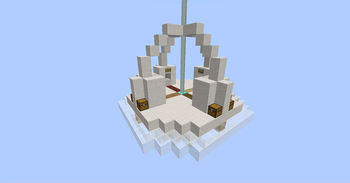
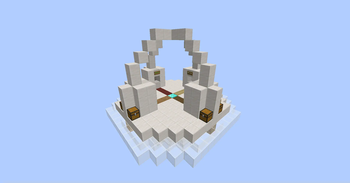
Save The Game Structure
Here you save Minecraft and obtain the Godly Power item.
It only spawns at the coordinates: (0, 250, 0).
It has a pedestal for each gem, throw the gem into it.
The Gem Of Creativity goes in one of the 8 chests, find the correct one!

This mod will receive updates so stay tuned! Also, if this mod gets 1,000 downloads, I'll make a Map with this same idea instead of a mod and publish it in Modrinth, MCPEDL and Curseforge!
Made by RoCris
Available Versions
How to Install Save Minecraft (Save The Game) on Your Server
Order Server
Order a Minecraft Java server with at least 3 GB RAM (4 GB recommended).
Set forge Loader
In the panel under "Egg", select the forge loader and matching Minecraft version (1.20.1).
Install Mod
Open the mod browser in the dashboard and search for "Save Minecraft (Save The Game)". Click "Install" – done! Alternatively, upload the .jar via SFTP to the /mods folder.
Compatibility
Mod Loaders
Minecraft Versions
1.20.1
Server-side
✓ RequiredRecommended RAM
4 GB(min. 3 GB)Frequently Asked Questions
Save Minecraft (Save The Game) server crashes on startup – what to do?
Most common cause: wrong forge version or insufficient RAM. Check the server log (latest.log) for "OutOfMemoryError" or "Mixin" errors. With Mado Hosting: ensure at least 3 GB RAM is allocated and the loader matches the mod version (1.20.1). You can switch loaders with one click in the panel.
Is Save Minecraft (Save The Game) compatible with forge?
Save Minecraft (Save The Game) officially supports forge for Minecraft 1.20.1. The Mado dashboard automatically detects incompatible loader combinations.
Server lagging with Save Minecraft (Save The Game) – how to optimize performance?
Recommended RAM: 4 GB (per 8 players). Use /spark profiler to check if Save Minecraft (Save The Game) consumes the most tick time. Common fixes: reduce server view-distance to 8-10, install "performant" or "starlight" as supplementary mods on Forge. With Mado Hosting, your server runs on NVMe SSDs with dedicated CPU cores for minimal latency.
Similar Mods




Rent Modded Server
Install Save Minecraft (Save The Game) with just one click on your server.