
scarpet-webserver
Allows for running webservers with scarpet so they interact with minecraft
Screenshots
About this Mod
scarpet-webserver




A Carpet mod extension for running webservers with scarpet
Requires Carpet mod
Warning: Only use this mod with scripts you trust or made yourself. Use this at your own risk.
This project uses and includes Jetty 12 in builds for the webserver (License)
Usage
To use a webserver in scarpet, it has to be defined in the scarpet-webserver.json config file first.
When the mod first loads, it creates a sample config, where you can define multiple webservers. Each one has a unique id and a port.
An example config could look like this:
{
  "webservers": [
    {
      "id": "myserver",
      "port": 80
    }
  ]
}
This server can then be used in a script.
Example syntax
You can take a look at the full working example with the html files here.
The example also contains more routes and a simple templating mechanism.
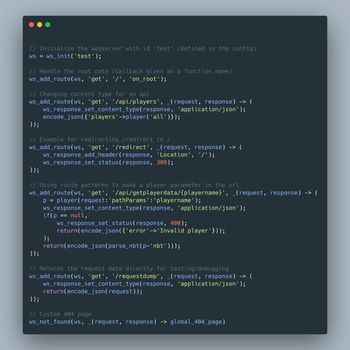
// Initialize the webserver with id 'test' (Defined in the config)
ws = ws_init('test');

// Handle the root path (Callback given as a function name)
ws_add_route(ws, 'get', '/', 'on_root');

// Changing content type for an api
ws_add_route(ws, 'get', '/api/players', _(request, response) -> (
    ws_response_set_content_type(response, 'application/json');
    encode_json({'players'->player('all')});
));

// Example for redirecting /redirect to /
ws_add_route(ws, 'get', '/redirect', _(request, response) -> (
    ws_response_set_status(response, 301);
    ws_response_add_header(response, 'Location', '/');
    ''
));

// Using route patterns to make a player parameter in the url
ws_add_route(ws, 'get', '/api/getplayerdata/{player}', _(request, response) -> (
    playername = request~'pathParams':'player';
    p = player(playername);
    ws_response_set_content_type(response, 'application/json');
    if(p == null,
        ws_response_set_status(response, 400);
        return(encode_json({'error'->'Invalid player'}));
    );
    return(encode_json(parse_nbt(p~'nbt')));
));

// Returns the request data directly for testing/debugging
ws_add_route(ws, 'get', '/requestdump', _(request, response) -> (
    ws_response_set_content_type(response, 'application/json');
    request_data = {};
    for(global_request_fields, request_data-blocked:_ = request~_);
    return(encode_json(request_data));
));

// Custom 404 page
ws_not_found(ws, _(request, response) -> global_404_page);
Route callback
The callback function for routes should have this signature:
_(request, response) -> (
    // do stuff
    return('html body...')
)
The request parameter provides a request value of all the request details.
You can also use the example script for testing, which has a /requestdump route that sends all the request data as json back.
The response is a response value.
The value returned by the function will be the response body (in most cases the html page) to be sent.
Values
This mod adds two new value types:
webserver
This is a handle to the running webserver, which use to create routes.
This can be retrieved using ws_init(id).
request
This value is provided in route callbacks, and is used to retrieve various request data.
Note that retrieving values from this value needs to be done using the ~ query operator,
but some of those values are maps, which are accessed using :.
You can run the example script and send a request to /requestdump to get all request data returned for testing.
request~'headers'
Returns a map with string keys (header names) and string values.
If a header has multiple values, it is a list of strings.
For example, the Referer header can be accessed with request~'headers':'Referer'
Example header map:
{
    'Accept'-> [
      'text/html',
      'application/xhtml+xml',
      'application/xml;q=0.9',
      '*/*;q=0.8'
    ],
    'Connection' -> 'keep-alive',
    'User-Agent' -> 'Mozilla/5.0 (Windows NT 10.0;Win64;x64;rv:138.0) Gecko/20100101 Firefox/138.0'
}
request~'method'
Returns the HTTP-Method of the request.
request~'beginNanoTime'
Returns the time in nanoseconds when the request was received.
request~'connection'
Returns a map with information about the connection.
It has the following keys:
protocol: The protocol of the connection (e.g.HTTP/1.1)httpVersion: The HTTP-Version (e.g.HTTP/1.1)id: Returns a unique id for the network connection (within the lifetime of the server)persistent: Whether the connection is persistentsecure: Whether the connection is secure (using HTTPS)
request~'uri'
Returns a map with information about the requested URI.
For more information on these fields, see
Anatomy of a URL
in the MDN web docs.
It has the following keys:
scheme: The scheme of the request (usuallyhttpsorhttp)authority: The domain and port (e.g.localhost:8000,my.example.com)host: The domainpost: The port as a numberpath: The path of the request (e.g./api/users)canonicalPath: The path of the request with all special characters (except /) URL-encodeddecodedPath: The path of the request with all URL-encoded characters decodedparam: The last path parameter ornullquery: The query parameters in the url (e.g.search=test&limit=50)fragment: Never actually sent to the server, should always benulluser: The user of the urlasString: The full URI as a stringqueryParameters: The query parameters parsed as map. Accessing one query parameter can be done withrequest~'uri':'queryParameters':'search'
request~'pathParams'
Returns a map with all path parameters.
When creating an endpoint with a path parameter like this: /api/getplayerdata/{player},
the player parameter in the path can be retrieved like this:
ws_add_route(ws, 'get', '/api/getplayerdata/{player}', _(request, response) -> (
    playername = request~'pathParams':'player';
    ...
));
request~'body_string'
Returns the body of the request as a string.
response
This value is provided in route callbacks, and is used to assign various response data.
Functions
ws_init(id)
Returns a webserver value from the config id.
This also clears all routes and starts it, if it isn't already.
ws_add_route(webserver, method, path, callback)
Adds a route to the webserver.method is the http method, like get or post.
The callback can be either a string of the name of a previously declared function, or a lambda function.
See the route callback section for more details.
The path uses jetty's UriTemplatePathSpec,
so you can use its syntax (Level 1).
It supports path parameters like /shop/{product}, which can then be retrieved using request:'pathParams':'product'.
ws_not_found(webserver, callback)
Sets the handler for requests without a matching route.
ws_response_set_status(response, statusCode)
Sets an http status code for the response.
ws_response_set_content_type(response, contentType)
Sets content type for the response.
ws_response_add_header(response, header, value)
Adds a response header.
Available Versions
How to Install scarpet-webserver on Your Server
Order Server
Order a Minecraft Java server with at least 3 GB RAM (4 GB recommended).
Set fabric Loader
In the panel under "Egg", select the fabric loader and matching Minecraft version (26.2).
Install Mod
Open the mod browser in the dashboard and search for "scarpet-webserver". Click "Install" – done! Alternatively, upload the .jar via SFTP to the /mods folder.
Compatibility
Mod Loaders
Minecraft Versions
26.2, 26.2-rc-2, 26.2-rc-1 (+282 more)
Server-side
✓ RequiredRecommended RAM
4 GB(min. 3 GB)Frequently Asked Questions
scarpet-webserver server crashes on startup – what to do?
Most common cause: wrong fabric version or insufficient RAM. Check the server log (latest.log) for "OutOfMemoryError" or "Mixin" errors. With Mado Hosting: ensure at least 3 GB RAM is allocated and the loader matches the mod version (26.2). You can switch loaders with one click in the panel.
Is scarpet-webserver compatible with fabric?
scarpet-webserver officially supports fabric for Minecraft 26.2, 26.2-rc-2, 26.2-rc-1. The Mado dashboard automatically detects incompatible loader combinations.
Server lagging with scarpet-webserver – how to optimize performance?
Recommended RAM: 4 GB (per 8 players). Use /spark profiler to check if scarpet-webserver consumes the most tick time. Common fixes: reduce server view-distance to 8-10, install "performant" or "starlight" as supplementary mods on Forge. With Mado Hosting, your server runs on NVMe SSDs with dedicated CPU cores for minimal latency.
Similar Mods



Rent Modded Server
Install scarpet-webserver with just one click on your server.