
SCNicknamer
Lightweight client-side nickname and colour mod.
Screenshots
About this Mod
SC Nicknamer
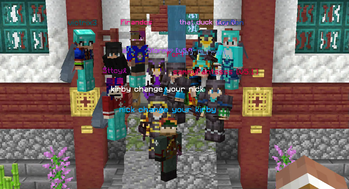
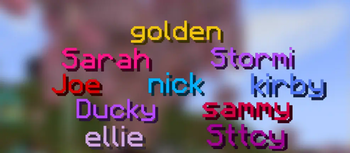
Styles in-game nicknames, name colours, and locator icons with a public json file.
This allows everyone to see the same nicknames and colours in-game.
Note: This was created for Mumbo Jumbo's Minecraft Server, though you can use it on your server as well! To use this mod on your server, someone will need to host a json file with the data.
Note: This is not official, nor required for Spooncraft.
Features
SCNicknamer displays the preset nickname and colours of names in-game.
It colours Minecraft names with preset colours in the server tablist, player nametags, and chat messages, and optionally replaces them with nicknames in the same places.
The mod also colours player locator icons in the locator bar.
Configuration
With ModMenu, you can enable and disable replacing and colouring names in each location (tablist, nametags, and chat) or colouring locator bar icons.
You can also change the location from which the data is sourced. This allows you to use it on your servers. An example of the data format can be seen here.
Disclaimer
This mod was created for Java 1.21 and above client-side Fabric.
I will not make a version for Bedrock, Forge, or versions before 1.21.
I may make a server-side version in future, depending on demand.
This mod was created primarily for the Mumbo Jumbo Spooncraft Server; however, it will work for other servers provided you have a json file hosted somewhere.
Issues & Suggestions
If you have any issues or suggestions, please let me know.
You can create a new issue on GitHub here,
or contact pointer_rain on Discord.
Available Versions
How to Install SCNicknamer on Your Server
Order Server
Order a Minecraft Java server with at least 3 GB RAM (4 GB recommended).
Set fabric Loader
In the panel under "Egg", select the fabric loader and matching Minecraft version (26.1.2).
Install Mod
Open the mod browser in the dashboard and search for "SCNicknamer". Click "Install" – done! Alternatively, upload the .jar via SFTP to the /mods folder.
Compatibility
Mod Loaders
Minecraft Versions
26.1.2, 26.1.1, 26.1 (+11 more)
Server-side
✗ UnsupportedRecommended RAM
4 GB(min. 3 GB)Frequently Asked Questions
SCNicknamer server crashes on startup – what to do?
Most common cause: wrong fabric version or insufficient RAM. Check the server log (latest.log) for "OutOfMemoryError" or "Mixin" errors. With Mado Hosting: ensure at least 3 GB RAM is allocated and the loader matches the mod version (26.1.2). You can switch loaders with one click in the panel.
Is SCNicknamer compatible with fabric?
SCNicknamer officially supports fabric for Minecraft 26.1.2, 26.1.1, 26.1. The Mado dashboard automatically detects incompatible loader combinations.
Server lagging with SCNicknamer – how to optimize performance?
Recommended RAM: 4 GB (per 8 players). Use /spark profiler to check if SCNicknamer consumes the most tick time. Common fixes: reduce server view-distance to 8-10, install "performant" or "starlight" as supplementary mods on Forge. With Mado Hosting, your server runs on NVMe SSDs with dedicated CPU cores for minimal latency.
Similar Mods






Rent Modded Server
Install SCNicknamer with just one click on your server.