
SCP: Facility
Build your own SCP Foundation with a lot of new blocks, systems and even personnel!
Screenshots
About this Mod
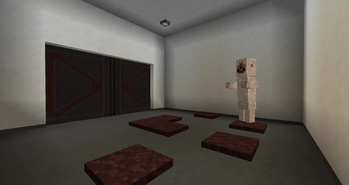
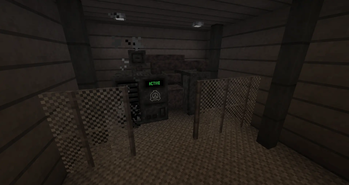
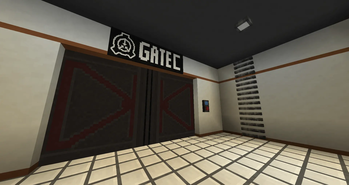
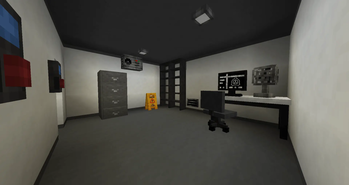
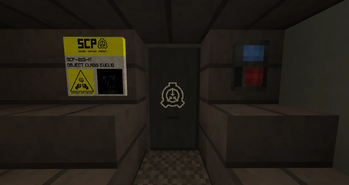
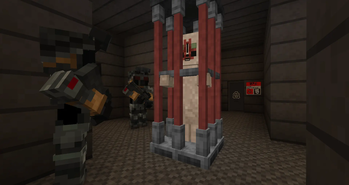
SCP: Facility adds A LOT of new blocks, items and systems to build your own SCP Foundation. It includes a wide variety of building blocks, decorations, functional systems, keycards, and personnel to simulate a fully operational site. From simple containment rooms to complex facilities with working security systems, events, and also some Groups of Interest, like the Chaos Insurgency, this mod allows you to create and control your own SCP Foundation Site!
Updates continue on Curseforge
- A mod made by Zcoper
- Mod created with MCreator!
- Requires Geckolib
● Visit my Discord Server!
https://discord.gg/akP56NtmVQ
● Important FaQ
Spoiler
► How do I disable the red screen from alarms?
You can disable the Overlay Screen from alarms and events by setting the gamerule "EnableAlarmOverlay" to false
► How do I disable the music from events?
You can disable the Event music by setting the gamerule "EnableFacilityEventMusic" to false
► How do I disable the Chaos Insurgency to hack C.A.S.S.I.E?
The Chaos Insurgency can hack C.A.S.S.I.E. if they are within a 6 block radius. They will try moving to C.A.S.S.I.E. within a 50 block radius.
You can disable the hacking by setting the gamerule "EnableCassieHack" to false
► How do I disable the Text Messages from C.A.S.S.I.E?
You can disable the Chat messages from C.A.S.S.I.E. by setting the gamerule "EnableCassieMessages" to false
► How do I disable the MTF to spawn?
You can disable the MTF spawning by setting the gamerule "EnableMTFSpawn" to false
► How do I disable the Chaos Insurgency to spawn?
You can disable the Chaos Insurgency spawning by setting the gamerule "EnableChaosInsurgencySpawn" to false
► How do I disable the GOC to spawn?
You can disable the GOC spawning by setting the gamerule "EnableGOCSpawn" to false
► How do I disable the Serpents Hand to spawn?
You can disable the Serpents Hand spawning by setting the gamerule "EnableSerpentsHandSpawn" to false
► How do I disable the Ambient Noises?
The Ambient Noises or Mood Noises can be played during a lockdown.
You can disable the Ambient Noises by setting the gamerule "EnableFacilityMoodSounds" to false
► How do I reset C.A.S.S.I.E?
You can use the command "/reset_cassie" to reset all the systems.
This could be useful if you somehow break the system.
► How do I mark doors and gates to specific zones?
You can mark doors and gates to three zones by placing the doors or gates on specific blocks
● Light Containment Zone: Any Block
● Heavy Containment Zone: Metal block, metal grate, foundation bricks
● Entrance Zone: Foundation floor tiles
► How do I avoid the Decontamination Gas?
You can avoid the gas by standing outside of the facility or wearing a full Gas Hazmat Suit.
► How do I give scanners a security level?
You just have to place a Keycard scanner and right click it with a keycard that has the level you want the scanner to detect.
For example: You want a Keycard scanner with security level 3, you have to click the scanner with a Keycard with the level 3. Keycards with higher security level can also access the scanner after setting the security level to 3.
Same goes for Hand Scanners. Just right click it with an empty hand and the Hand Scanner will set the ID to your playername. Only you can activate this Scanner now.
► How do I disable the Lockdown, Decontamination or else?
You can disable a lockdown or decontamination by entering C.A.S.S.I.E. Menu and click on Lockdown or Decontamination.
► What can I do with C.A.S.S.I.E?
C.A.S.S.I.E. is an important block you need. When you have C.A.S.S.I.E. you will get notified about events with messages.
You can also right click C.A.S.S.I.E. to turn it on and enter the menu, but first you have to login with a code. After that, you can choose 6 options.
- Lockdown = Closes all doors, gates and disables foundation buttons, tesla gates, keycard scanners, computers, alpha warhead panels.
- Decontamination = An event where the facility will be locked down after a while and start releasing toxic gas that kills everything inside.
- Doors = Can open or close all doors and gates at once.
- Tesla Gate = Can activate or deactivate all tesla gates
- Restart = Only necessary if C.A.S.S.I.E. got hacked.
- Shut down = Shuts down C.A.S.S.I.E.
If there is a green marker next to the option, this will mean that the following option is already engaged, tesla gates are active or doors and gates are closed.
To disable Lockdown, Decontamination, Tesla Gates or opening/closing all doors, you need to click the option again.
If the text is in a dark gray, that means the following option can't be clicked, due to other actions like a Lockdown, Hack or Decontamination.
► Which events are present in the mod?
There are 4 types of events that can happen:
Lockdown. This event will close all doors and gates and cannot be opened. Foundation buttons, tesla gates, scanners, computers or alpha warhead panels won't work either. This event is often the result of other events or by C.A.S.S.I.E. You can disable this event with C.A.S.S.I.E. During this event, you can hear Ambient Noises.
Facility overall Decontamination: This event will release toxic gas into the facility. This event can be triggered or disabled with C.A.S.S.I.E.
Alpha Warhead Emergency Detonation Sequence: This event will explode the Alpha Warheads which results in a HUGE crater. Be careful with this event. It can be triggered or deactivated by using the Alpha Warhead Panel. Deactivation only works before the Lockdown takes place.
C.A.S.S.I.E. Hack: This event will take place when the Chaos Insurgency spawns and trys to walk to C.A.S.S.I.E. within a 50 block radius. If they reach C.A.S.S.I.E. they will hack into C.A.S.S.I.E. and start the Facility overall decontamination event, and also a lockdown in each zone. To stop this event, you first have to kill the Chaos Insurgency members, restarting C.A.S.S.I.E. within the C.A.S.S.I.E. menu and also disable the decontamination and lockdown.
Containment Breach: This event will only be triggered if a player enables it in C.A.S.S.I.E. During this event, the monitors will show an Emergency screen, C.A.S.S.I.E. shows red screens and you can sometimes hear ambient noises. During this Event, NTF Units can spawn, perfect for roleplay.
► Does the Tesla Gate kills SCP-106 instantly?
Yes, the tesla gate is compatible with the SCP-106 Mod and kills SCP-106 instantly
► Does this mod include SCPs?
No, the SCPs themself are seperated mods. This mod only adds building blocks, decorative stuff, labels and more but not the SCPs themself.
► Does the mod work with other SCP Mods?
Yes the mod works with other SCP mods aslong as they are both from the same creator named Zcoper. SCP mods that aren't from the same creator won't interact with this Mod.
► Why do some blocks don't change their texture?
Some blocks of this mod can change their texture during events. But this only works 10 blocks under or above the block limit (world height)
► What are the login codes?
You have to enter a code to login to certain systems. You do not have to enter the login code if you use a keycard with the security level of the O5. The code is entered in the order of the numbers
Computer Code:
9 | 4 | 10 | 5 | 1
2 | 6 | 8 | 3 | 7
Alpha Warhead Code:
2 | 7 | 3 | 5 | 9
4 | 1 | 10 | 8 | 6
C.A.S.S.I.E. Code:
5 | 2 | 8 | 4 | 9
7 | 10 | 6 | 1 | 3
Verification Code:
1 | 2 | 3 | 4 | 5
► How do I open Doors and Gates?
You need to open the doors and gates with a foundation button or a scanner near the door/gate.
This only works if there is an active Generator in the world.
► Why can't I use some blocks?
To use the certain blocks and systems, you need a generator that is active in your world.
► Why do events continue even when I stopped them?
This can happen when you activated an event, stopped it and started it again within 2 - 5 minutes. But only if it's the same event. Just wait a bit before starting the event again.
► Why does the system shut down if I disable an generator but have multiple ones, same goes for C.A.S.S.I.E.
You should only have 1 generator or 1 C.A.S.S.I.E. in your world. If they get shut down or else, a variable is change which applies for the whole world.
► Is the mod compatible with SCP-303, The Doorman?
Yes! The SCP: Facility mod is compatible with SCP-303. When you close a door, SCP-303 could appear. If you open the door, he will show up.
► Is the mod compatible with SCP-079, The Old AI?
Yes! The SCP: Facility mod is compatible with SCP-079. When SCP-079 is active and a player is within 200 blocks, it can close gates, doors or show it's face on monitors or computers for a short moment.
► How do mobs from the mod spawn?
Class-D only spawn if a Class-D spawn marker has been placed. It rarely spawn a Class-D if there is no Class-D within 3 blocks, no more than 20 D-Classes exist in the world, no event is active, and a player is within 100 blocks but not within 20 blocks.
Scientist only spawn if a Scientist spawn marker has been placed. It rarely spawn a Scientist if there is no Scientist within 6 blocks, no more than 8 Scientists exist in the world, no event is active, and a player is within 100 blocks but not within 20 blocks.
Security Guards only spawn if a Security Guard spawn marker has been placed. It rarely spawn one or two Security Guards if there is no Security Guard within 6 blocks, no more than 12 Security Guards exist in the world, no event is active, and a player is within 100 blocks but not within 20 blocks.
Nine-Tailed Fox only spawn during a lockdown, if the gamerule "EnableMTFSpawn" is set to true, no Player or NTF is nearby or close to the C.A.S.S.I.E. system. They spawn from foundation doors that are placed on top of foundation floor tiles. No Alpha Warhead should be activated.
Chaos Insurgency only spawn if the gamerule "EnableChaosInsurgencySpawn" is set to true, no Player, Serpents Hand or Chaos Insurgency is nearby. No NTF should be close to the C.A.S.S.I.E. system, but they should have been spawned before. They spawn from foundation doors that are placed on top of foundation floor tiles. No Alpha Warhead should be activated.
GOC only spawn if the gamerule "EnableGOCSpawn" is set to true, no Player, or GOC is nearby. Chaos Insurgency must have been spawned and a hostile mob should be within a 50 block radius. No NTF should be close to the C.A.S.S.I.E. system. They spawn from foundation doors that are placed on top of foundation floor tiles. No Alpha Warhead or decontamination should be activated.
Serpents Hand only spawn if the gamerule "EnableSerpentsHandSpawn" is set to true, no Player, Serpents Hand or Chaos Insurgency is nearby and a hostile mob should be within a 50 block radius. No NTF should be close to the C.A.S.S.I.E. system, but they should have been spawned before. They spawn from foundation doors that are placed on top of foundation floor tiles. No Alpha Warhead or decontamination should be activated.
All the entities can still spawn by using a spawn egg of course, no matter the condition
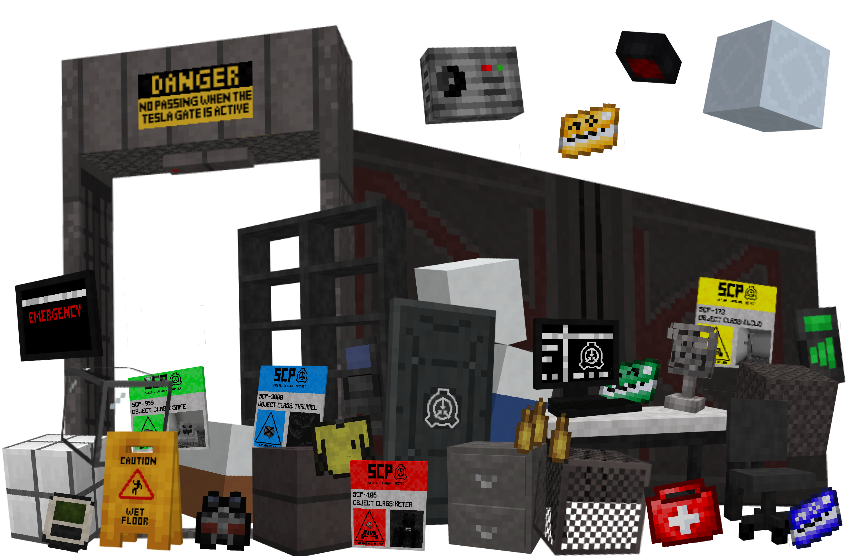
The mod includes a large collection of SCP Foundation styled building blocks and decorative elements designed to create detailed facilities. Players can build everything from containment chambers to hallways and control rooms using new blocks for walls, floors, ceilings, glass, fences, grates or even new light blocks. Some blocks define facility zones such as Entrance Zone, Light Containment Zone or Heavy Containment Zone, allowing doors and gates to function correctly during events, if they are placed on a specific block. In addition to building blocks, the mod provides decorative elements like pipes, vents, fans, tables, chairs, metal ladders, caution tape or wet floor signs. Tesla Gates are also added which will shock anything going through it. New Foundation Doors or Gates are a must have in Facilities. Storage blocks like shelves and drawers allow basic item storage, making facilities feel more functional and alive. The Mod not only introduces blocks, but also items like keycards, medkits, the S-Nav to detect SCPs, Armor and two new weapons. There is so much you can do with these new additions!
- Config File not inculed.
- You are all allowed to use this mod in your modpacks!
- Do not port my mods without permission!
Available Versions
How to Install SCP: Facility on Your Server
Order Server
Order a Minecraft Java server with at least 3 GB RAM (4 GB recommended).
Set forge Loader
In the panel under "Egg", select the forge loader and matching Minecraft version (1.20.1).
Install Mod
Open the mod browser in the dashboard and search for "SCP: Facility". Click "Install" – done! Alternatively, upload the .jar via SFTP to the /mods folder.
Compatibility
Mod Loaders
Minecraft Versions
1.20.1, 1.19.4, 1.19.2
Server-side
✓ RequiredRecommended RAM
4 GB(min. 3 GB)Frequently Asked Questions
SCP: Facility server crashes on startup – what to do?
Most common cause: wrong forge version or insufficient RAM. Check the server log (latest.log) for "OutOfMemoryError" or "Mixin" errors. With Mado Hosting: ensure at least 3 GB RAM is allocated and the loader matches the mod version (1.20.1). You can switch loaders with one click in the panel.
Is SCP: Facility compatible with forge?
SCP: Facility officially supports forge for Minecraft 1.20.1, 1.19.4, 1.19.2. The Mado dashboard automatically detects incompatible loader combinations.
Server lagging with SCP: Facility – how to optimize performance?
Recommended RAM: 4 GB (per 8 players). Use /spark profiler to check if SCP: Facility consumes the most tick time. Common fixes: reduce server view-distance to 8-10, install "performant" or "starlight" as supplementary mods on Forge. With Mado Hosting, your server runs on NVMe SSDs with dedicated CPU cores for minimal latency.
Similar Mods




![[TaCZ] Timeless and Classics Zero](https://cdn.modrinth.com/data/SzzJttH8/fd27766d2bb8390d284696b1dbd358f87e081439_96.webp)

Rent Modded Server
Install SCP: Facility with just one click on your server.