
Screenshot Uploader
Upload your screenshots to a server / the server you're playing on.
Screenshots
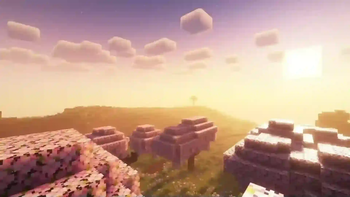
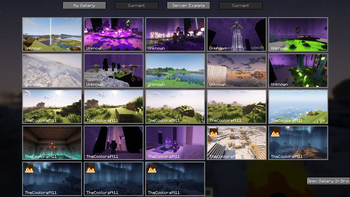
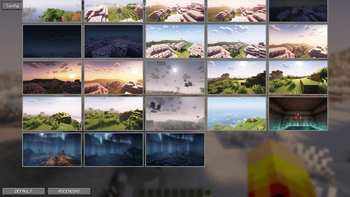
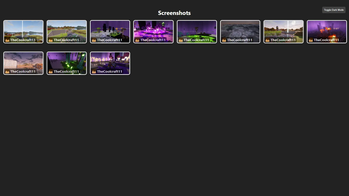
About this Mod
ScreenshotUploader is a Minecraft mod that enhances your gameplay by allowing you to upload your in-game screenshots
directly to a designated server. This feature enables you to share your creations and memorable moments with friends and
the community effortlessly. It simplifies the process of sharing in-game screenshots, eliminating the need for external
applications or manual uploads.
Features:
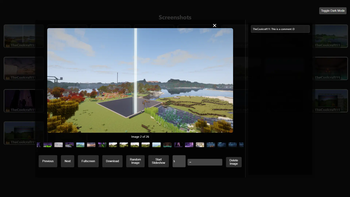
Ingame Screenshot Browser: View your own local or the screenshots of your friends on the webserver. (Press
Gto
open)Ingame Image Editor: press
Vbefore making your screenshot or click the edit button in your local galleryDirect Uploads: Capture and upload your Minecraft screenshots to a specified server without leaving the game.
Integrated Webserver: Screenshots are uploaded to an integrated webserver, which displays them in a convenient web
gallery.Custom Server Support: Configure the mod to upload screenshots to your own server, providing flexibility and control
over your shared content. The mod supports HTTP POST requests using multipart form data, making it compatible with
custom servers or APIs.Screenshot Collections: Organize your screenshots into collections for easier management.
Customizable Settings: Adjust the mod's settings to suit your preferences, including upload paths and server
configurations.Screenshot Statistics: View statistics about your uploaded screenshots, such as the number of uploads or a heatmap of
your most active screenshot areas.Ingame Screenshot Editor: Edit your screenshots directly in-game before uploading them, allowing you to add text,
annotations, or other modifications.Local Gallery: View your own screenshots in a local gallery, making it easy to browse and manage your captured
moments.Web Gallery: Access a web gallery to view and share your uploaded screenshots with others.
Comments and Tags: Add comments and tags to your screenshots for better organization and sharing.
Screenshot Deletion Permissions: Screenshots can be deleted by the uploader, any player, server operators, or via a
passphrase, configurable to match your servers needsScreenshot Metadata-blocked: Optionally embed information such as world name, server IP, and coordinates. Displayed in the
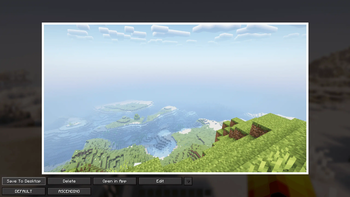
ingame gallery. Disabled by default.Ask Before Uploading: Display a promt in which you can select what you want to do with the taken screenshot. (Save,
Upload, Delete)By default only screenshots made while the HUD is hidden (F1) are uploaded. Can be disabled in the config:
requireNoHud
Requirements:
- Requires Minecraft Fabric 1.21 - 1.21.5.
- Requires a server that can handle HTTP POST requests and has public endpoints for uploads (if not using the integrated
webserver).
1. Installation Guide
Client
Prerequisites: Minecraft Fabric 1.21 - 1.21.5
Steps:
- Download the mod file from here.
- Place the
.jarin the mods folder of your Minecraft directory. - Launch Minecraft with the mod installed.
- (Join a server with the mod installed)
- Take a screenshot
- You can open the Gallery by pressing
G - You can adjust the mod to your needs by opening the config
Ingame Gallery -> Config
Server
Steps:
- Download the mod or plugin file from here.
- Place the
.jarin the mods / plugins folder of your Server directory. - Open the config (config/screenshotUploader/serverConfig.json, for Fabric; plugins/ScreenshotUploader/config.yml, for Paper, etc.)
- Change the entry
websiteURLto the public url of the webserver (the url to open the screenshots gallery in the browser) e.g."https://yourserverip.com:4567" - Take a look at the Wiki or change the config
Available Versions
How to Install Screenshot Uploader on Your Server
Order Server
Order a Minecraft Java server with at least 3 GB RAM (4 GB recommended).
Set bukkit Loader
In the panel under "Egg", select the bukkit loader and matching Minecraft version (1.21.8).
Install Mod
Open the mod browser in the dashboard and search for "Screenshot Uploader". Click "Install" – done! Alternatively, upload the .jar via SFTP to the /mods folder.
Compatibility
Mod Loaders
Minecraft Versions
1.21.8, 1.21.7, 1.21.6 (+8 more)
Server-side
~ OptionalRecommended RAM
4 GB(min. 3 GB)Frequently Asked Questions
Screenshot Uploader server crashes on startup – what to do?
Most common cause: wrong bukkit version or insufficient RAM. Check the server log (latest.log) for "OutOfMemoryError" or "Mixin" errors. With Mado Hosting: ensure at least 3 GB RAM is allocated and the loader matches the mod version (1.21.8). You can switch loaders with one click in the panel.
Is Screenshot Uploader compatible with bukkit and fabric and paper and spigot?
Screenshot Uploader officially supports bukkit, fabric, paper, spigot for Minecraft 1.21.8, 1.21.7, 1.21.6. The Mado dashboard automatically detects incompatible loader combinations.
Server lagging with Screenshot Uploader – how to optimize performance?
Recommended RAM: 4 GB (per 8 players). Use /spark profiler to check if Screenshot Uploader consumes the most tick time. Common fixes: reduce server view-distance to 8-10, install "performant" or "starlight" as supplementary mods on Forge. With Mado Hosting, your server runs on NVMe SSDs with dedicated CPU cores for minimal latency.
Similar Mods






Rent Modded Server
Install Screenshot Uploader with just one click on your server.