
Seeds Bag
For farmers who are troubled by too many types of seeds
Screenshots

About this Mod

Any 'seed' is fine!
任何“种子”都可以!
Description
This mod adds a specialized Seed Bag to the game. It helps you automatically collect seeds and increases farming efficiency.

Key Features:
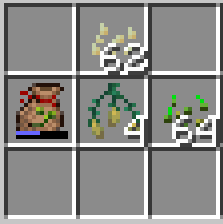
- Auto-Pickup: As long as the Seed Bag is in your inventory, any seeds you pick up will automatically be stored inside, preventing inventory clutter.
- Direct Planting: Right-click on farmland while holding a filled bag to plant seeds directly. It will plant them according to their order within the bag.
- Controls: The bag functions similarly to the vanilla Bundle. Right-click an empty slot with the bag to move seeds out, or right-click seeds with the bag to store them.
- Capacity: A single bag can hold up to 512 seeds.
✅Compatibility: This mod is compatible with most other mods that correctly use the
c:seedsorminecraft:seedstags (e.g., Farmer's Delight).
Crafting Recipes
You can obtain the Seed Bag using either of the following methods:
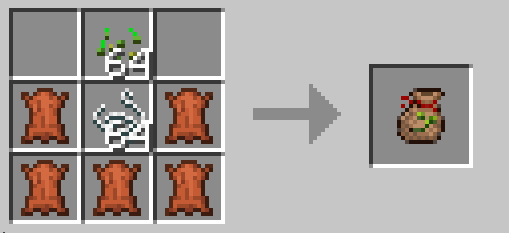
Method 1: Direct Crafting
- Top Row: Empty | Any Seed | Empty
- Middle Row: Leather | String | Leather
- Bottom Row: Leather | Leather | Leather

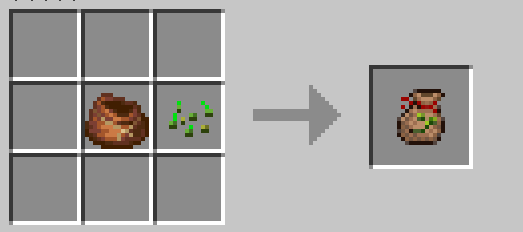
Method 2: Transformation
- Combine a Vanilla Bundle with Any Seed in a crafting grid.

介绍
模组在游戏中增加了一个种子袋,能自动收集种子,提升耕种效率。
主要功能:
- 自动拾取填充: 只要物品栏中携带种子袋,捡起的种子将自动进入袋内,避免占用背包空格。
- 直接播种: 手持装有种子的袋子对耕地点击右键即可播种。播种顺序取决于种子在袋内的排列位置。
- 操作方式: 交互与原版收纳袋一致。用袋子点击空格取出种子,用袋子点击种子进行收纳。
- 容量: 单个种子袋可容纳 512 个种子。
✅兼容性: 本模组兼容绝大部分将种子正确添加至
c:seeds或minecraft:seeds标签的模组(如农夫乐事等)。
合成表
你可以通过以下两种方式获得种子袋:
方式一:基础合成
- 顶部: 空置 | 任意种子 | 空置
- 中间: 皮革 | 线 | 皮革
- 底部: 皮革 | 皮革 | 皮革
方式二:快捷转化
- 在合成栏中放入 原版收纳袋 + 任意种子 即可直接合成。
Available Versions
How to Install Seeds Bag on Your Server
Order Server
Order a Minecraft Java server with at least 3 GB RAM (4 GB recommended).
Set neoforge Loader
In the panel under "Egg", select the neoforge loader and matching Minecraft version (1.21.11).
Install Mod
Open the mod browser in the dashboard and search for "Seeds Bag". Click "Install" – done! Alternatively, upload the .jar via SFTP to the /mods folder.
Compatibility
Mod Loaders
Minecraft Versions
1.21.11, 1.21.10, 1.21.9 (+9 more)
Server-side
✓ RequiredRecommended RAM
4 GB(min. 3 GB)Frequently Asked Questions
Seeds Bag server crashes on startup – what to do?
Most common cause: wrong neoforge version or insufficient RAM. Check the server log (latest.log) for "OutOfMemoryError" or "Mixin" errors. With Mado Hosting: ensure at least 3 GB RAM is allocated and the loader matches the mod version (1.21.11). You can switch loaders with one click in the panel.
Is Seeds Bag compatible with neoforge?
Seeds Bag officially supports neoforge for Minecraft 1.21.11, 1.21.10, 1.21.9. The Mado dashboard automatically detects incompatible loader combinations.
Server lagging with Seeds Bag – how to optimize performance?
Recommended RAM: 4 GB (per 8 players). Use /spark profiler to check if Seeds Bag consumes the most tick time. Common fixes: reduce server view-distance to 8-10, install "performant" or "starlight" as supplementary mods on Forge. With Mado Hosting, your server runs on NVMe SSDs with dedicated CPU cores for minimal latency.
Similar Mods



Rent Modded Server
Install Seeds Bag with just one click on your server.
Details
- License
- Creative Commons Attribution Non Commercial No Derivatives 4.0 International
- Server-side
- Required