
Selfexpression: New Edge
Addon to the "Selfexression" mod, that adds 3D clothes!
Screenshots
About this Mod
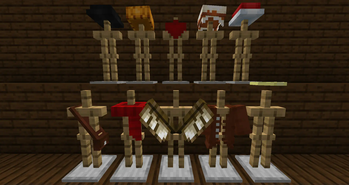
Add 3D clothes in your world!
The Selfexpression mod now has an addon that adds 3D clothes! Now you can go beyond ordinary clothes and create something more interesting!
In order to create clothes, you need to download the original mod

Using
You can ise this mod and all addons for free in your modpacks
My discord server
If you speak Russian, then you can join my discord server, where you can find news on my projects, chat with me and my team, or just find friends. However, if you do not speak Russian, this does not mean that you are not allowed on my discord server. You can also join, I will be glad to see everyone. In addition, all important news is duplicated into English, so you do not need to translate the text.
Добавь 3Д одежду в свой мир!
Мод Selfexpression теперь имеет свой аддон, который добавит 3Д одежду! Теперь вы сможете вырваться за рамки обычной одежды, и создать нечто более интересное!
Перед тем как создать одежду, вам необходимо скачать оригинальный мод
Использование
Вы можете использовать этот мод и все аддоны бесплатно в ваших сборках
Мой Discord-сервер
Приглашаю тебя на мой Discord-сервер! Там ты сможешь узнать новости о моих проектах, пообщаться со мной и моей командой, или просто найти друзей.
Available Versions
How to Install Selfexpression: New Edge on Your Server
Order Server
Order a Minecraft Java server with at least 3 GB RAM (4 GB recommended).
Set forge Loader
In the panel under "Egg", select the forge loader and matching Minecraft version (1.21.5).
Install Mod
Open the mod browser in the dashboard and search for "Selfexpression: New Edge". Click "Install" – done! Alternatively, upload the .jar via SFTP to the /mods folder.
Compatibility
Mod Loaders
Minecraft Versions
1.21.5, 1.21.4, 1.21.3 (+6 more)
Server-side
✓ RequiredRecommended RAM
4 GB(min. 3 GB)Frequently Asked Questions
Selfexpression: New Edge server crashes on startup – what to do?
Most common cause: wrong forge version or insufficient RAM. Check the server log (latest.log) for "OutOfMemoryError" or "Mixin" errors. With Mado Hosting: ensure at least 3 GB RAM is allocated and the loader matches the mod version (1.21.5). You can switch loaders with one click in the panel.
Is Selfexpression: New Edge compatible with forge and neoforge?
Selfexpression: New Edge officially supports forge, neoforge for Minecraft 1.21.5, 1.21.4, 1.21.3. The Mado dashboard automatically detects incompatible loader combinations.
Server lagging with Selfexpression: New Edge – how to optimize performance?
Recommended RAM: 4 GB (per 8 players). Use /spark profiler to check if Selfexpression: New Edge consumes the most tick time. Common fixes: reduce server view-distance to 8-10, install "performant" or "starlight" as supplementary mods on Forge. With Mado Hosting, your server runs on NVMe SSDs with dedicated CPU cores for minimal latency.
Similar Mods




![[TaCZ] Timeless and Classics Zero](https://cdn.modrinth.com/data/SzzJttH8/fd27766d2bb8390d284696b1dbd358f87e081439_96.webp)

Rent Modded Server
Install Selfexpression: New Edge with just one click on your server.