SenpaiHUD
Real-time player stats mod for MushMC's Bed Wars.
Screenshots
About this Mod
SenpaiHUD - BedWars Stats for MushMC
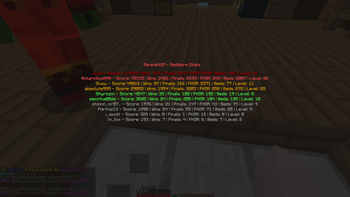
SenpaiHUD is a Minecraft mod designed specifically for players on the MushMC server. With a simple keypress, SenpaiHUD fetches and displays detailed BedWars statistics for all players currently in your lobby, helping you analyze your competition and teammates in real time.
Features
- Instant Stats: View BedWars stats (score, wins, finals, FKDR, beds broken, level, winstreak, account type, ban blacklist count, and first login) for every player in your lobby.
- Stylish GUI: A clean, easy-to-read interface with sorting, color-coded ranks, and icons for premium accounts, new players, and ban warnings.
- Smart Caching: Fast performance with built-in caching for up to 500 players, ensuring stats load quickly and efficiently.
- Scroll & Search: Easily scroll through large lobbies and see all relevant stats at a glance.
How to Use
- Join the MushMC server.
- Press the apostrophe key (
') to open the SenpaiHUD stats screen. - Instantly view and compare BedWars stats for everyone in your lobby.
Requirements
- Minecraft Forge (1.8.x recommended)
- MushMC server
Why SenpaiHUD?
SenpaiHUD gives you a competitive edge by letting you know who’s who in your BedWars lobby. Whether you’re looking for top players, new accounts, or potential cheaters, SenpaiHUD puts all the information at your fingertips.
Note: This mod is exclusively for MushMC and will not function on other servers.
Available Versions
How to Install SenpaiHUD on Your Server
Order Server
Order a Minecraft Java server with at least 3 GB RAM (4 GB recommended).
Set forge Loader
In the panel under "Egg", select the forge loader and matching Minecraft version (1.8.9).
Install Mod
Open the mod browser in the dashboard and search for "SenpaiHUD". Click "Install" – done! Alternatively, upload the .jar via SFTP to the /mods folder.
Compatibility
Mod Loaders
Minecraft Versions
1.8.9
Server-side
✗ UnsupportedRecommended RAM
4 GB(min. 3 GB)Frequently Asked Questions
SenpaiHUD server crashes on startup – what to do?
Most common cause: wrong forge version or insufficient RAM. Check the server log (latest.log) for "OutOfMemoryError" or "Mixin" errors. With Mado Hosting: ensure at least 3 GB RAM is allocated and the loader matches the mod version (1.8.9). You can switch loaders with one click in the panel.
Is SenpaiHUD compatible with forge?
SenpaiHUD officially supports forge for Minecraft 1.8.9. The Mado dashboard automatically detects incompatible loader combinations.
Server lagging with SenpaiHUD – how to optimize performance?
Recommended RAM: 4 GB (per 8 players). Use /spark profiler to check if SenpaiHUD consumes the most tick time. Common fixes: reduce server view-distance to 8-10, install "performant" or "starlight" as supplementary mods on Forge. With Mado Hosting, your server runs on NVMe SSDs with dedicated CPU cores for minimal latency.
Rent Modded Server
Install SenpaiHUD with just one click on your server.