
Disguises
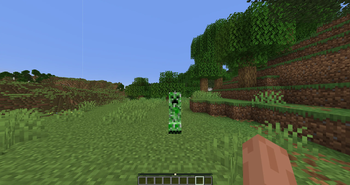
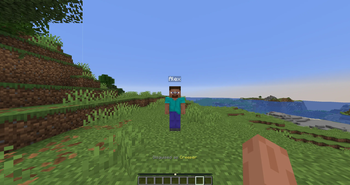
A Fabric disguise mod inspired by LibsDisguises. Disguise players or any entity as mobs, animals, players, inanimate objects, and more. With per-entity options, equipment, self-view support, and a fully configurable permission system.
Screenshots
About this Mod
Disguises
A powerful, server-side Fabric disguise mod inspired by LibsDisguises. Disguise players or any entity as virtually any mob, animal, player, block display, item, vehicle, or projectile, with fine-grained per-entity customisation, equipment overrides, self-view support, and a fully configurable permission system.
Everything runs on the server, so your players just join with vanilla Fabric and it works. There is no client mod or resource pack to install.
Over 100 entity types are supported, from passive animals and hostile mobs to other players (with their real skins), block displays, items, every boat and minecart variant, and projectiles. Each type takes its own flags for things like colour, age, pose, equipment, tameness and professions, all with full tab-completion.
For build instructions and source, see the GitHub repository.
Requires Fabric Loader and Fabric API. The main build targets Minecraft 26.1.2, and an alternate 1.21.11 build is available.
Features
Disguise anything as anything
- Players can disguise as any mob, animal, player skin, or inanimate entity
- Server-side mobs and entities can also be disguised (e.g. disguise a zombie as a villager)
- Observer-specific overrides, make one player see a different disguise than everyone else
- Disguises persist across chunks and dimensions (configurable)
Self-view support
Players can optionally see their own disguise from a third-person puppet perspective, mirroring their crouch, sprint, swim, and elytra state in real time.
Player skins and saved presets
Players can disguise as named player skins, cache fetched skins, and save reusable disguise presets for quick re-application.
Vanish-aware packet handling
Observer-specific disguises and vanish providers are supported, including a built-in scoreboard-tag fallback for vanished entities.
Sound replacement
Ambient, hurt, death, and footstep sounds are automatically replaced with the disguise type's sounds.
Extensive entity customisation
Every disguise type supports entity-specific flags set inline with the disguise command:
| Category | Example flags |
|---|---|
| Universal | setFire, setInvisible, setGlowing, setCustomName, setCrouching |
| Living entities | setHealth, setBaby |
| Sheep | setColor RED, setSheared |
| Creeper | setPowered, setIgnited |
| Wolf / Cat | setTamed, setAngry, setCollarColor BLUE |
| Villager | setVillagerType plains, setProfession librarian, setVillagerLevel 3 |
| Horse | setHorseColor chestnut, setHorseStyle white_field |
| Panda | setMainGene playful, setHiddenGene brown |
| Shulker | setAttachFace north, setPeek 50, setShulkerColor CYAN |
| Armor Stand | setSmall, setShowArms, setHeadPose 0 45 0 |
| Block Display / Falling Block / Minecart | setBlock diamond_block |
| Item entity | setItem diamond |
| All living disguises | setHelmet iron_helmet, setMainHand diamond_sword |
Full tab-completion for all flags and their values is supported.
Supported Entity Types
100+ entity types across all categories:
- Passive animals: Cow, Sheep, Pig, Horse, Donkey, Mule, Cat, Wolf, Fox, Panda, Axolotl, Frog, Goat, Bee, Strider, Parrot, Rabbit, Llama, Turtle, Mooshroom, Villager, Iron Golem, Snow Golem, and more
- Hostile / neutral mobs: Zombie, Skeleton, Creeper, Enderman, Blaze, Warden, Breeze, Pillager, Piglin, Ravager, Shulker, Phantom, Slime, Magma Cube, and more
- Player: Disguise as any player (with their skin)
- Block / display entities: Falling Block, Block Display, Item
- Vehicles: All 20 boat variants, all 7 minecart types
- Projectiles: Arrow, Trident, Firework Rocket, Ender Pearl, Snowball, and more
Commands
Permissions are configurable per-command in
disguises.json.
| Command | Description |
|---|---|
/disguise <type> [flags...] |
Disguise yourself |
/disguise player <name> [flags...] or /disguise as <name> [flags...] |
Disguise yourself as a named player skin |
/disguise <type> <target> [flags...] |
Disguise another player |
/disguise <type> <target> player <name> [flags...] |
Disguise another player as a named player skin |
/disguise entity <target> <type> [flags...] |
Disguise a targeted entity |
/disguise entity <target> player <name> [flags...] |
Disguise a targeted entity as a named player skin |
/disguise radius <r> <type> [flags...] |
Disguise all entities within radius |
/disguise radius <r> player <name> [flags...] |
Disguise all entities within radius as a named player skin |
/disguise modify <flags...> |
Modify your active disguise |
/disguise viewself [on|off] |
Toggle whether you see your own disguise |
/undisguise [target] |
Remove a disguise |
/undisguise radius <r> |
Remove disguises from all entities within radius |
/disguises reload |
Reload the config |
/disguises info [player] |
Show active disguise info |
/disguises list |
List all currently disguised entities |
/disguises clearcache |
Clear the player-skin cache |
/disguises observer <target> <viewer> <type> [flags] |
Set a per-observer disguise override |
/disguises removeobserver <target> <viewer> |
Remove one per-observer disguise override |
/disguises clearobservers <target> |
Remove all per-observer overrides for an entity |
/savedisguise save <name> <type> [flags...] |
Save a personal disguise preset |
/savedisguise apply <name> |
Apply a saved disguise preset |
/savedisguise list |
List your saved disguise presets |
/savedisguise delete <name> |
Delete a saved disguise preset |
/disguisehelp [type] |
List disguise types or flags for one type |
Configuration
disguises.json (in your config folder):
| Option | Default | Description |
|---|---|---|
showDisguiseActionBar |
true |
Show the disguise type in the action bar |
actionBarIntervalTicks |
100 |
How often the action bar reminder appears (0 = only on change) |
disguiseSounds |
true |
Replace sounds with the disguise type's sounds |
selfDisguiseDefault |
false |
Players see their own disguise by default |
showDisguiseInTab |
false |
Keep fake player disguises visible in the tab list while skins load |
tabRemoveDelayTicks |
20 |
Ticks before removing a fake player tab entry after spawn |
vanishedEntitiesHidden |
true |
Hide vanished disguised entities from unauthorized observers |
undisguiseOnDeath |
false |
Remove disguise when the player dies |
undisguiseOnWorldChange |
false |
Remove disguise on dimension change |
persistDisguises |
false |
Save and restore disguises across server restarts |
showEquipmentThroughDisguise |
false |
Show the real entity's equipment through the disguise |
enforceTypePermissions |
false |
Require disguises.type.<type> permission per entity type |
permLevelSelf/Others/Entity/Radius |
2 |
Op levels for each command category |
permLevelAdmin |
3 |
Op level for /disguises admin commands |
disabledEntityTypes |
[] |
Block specific entity types from being used |
Requirements
- Fabric Loader
- Fabric API
- Main build: Minecraft 26.1.2
- Alternate build: Minecraft 1.21.11
Inspired by
LibsDisguises, the gold standard for Bukkit/Spigot disguise plugins, reimagined for Fabric.
Available Versions
How to Install Disguises on Your Server
Order Server
Order a Minecraft Java server with at least 3 GB RAM (4 GB recommended).
Set fabric Loader
In the panel under "Egg", select the fabric loader and matching Minecraft version (26.1.2).
Install Mod
Open the mod browser in the dashboard and search for "Disguises". Click "Install" – done! Alternatively, upload the .jar via SFTP to the /mods folder.
Compatibility
Mod Loaders
Minecraft Versions
26.1.2, 1.21.11
Server-side
✓ RequiredRecommended RAM
4 GB(min. 3 GB)Frequently Asked Questions
Disguises server crashes on startup – what to do?
Most common cause: wrong fabric version or insufficient RAM. Check the server log (latest.log) for "OutOfMemoryError" or "Mixin" errors. With Mado Hosting: ensure at least 3 GB RAM is allocated and the loader matches the mod version (26.1.2). You can switch loaders with one click in the panel.
Is Disguises compatible with fabric?
Disguises officially supports fabric for Minecraft 26.1.2, 1.21.11. The Mado dashboard automatically detects incompatible loader combinations.
Server lagging with Disguises – how to optimize performance?
Recommended RAM: 4 GB (per 8 players). Use /spark profiler to check if Disguises consumes the most tick time. Common fixes: reduce server view-distance to 8-10, install "performant" or "starlight" as supplementary mods on Forge. With Mado Hosting, your server runs on NVMe SSDs with dedicated CPU cores for minimal latency.
Similar Mods






Rent Modded Server
Install Disguises with just one click on your server.