
Server Master
Your complete server management solution! From homes and warps, to auto-messagers and chat tools, this mod gives you everything you need for both single and multiplayer worlds.
Screenshots




About this Mod

Your complete server management solution! From homes and warps, to auto-messagers and chat tools, this mod gives you everything you need for both single and multiplayer worlds.
🚧 Current Status
This mod is a work in progress, which means some features are not yet available. I'm actively developing and will be adding more content and improvements in future updates. You can find a list of available content below.
⚙️ Configuration
All configuration files are saved in JSON format. You can find the documentation on how to set it up on the Wiki Page.
🌟 Features
✅ Welcome Message
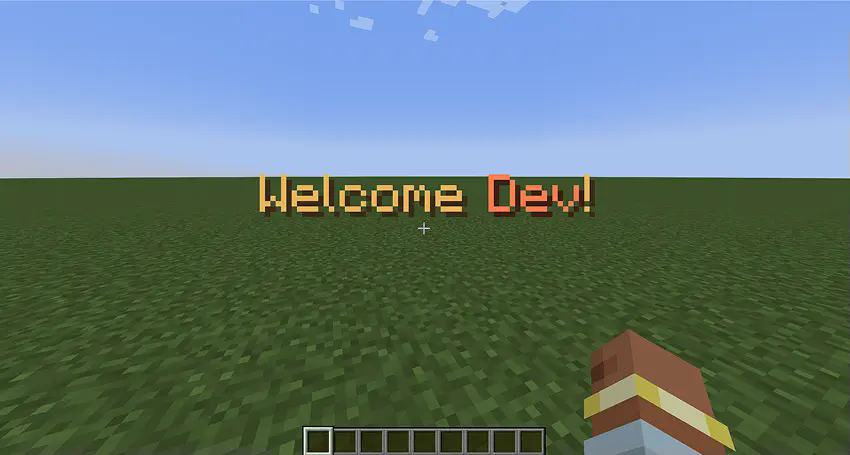
Customize the welcome message and sound that plays when players join the game.
✅ MOTD (Message of the Day)

Customize the messages displayed to players when they join the server.
✅ Rules Command
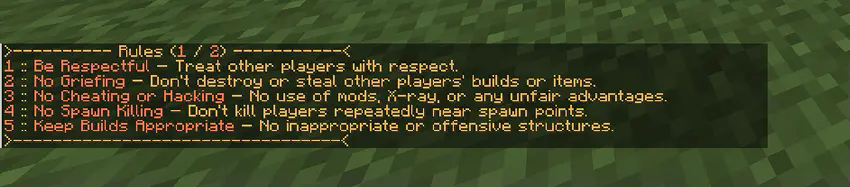
Customize the rules that players see when using the /rules command.
✅ Auto Messenger

Automatically sends messages in the chat at specified intervals.
✅ Customize Join and Leave Messages

Set up custom messages that are displayed when players join or leave the server.
✅ Message Variables
You can use variables within messages to dynamically display information.
✅ Custom Variables
You can define custom variables to be used within your messages. These variables can be linked to actions like opening URLs or running commands.

Server Master is still in development, and I’d love to hear your feedback!
If you find any bugs or have suggestions, please report them in the comments.
Your input will help make the mod even better!
Available Versions
How to Install Server Master on Your Server
Order Server
Order a Minecraft Java server with at least 3 GB RAM (4 GB recommended).
Set neoforge Loader
In the panel under "Egg", select the neoforge loader and matching Minecraft version (1.21.1).
Install Mod
Open the mod browser in the dashboard and search for "Server Master". Click "Install" – done! Alternatively, upload the .jar via SFTP to the /mods folder.
Compatibility
Mod Loaders
Minecraft Versions
1.21.1
Server-side
✓ RequiredRecommended RAM
4 GB(min. 3 GB)Frequently Asked Questions
Server Master server crashes on startup – what to do?
Most common cause: wrong neoforge version or insufficient RAM. Check the server log (latest.log) for "OutOfMemoryError" or "Mixin" errors. With Mado Hosting: ensure at least 3 GB RAM is allocated and the loader matches the mod version (1.21.1). You can switch loaders with one click in the panel.
Is Server Master compatible with neoforge?
Server Master officially supports neoforge for Minecraft 1.21.1. The Mado dashboard automatically detects incompatible loader combinations.
Server lagging with Server Master – how to optimize performance?
Recommended RAM: 4 GB (per 8 players). Use /spark profiler to check if Server Master consumes the most tick time. Common fixes: reduce server view-distance to 8-10, install "performant" or "starlight" as supplementary mods on Forge. With Mado Hosting, your server runs on NVMe SSDs with dedicated CPU cores for minimal latency.
Similar Mods






Rent Modded Server
Install Server Master with just one click on your server.