
Server Redstone Block
Never have a broken redstone contraption due to server restarts again!
Screenshots

About this Mod
Server Redstone Block

Description
Ever had redstone contraptions break on you due to a server restart?
This block acts as a normal redstone block but the server admins can trigger a warning state and an off state at will.
This can give time for the contraptions to shut down gracefully before a server shutdown.
Usage
You have to have it installed both on the server and the client side as it adds a new block.
Why do you need it on the client side too?
Believe me, I've tried to make this a server-only mod. The issue is: player experience.
Using only vanilla items and solutions that work from 1.18.2 upwards makes it very difficult to create a solution that is easy to grasp as a player. Imagine using a bunch of redstone blocks in your build but one of them is a "special" block that gets turned off. We need some sort of a visual clue so that you could identify the block in question.With the client side present, we have the option of custom textures and custom block behaviour which makes it very straight forward to use.
Do you think you can solve this issue?
If you're a mod developer and you think you have a solution for this, please get in touch. I'm very interested in a good solution!
Player
As a player, you can use the block as a normal redstone block.
Crafting
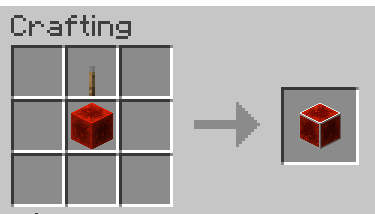
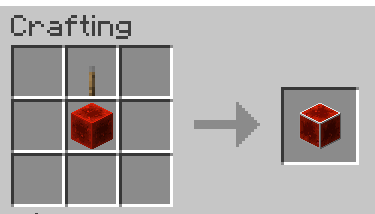
You can craft it with a regular redstone block and a lever.
Redstone Output
- On: 15 power
- Warning: 1 power
- Off: 0 power
Recommended use for players
Use the above power states to react. Things that usually break the most on a restart are minecart and flying machine based contraptions.
You can use the block to add in a check if you should start a next run of your system.
You could outright use it as a power source that will shut off when need to. Just make sure that your system doesn't run longer than the time it warns you of an impeding restart.
Admin
To control the block, you need to have a permission level of 4.
When the server starts, the blocks always start in the ON state.
Commands
/srs on: Sets the block to the on state/srs warning: Sets the block to the warning state/srs off: Sets the block to the off state
Recommended use
If you have scheduled restarts on your server, I recommend having the automation issue a srs warning 5 minutes before the restart.
That signals to the contraptions that if it's a fast system, it could still run. Otherwise caution.
Around 1-2 minutes before the restart/shutdown, you should issue a srs off to make sure that all running contraptions have time to settle down.
Telemetry
The mod collects minimal anonymous telemetry to help the decision making when maintaining the mod. You can see what is collected here)
Get in touch
I'm very curious to learn how you use this. Please drop by discord if you have any questions or feedback https://discord.gg/dvg3tcQCPW
I'd also like to hear from server owners if there's anything else I could help with.
Available Versions
How to Install Server Redstone Block on Your Server
Order Server
Order a Minecraft Java server with at least 3 GB RAM (4 GB recommended).
Set fabric Loader
In the panel under "Egg", select the fabric loader and matching Minecraft version (1.21.4).
Install Mod
Open the mod browser in the dashboard and search for "Server Redstone Block". Click "Install" – done! Alternatively, upload the .jar via SFTP to the /mods folder.
Compatibility
Mod Loaders
Minecraft Versions
1.21.4, 1.21, 1.20.2 (+7 more)
Server-side
✓ RequiredRecommended RAM
4 GB(min. 3 GB)Frequently Asked Questions
Server Redstone Block server crashes on startup – what to do?
Most common cause: wrong fabric version or insufficient RAM. Check the server log (latest.log) for "OutOfMemoryError" or "Mixin" errors. With Mado Hosting: ensure at least 3 GB RAM is allocated and the loader matches the mod version (1.21.4). You can switch loaders with one click in the panel.
Is Server Redstone Block compatible with fabric and forge and neoforge and quilt?
Server Redstone Block officially supports fabric, forge, neoforge, quilt for Minecraft 1.21.4, 1.21, 1.20.2. Note: Forge and Fabric mods are NOT cross-compatible – pick one loader and stick with it. The Mado dashboard automatically detects incompatible loader combinations.
Server lagging with Server Redstone Block – how to optimize performance?
Recommended RAM: 4 GB (per 8 players). Use /spark profiler to check if Server Redstone Block consumes the most tick time. Common fixes: reduce server view-distance to 8-10, install "performant" or "starlight" as supplementary mods on Forge. With Mado Hosting, your server runs on NVMe SSDs with dedicated CPU cores for minimal latency.
Similar Mods






Rent Modded Server
Install Server Redstone Block with just one click on your server.