
Server Swapper
Allows portal use between neoforge servers
Screenshots
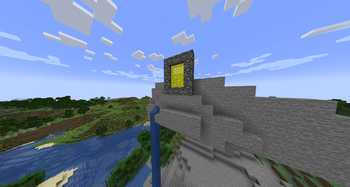
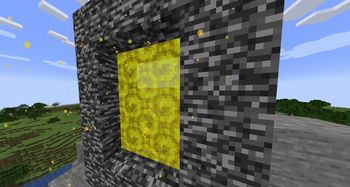
About this Mod
Are you looking for a portal to switch between Neoforge servers? Well here it is!
Key Features
Customizable Portals: Create special portals that act as gateways to other server instances or specific IPs/ports. The portals have a distinctive gold appearance with dynamic particle effects.
Persistent Server Destinations: Server administrators can easily manage a list of predefined server connections (name, IP, port) using intuitive in-game commands.
Cross-Server Chat (via RCON): Connect chat across your entire server network, allowing players on different servers to communicate seamlessly.
Configurable Message Formats: Tailor the appearance of cross-server chat messages, player join messages, and player leave messages using placeholders and various color codes.
How it Enhances Your Server
Easy Server Hubs: Create a central hub that links to your survival, creative, minigame, or resource servers.
Intuitive Navigation: Players don't need to disconnect and reconnect; simply walk through a portal.
Immersive Experience: The custom visuals make portal travel feel unique and magical.
Unified Community: Foster a more connected player base by enabling real-time chat and presence notifications across all linked servers.
Admin Control: Commands for adding, removing, and listing server destinations put you in charge of your network's flow.
Commands OP & LuckPerms Integration
/swp create <name>– Spawn a portal to a saved server destination./swp list– View all saved server destinations./swp add <name> <ip> <port>– Add a new server destination to the config./swp remove <name>– Remove a saved server destination./swp reload– Reload the mod's configuration./swp help– Display mod commands.
Configuration
There's a ton of config options, basically everything I could think anyone would want to change! This includes particle size, cooldown time, teleport delay, portal frame block, and much more. You can now also extensively customize the cross server chat message formats, including support for Minecraft's native § color codes, the common & format, and Solstice color tags, along with dynamic placeholders for server name, player name, LuckPerms prefix/suffix, and message content.
Limitations
- Single Player Incompatibility: The mod does not currently work in single-player mode and is designed specifically for multiplayer Neoforge servers (Work in Progress).
- RCON Dependency for Chat: Cross-server chat functionality requires proper RCON configuration on all linked servers.
Available Versions
How to Install Server Swapper on Your Server
Order Server
Order a Minecraft Java server with at least 3 GB RAM (4 GB recommended).
Set neoforge Loader
In the panel under "Egg", select the neoforge loader and matching Minecraft version (1.21.1).
Install Mod
Open the mod browser in the dashboard and search for "Server Swapper". Click "Install" – done! Alternatively, upload the .jar via SFTP to the /mods folder.
Compatibility
Mod Loaders
Minecraft Versions
1.21.1
Server-side
✓ RequiredRecommended RAM
4 GB(min. 3 GB)Frequently Asked Questions
Server Swapper server crashes on startup – what to do?
Most common cause: wrong neoforge version or insufficient RAM. Check the server log (latest.log) for "OutOfMemoryError" or "Mixin" errors. With Mado Hosting: ensure at least 3 GB RAM is allocated and the loader matches the mod version (1.21.1). You can switch loaders with one click in the panel.
Is Server Swapper compatible with neoforge?
Server Swapper officially supports neoforge for Minecraft 1.21.1. The Mado dashboard automatically detects incompatible loader combinations.
Server lagging with Server Swapper – how to optimize performance?
Recommended RAM: 4 GB (per 8 players). Use /spark profiler to check if Server Swapper consumes the most tick time. Common fixes: reduce server view-distance to 8-10, install "performant" or "starlight" as supplementary mods on Forge. With Mado Hosting, your server runs on NVMe SSDs with dedicated CPU cores for minimal latency.
Similar Mods






Rent Modded Server
Install Server Swapper with just one click on your server.