
Server Tools
Add more useful features to the server
Screenshots
About this Mod
Server Tools
If the cores mod is already installed, you can download the add-on files (the version that does not contain "all") to save space.
If you want to use JS code, please download the GraalJS mod.
functions
Login system:
Players will pop up a login interface when they enter the game, by clicking on the item to enter the password, click on the login to log in, the password must be 9-digit, initially no password, the first time you enter the password and successfully logged in that is the password for the future. Closing the login screen will get you kicked out. You will not be harmed during login and cannot interact.
Login message:
Definable first time join message, first time join message per day, every time join message
Entity cleanup:
multiple configurations, support for black and white lists, support for timed cleanup, support for cleanup after exceeding the cap, support for retaining items on creatures during cleanup, support for safe distances (no cleanup when there is a player within setting distance)
Item cleanup:
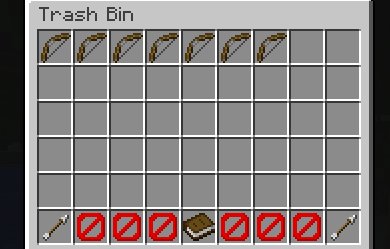
supports black and white lists, extra trash feature, cleaned items will be added to trash, can be turned on via /servers trash, this feature can be turned off.
Player blacklist:
support for normal ID, UUID, group, players located in the list can not join the server, rejection message can be customized, can be changed to allow mode, only allow players from the list to join.
Item blacklist:
items on the list are blocked from being acquired.
Attempt to fix abnormal entities:
try to remove entities that didn't die normally.
Other
Any ideas or suggestions you have can be commented on or made on Github!
Note:
Configuration files are located under “/your game directory/NekoServers”, not “config”.
Most of the messages sent are localized, you can add your own language in the Lang folder.
Please make sure that the player group files are located under PlayerGroup, where groups can be added.
For additional information you can visit the WIKI.
Any questions can be asked in github or contacted as below:
Available Versions
How to Install Server Tools on Your Server
Order Server
Order a Minecraft Java server with at least 3 GB RAM (4 GB recommended).
Set forge Loader
In the panel under "Egg", select the forge loader and matching Minecraft version (26.1.2).
Install Mod
Open the mod browser in the dashboard and search for "Server Tools". Click "Install" – done! Alternatively, upload the .jar via SFTP to the /mods folder.
Compatibility
Mod Loaders
Minecraft Versions
26.1.2, 26.1.1, 1.21.11 (+5 more)
Server-side
✓ RequiredRecommended RAM
4 GB(min. 3 GB)Frequently Asked Questions
Server Tools server crashes on startup – what to do?
Most common cause: wrong forge version or insufficient RAM. Check the server log (latest.log) for "OutOfMemoryError" or "Mixin" errors. With Mado Hosting: ensure at least 3 GB RAM is allocated and the loader matches the mod version (26.1.2). You can switch loaders with one click in the panel.
Is Server Tools compatible with forge and neoforge?
Server Tools officially supports forge, neoforge for Minecraft 26.1.2, 26.1.1, 1.21.11. The Mado dashboard automatically detects incompatible loader combinations.
Server lagging with Server Tools – how to optimize performance?
Recommended RAM: 4 GB (per 8 players). Use /spark profiler to check if Server Tools consumes the most tick time. Common fixes: reduce server view-distance to 8-10, install "performant" or "starlight" as supplementary mods on Forge. With Mado Hosting, your server runs on NVMe SSDs with dedicated CPU cores for minimal latency.
Similar Mods





Rent Modded Server
Install Server Tools with just one click on your server.