
ServerEcoMod
A lightweight, pure server-side economy mod with fully customizable currencies and an intuitive in-game chest GUI.
Screenshots
About this Mod
🇺🇸 ServerEcoMod — Pure Server-Side Economy
ServerEcoMod is a lightweight, Server-Side Only economy mod for Fabric 1.20.1. It is designed specifically for server administrators who want to introduce a flexible currency system and easy player-to-player transfers without forcing users to download any client-side mods!
Players using vanilla clients, Forge (via proxies), or even Bedrock Edition (via Geyser) can fully enjoy all the features of this mod.
✨ Features
- 🔌 100% Server-Side: Installed strictly on the server. No client-side downloads required.
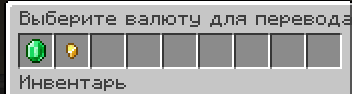
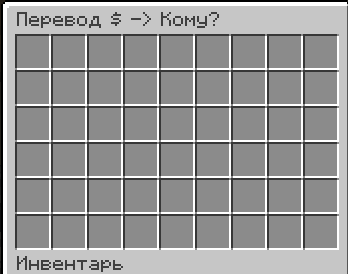
- 📦 Intuitive GUI: Bank menus open seamlessly via vanilla chest inventories directly in-game.
- ⚙️ Easy Configuration: Add, remove, and customize any currency within seconds using a simple JSON file.
- 💬 Secure Chat Input: Enter the exact transaction amount via chat safely (the numbers you type are intercepted and hidden from the global chat).
- 💾 Reliable Data Saving: All player balances are bound to their UUIDs and automatically saved within the world files, preventing any data loss.
🎮 Commands
👤 For Players:
/bank— Opens the graphical menu to select a currency and choose an online player for the transfer./balance— Displays your current balance for all available currencies in the chat.
👑 For Administrators (Requires OP 2+):
/moneyadmin give <amount>— Grants the specified amount of the primary currency to your balance for testing or events.
⚙️ Configuration
Upon the first server startup, a configuration file will be automatically generated at config/server_economy.json. You can modify it to match your server's theme:
{
  "currencies": [
    {
      "id": "usd",
      "displayName": "Dollar",
      "symbol": "\$",
      "itemMaterial": "minecraft:emerald"
    },
    {
      "id": "coin",
      "displayName": "Coin",
      "symbol": "⛃",
      "itemMaterial": "minecraft:gold_nugget"
    }
  ]
}
id— Unique identifier for the currency in the system.displayName— The name displayed in chat and menus.symbol— The icon or currency sign.itemMaterial— The ID of the vanilla item used as the icon in the GUI.
🚀 Installation
- Download the latest version of the mod.
- Drop the
.jarfile into themodsfolder of your Fabric 1.20.1 server. - Ensure that Fabric API is installed on the server.
- Restart the server, adjust the config file, and you are good to go!
🇷🇺 ServerEcoMod — Чисто серверная экономика
ServerEcoMod — это легковесный, полностью серверный (Server-Side Only) мод на экономику для Fabric 1.20.1. Он создан специально для администраторов серверов, которые хотят добавить гибкую систему валют и удобные переводы, не заставляя игроков скачивать какие-либо моды на свои компьютеры!
Игроки с ванильным клиентом, Forge (через прокси) или даже Bedrock (через Geyser) смогут полноценно пользоваться всем функционалом мода.
✨ Особенности
- 🔌 100% Server-Side: Мод устанавливается только на server. Клиентам скачивать его не нужно.
- 📦 Удобный GUI-интерфейс: Открытие меню банка через ванильные сундуки прямо в игре.
- ⚙️ Легкая настройка через конфиг: Добавляйте, удаляйте и настраивайте любые валюты за секунды через простой JSON-файл.
- 💬 Безопасный ввод суммы: Точный ввод количества монет для перевода через чат с автоматической защитой (ваши цифры перевода не увидит никто в общем чате).
- 💾 Надежное сохранение данных: Все балансы игроков привязаны к их UUID и автоматически сохраняются в файлы мира. Не бойтесь вайпов или крашей.
🎮 Игровые команды
👤 Для игроков:
/bank— Открывает графическое меню выбора валюты и списка онлайн-игроков для совершения перевода./balance— Показывает в чате ваш текущий баланс по всем доступным на сервере валютам.
👑 Для администраторов (требуется OP 2+):
/moneyadmin give <количество>— Быстрая выдача денег себе на баланс для тестов или проведения ивентов.
⚙️ Настройка конфигурации
После первого запуска мода в папке сервера появится файл config/server_economy.json. Вы можете открыть его и настроить валюты под тематику вашего сервера:
{
  "currencies": [
    {
      "id": "usd",
      "displayName": "Доллар",
      "symbol": "\$",
      "itemMaterial": "minecraft:emerald"
    },
    {
      "id": "coin",
      "displayName": "Монета",
      "symbol": "⛃",
      "itemMaterial": "minecraft:gold_nugget"
    }
  ]
}
id— Уникальный идентификатор валюты в системе.displayName— Название, которое будет отображаться в чате и меню.symbol— Иконка или значок валюты.itemMaterial— ID ванильного предмета, который станет иконкой этой валюты в GUI-меню банка.
🚀 Установка
- Скачайте актуальную версию мода.
- Поместите
.jarфайл в папкуmodsна вашем Fabric сервере версии 1.20.1. - Убедитесь, что на сервере установлен Fabric API.
- Перезапустите сервер, настройте конфиг и наслаждайтесь игрой!
Available Versions
How to Install ServerEcoMod on Your Server
Order Server
Order a Minecraft Java server with at least 3 GB RAM (4 GB recommended).
Set fabric Loader
In the panel under "Egg", select the fabric loader and matching Minecraft version (1.20.6).
Install Mod
Open the mod browser in the dashboard and search for "ServerEcoMod". Click "Install" – done! Alternatively, upload the .jar via SFTP to the /mods folder.
Compatibility
Mod Loaders
Minecraft Versions
1.20.6, 1.20.5, 1.20.4 (+3 more)
Server-side
✓ RequiredRecommended RAM
4 GB(min. 3 GB)Frequently Asked Questions
ServerEcoMod server crashes on startup – what to do?
Most common cause: wrong fabric version or insufficient RAM. Check the server log (latest.log) for "OutOfMemoryError" or "Mixin" errors. With Mado Hosting: ensure at least 3 GB RAM is allocated and the loader matches the mod version (1.20.6). You can switch loaders with one click in the panel.
Is ServerEcoMod compatible with fabric?
ServerEcoMod officially supports fabric for Minecraft 1.20.6, 1.20.5, 1.20.4. The Mado dashboard automatically detects incompatible loader combinations.
Server lagging with ServerEcoMod – how to optimize performance?
Recommended RAM: 4 GB (per 8 players). Use /spark profiler to check if ServerEcoMod consumes the most tick time. Common fixes: reduce server view-distance to 8-10, install "performant" or "starlight" as supplementary mods on Forge. With Mado Hosting, your server runs on NVMe SSDs with dedicated CPU cores for minimal latency.
Similar Mods



![CobbleDollars [Cobblemon Addon]](https://cdn.modrinth.com/data/s7N7AsqL/684040a264fc1d7f9b856ec5d2da39767398c7ad.png)

Rent Modded Server
Install ServerEcoMod with just one click on your server.