
ServerLinksSender
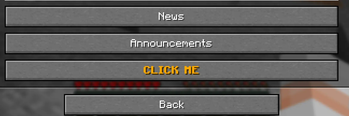
Built on vanilla 1.21 functionality. Provide players with links they can open up in-game via their pause menu!
Screenshots
About this Mod
ServerLinksSender
Context
Minecraft 1.21 released a new feature, allowing vanilla servers to send vanilla clients certain links which the client then can display in the pause menu under a new option called Server Links. In there they are listed and can be clicked on.
Vanilla only exposes sending a “Bug report link” that players can use to report bugs on the server, but the system is capable of doing much more! That’s where this mod comes in.
Description
ServerLinksSender allows to configure custom button labels and links for those, so you can supply your very own links and labels for things like server website, vote links, discord links, etc. and periodically update them as the server runs.
Additionally, this supports placeholder API and quicktext, allowing for easy and dynamic text components.
Finally, you can make use of the Predicate API to send certain links only under certain conditions, for example, send a link to the staff docs only to players with the staff permission or send a link with event rules if players are in the event world!
Limitations
First things first, you are not able to use clickevents or hovereffects of any sort as these are used in a button, not chat. I have not tested everything, but can confirm text decorations and colours work fine.
Additionally, the vanilla server links screen does NOT re-render if the new links gets sent. It will only re-render whenever the player actually opens it, and then it only gets rendered once, meaning you can't do super dynamic placeholders like worldtime as they don't get updated as the played looks at them.
Commands
| Command | Permission | Description |
|---|---|---|
/reloadserverlinks [--force-update] |
serverlinks.main |
Reloads the config from file and can optionally send the new list to all currently online players; this is especially useful if the players only get the links once (more on that below) and you want to update the links without having to re-log |
Example config
The mod creates a default configuration that you can use as a baseline, below is a similar configuration with some explanations (marked with //
{
// how many ticks should pass before the list gets sent to all players again
// you will need this if you have placeholders in use that change throughout user's play session. Setting this to 20 means it gets sent roughly every second. Lower than 20 is not recommended.
// Setting this to -1 will disable periodic updates, meaning players will only get the list when they login (or --force-update is used)
  "refresh_interval": -1,
// list of links to get sent to all users without any condition
  "global_server_links": {
    "<red><bold>My cool link!": "https://google.com"
  },
// multiple sets of links that can be sent additionally to those above if the player matches the requirements (e.g. has a certain permission or is in a certain world)
  "additional_links": [
    {
      "links": {
        "<rb>My cool extra link!": "https://google.com"
      },
      // for more info on how to use this, see here https://github.com/Patbox/PredicateAPI/blob/1.21/BUILTIN.md
      "requirement": {
        "type": "permission",
        "permission": "example.permission",
        "operator": 2
      }
    }
  ]
}
Available Versions
How to Install ServerLinksSender on Your Server
Order Server
Order a Minecraft Java server with at least 3 GB RAM (4 GB recommended).
Set fabric Loader
In the panel under "Egg", select the fabric loader and matching Minecraft version (1.21.3).
Install Mod
Open the mod browser in the dashboard and search for "ServerLinksSender". Click "Install" – done! Alternatively, upload the .jar via SFTP to the /mods folder.
Compatibility
Mod Loaders
Minecraft Versions
1.21.3, 1.21.2, 1.21.1 (+1 more)
Server-side
✓ RequiredRecommended RAM
4 GB(min. 3 GB)Frequently Asked Questions
ServerLinksSender server crashes on startup – what to do?
Most common cause: wrong fabric version or insufficient RAM. Check the server log (latest.log) for "OutOfMemoryError" or "Mixin" errors. With Mado Hosting: ensure at least 3 GB RAM is allocated and the loader matches the mod version (1.21.3). You can switch loaders with one click in the panel.
Is ServerLinksSender compatible with fabric?
ServerLinksSender officially supports fabric for Minecraft 1.21.3, 1.21.2, 1.21.1. The Mado dashboard automatically detects incompatible loader combinations.
Server lagging with ServerLinksSender – how to optimize performance?
Recommended RAM: 4 GB (per 8 players). Use /spark profiler to check if ServerLinksSender consumes the most tick time. Common fixes: reduce server view-distance to 8-10, install "performant" or "starlight" as supplementary mods on Forge. With Mado Hosting, your server runs on NVMe SSDs with dedicated CPU cores for minimal latency.
Similar Mods






Rent Modded Server
Install ServerLinksSender with just one click on your server.