
ServerPulse
Effortless Minecraft performance monitoring with pre-configured Grafana/InfluxDB via Docker.
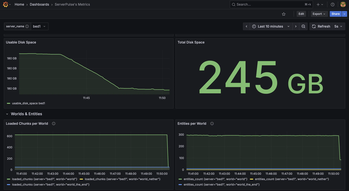
Screenshots


About this Mod

ServerPulse is your all-in-one server monitoring solution that combines powerful metrics collection, beautiful visualizations, real-time alerting, and effortless setup. Monitor TPS, memory, entities, and more through professional Grafana dashboards - all up and running in minutes with Docker!
Tired of guessing why your server is lagging? Frustrated with complex monitoring setups? ServerPulse is what you are looking for!
If you need support, or you have any question, join our Discord server
Why ServerPulse?
- Zero-Configuration Monitoring: Get started in minutes with our Docker Compose setup - InfluxDB, Grafana, and pre-built dashboards, all ready to go!
- Universal Platform Support: Works with any Bukkit-based, Velocity, BungeeCord and Fabric server while taking advantage of Paper-specific optimizations when available
- Complete Solution: Not just a metrics exporter - includes the entire monitoring stack optimized for time-series data
- Per-World Performance Tracking: Uniquely monitor metrics separately for each world - find problem areas fast!
- Advanced Tagging System: Group and filter metrics by server, network, region, or any custom dimension
- Production-Ready Infrastructure: Built-in health checks, automatic reconnection, and proper error handling
Real-Time Metrics Include:
- TPS (1m, 5m, 15m)
- MSPT (last, min, max, 1m, 5m, 15m)
- CPU Usage (System, JVM, Available Processors)
- Online Players
- Player Ping Statistics (min, max, avg)
- JVM Memory (Used, Committed, Max Heap)
- Disk Usage (Usable Bytes & Percent)
- Per-World Stats:
- Loaded Chunks
- Total Entities
Alert Notification System:
- Multi-Platform Support: Choose between Discord or Telegram for notifications
- Instant Notifications: Get alerted when TPS drops, memory spikes, or other
critical events occur - Customizable Thresholds: Set your own alert conditions for any metric
- Intelligent Alert Grouping: Prevents notification spam during ongoing issues
- Easy Integration: Simple webhook setup for Discord or bot configuration for
Telegram
Technical Features:
- Efficient & Safe: Asynchronous tasks and batch writing minimize performance
impact - Platform Detection: Automatically detects your server type and uses the optimal implementation
- Flexible Configuration: Customize metrics collection intervals, alerts, and
tagging - Professional Dashboards: Start monitoring immediately with pre-designed Grafana
dashboards - Open Source: Full transparency and community-driven development
Requirements:
- Server: Any Bukkit-based, Velocity, BungeeCord or Fabric server (Bukkit, Spigot, Paper, or forks like Purpur, Pufferfish)
- System: Docker and Docker Compose for the monitoring stack
- Optional: Discord server or Telegram bot for alert notifications
Quick Start:
Clone, compose up, and you're monitoring! Full setup guide at https://github.com/renvins/serverpulse
Screenshots: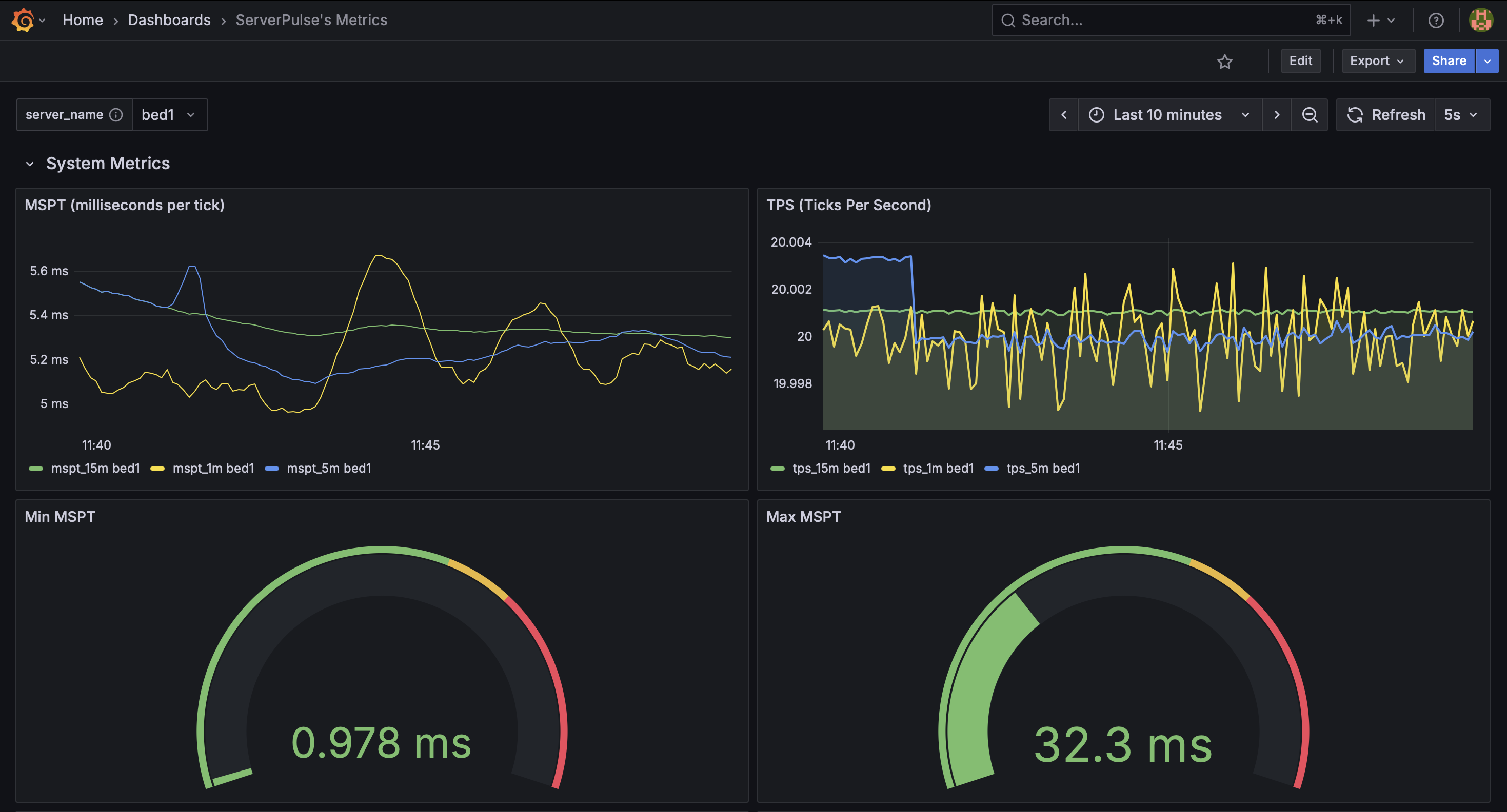
Example dashboard view 1: System Metrics
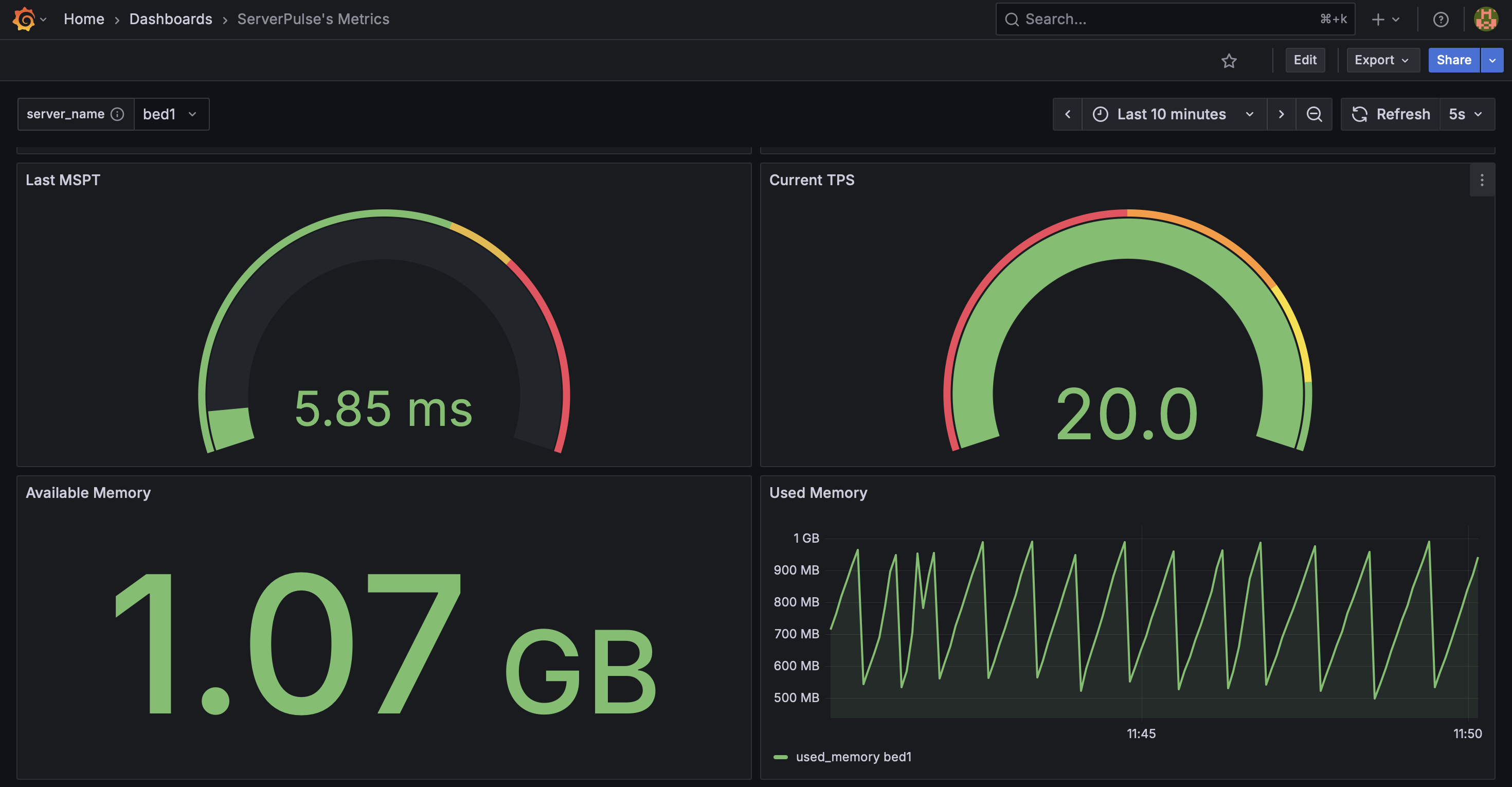
Example dashboard view 2: System Metrics 2
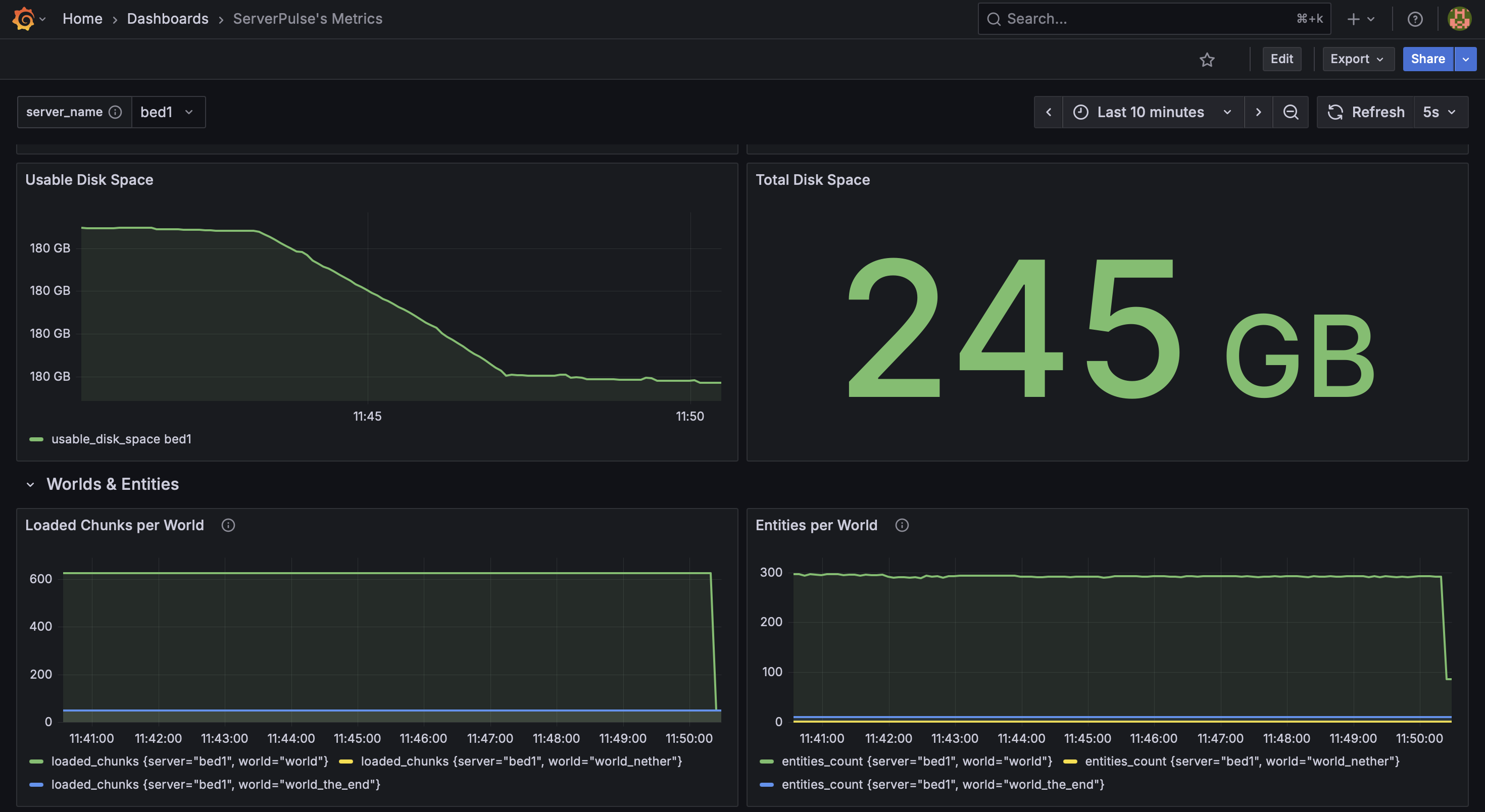
Example dashboard view 3: System & World Metrics
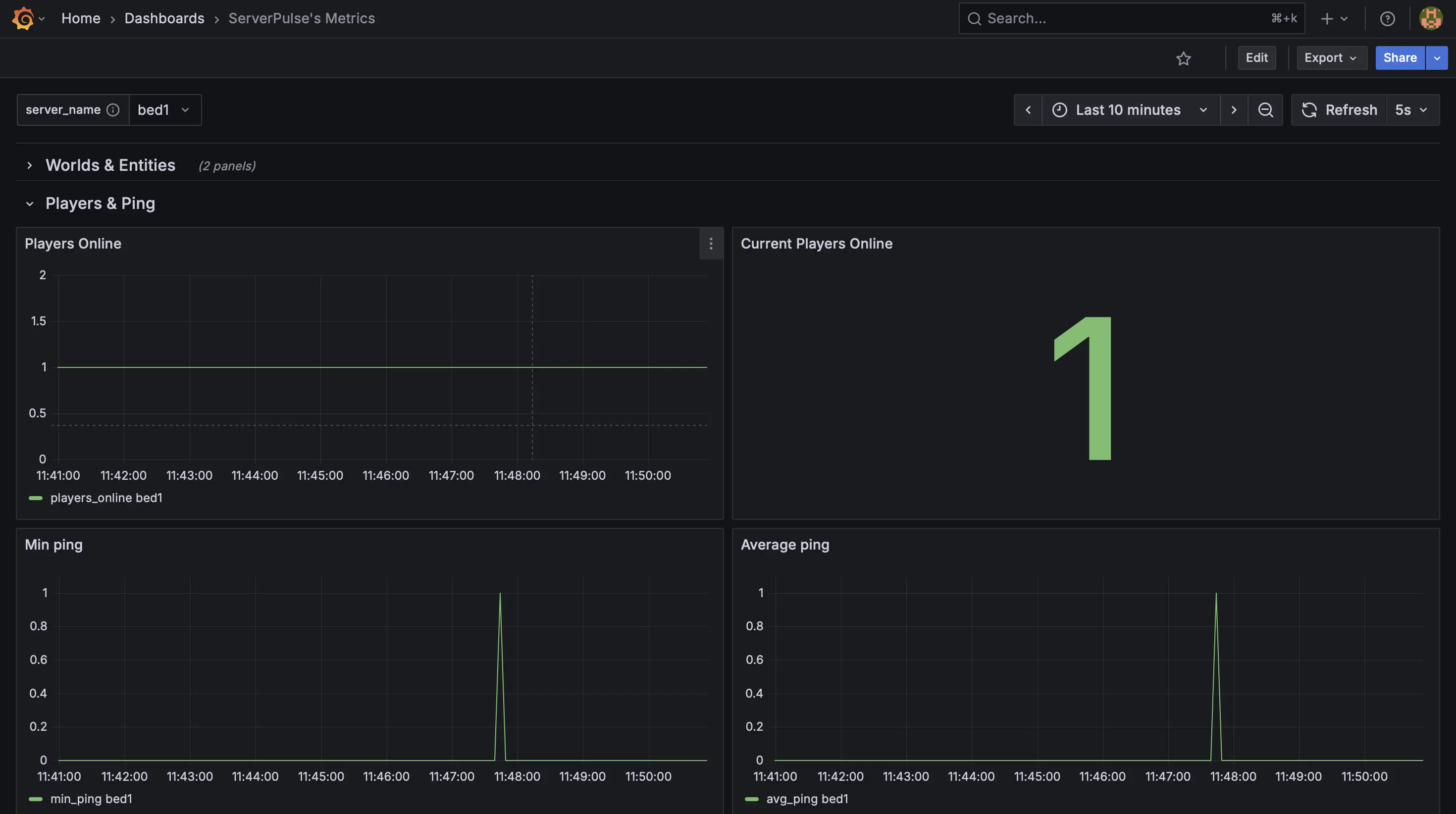
Example dashboard view 4: Player Metrics
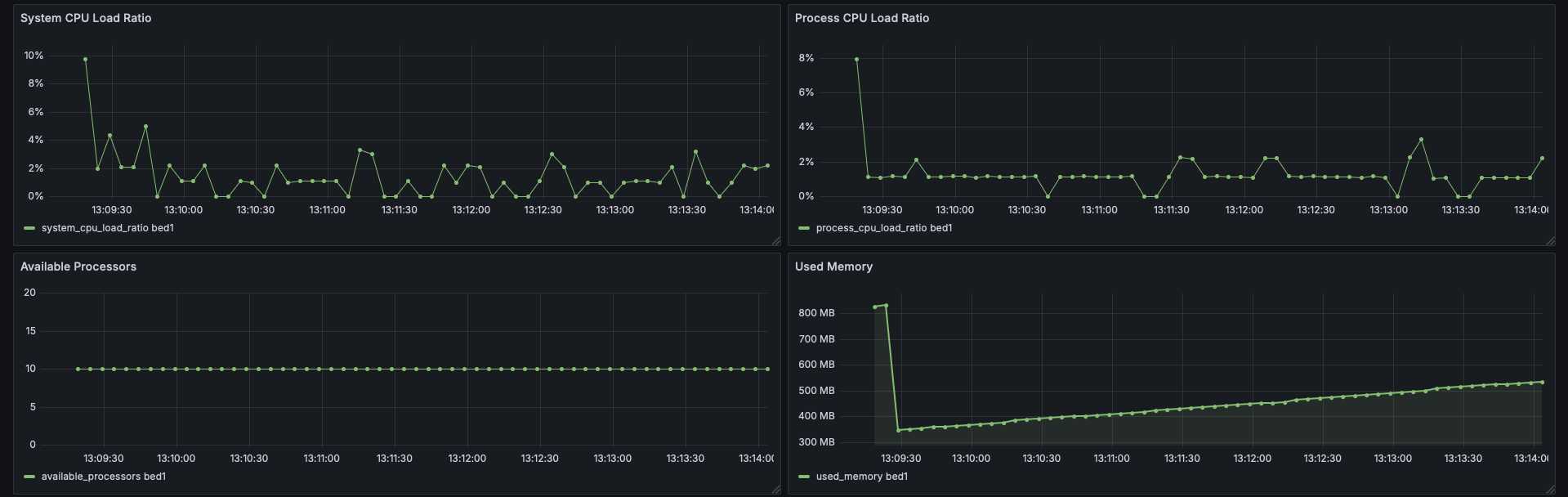
Example dashboard view 5: CPU Stats
Support & Contributions:
- Issues & Features https://github.com/renvins/serverpulse/issues
- Contributing https://github.com/renvins/serverpulse/blob/master/CONTRIBUTING.md
- Discord https://discord.gg/jZUqcemc4G
Ready to take control of your server's performance with a professional monitoring solution? Download ServerPulse today!
Available Versions
How to Install ServerPulse on Your Server
Order Server
Order a Minecraft Java server with at least 3 GB RAM (4 GB recommended).
Set bukkit Loader
In the panel under "Egg", select the bukkit loader and matching Minecraft version (1.21.10).
Install Mod
Open the mod browser in the dashboard and search for "ServerPulse". Click "Install" – done! Alternatively, upload the .jar via SFTP to the /mods folder.
Compatibility
Mod Loaders
Minecraft Versions
1.21.10, 1.21.8, 1.21.7 (+1 more)
Server-side
✓ RequiredRecommended RAM
4 GB(min. 3 GB)Frequently Asked Questions
ServerPulse server crashes on startup – what to do?
Most common cause: wrong bukkit version or insufficient RAM. Check the server log (latest.log) for "OutOfMemoryError" or "Mixin" errors. With Mado Hosting: ensure at least 3 GB RAM is allocated and the loader matches the mod version (1.21.10). You can switch loaders with one click in the panel.
Is ServerPulse compatible with bukkit and bungeecord and fabric and paper and purpur and spigot and velocity?
ServerPulse officially supports bukkit, bungeecord, fabric, paper, purpur, spigot, velocity for Minecraft 1.21.10, 1.21.8, 1.21.7. The Mado dashboard automatically detects incompatible loader combinations.
Server lagging with ServerPulse – how to optimize performance?
Recommended RAM: 4 GB (per 8 players). Use /spark profiler to check if ServerPulse consumes the most tick time. Common fixes: reduce server view-distance to 8-10, install "performant" or "starlight" as supplementary mods on Forge. With Mado Hosting, your server runs on NVMe SSDs with dedicated CPU cores for minimal latency.
Similar Mods






Rent Modded Server
Install ServerPulse with just one click on your server.