
SetBlock-TNT
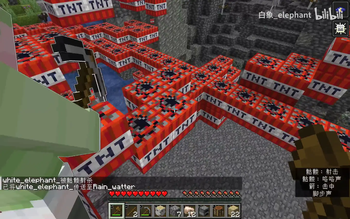
This data pack will continuously generate TNT under the players' feet.
Screenshots
About this Mod
[SBT]TNT生成 (SetBlock-TNT)
The English description is below.
如果遇到任何问题,请点击 这里 反馈
简介
- 本数据包会在玩家脚底下不断生成 TNT
- 数据包第一次加载后需要玩家的血量更新一次(如受伤)方可正常生成 TNT
功能
基本
- 在所有生存、冒险模式玩家血量大于等于 5 点(

 )时在其脚下放置 TNT
 - 在所有生存、冒险模式玩家血量小于等于 4 点(),大于等于 1 点()时在其脚下放置红石块,在红石块下方放置 TNT(我们称之为补刀)
- 将玩家背包中的每个 TNT 转化为 1 点经验
- 为所有玩家提供无限夜视、发光,移除黑暗效果,并开启死亡不掉落
- 在屏幕右侧显示死亡榜,在玩家列表栏显示血条
优化
- 清除玩家附近的火
- 清除距离玩家 20 格外的 TNT 实体
- 在 TNT 附近五格内的 TNT 实体数大于 200 时清除这些 TNT 实体
If you encounter any issues, please click here to report
Introduction
- This datapack continuously generates TNT beneath players' feet
- After the datapack is first loaded, players need to have their health updated once (such as taking damage) for TNT generation to work properly
Features
Basic
- Places TNT beneath all survival and adventure mode players when their health is greater than or equal to 5 points ()
- When all survival and adventure mode players have health less than or equal to 4 points () but greater than or equal to 1 point (), places a redstone block beneath them and TNT below the redstone block (we call this "finishing blow")
- Converts each TNT in players' inventory to 1 experience point
- Provides all players with infinite night vision and glowing effects, removes darkness effect, and enables keep inventory on death
- Displays death leaderboard on the right side of the screen and health bars in the player list
Optimization
- Clears fire near players
- Clears TNT entities more than 20 blocks away from players
- Clears TNT entities when there are more than 200 TNT entities within 5 blocks of any TNT
Available Versions
How to Install SetBlock-TNT on Your Server
Order Server
Order a Minecraft Java server with at least 3 GB RAM (4 GB recommended).
Set datapack Loader
In the panel under "Egg", select the datapack loader and matching Minecraft version (1.21.10).
Install Mod
Open the mod browser in the dashboard and search for "SetBlock-TNT". Click "Install" – done! Alternatively, upload the .jar via SFTP to the /mods folder.
Compatibility
Mod Loaders
Minecraft Versions
1.21.10, 1.21.9, 1.21.8 (+12 more)
Server-side
✓ RequiredRecommended RAM
4 GB(min. 3 GB)Frequently Asked Questions
SetBlock-TNT server crashes on startup – what to do?
Most common cause: wrong datapack version or insufficient RAM. Check the server log (latest.log) for "OutOfMemoryError" or "Mixin" errors. With Mado Hosting: ensure at least 3 GB RAM is allocated and the loader matches the mod version (1.21.10). You can switch loaders with one click in the panel.
Is SetBlock-TNT compatible with datapack and fabric and forge and neoforge and quilt?
SetBlock-TNT officially supports datapack, fabric, forge, neoforge, quilt for Minecraft 1.21.10, 1.21.9, 1.21.8. Note: Forge and Fabric mods are NOT cross-compatible – pick one loader and stick with it. The Mado dashboard automatically detects incompatible loader combinations.
Server lagging with SetBlock-TNT – how to optimize performance?
Recommended RAM: 4 GB (per 8 players). Use /spark profiler to check if SetBlock-TNT consumes the most tick time. Common fixes: reduce server view-distance to 8-10, install "performant" or "starlight" as supplementary mods on Forge. With Mado Hosting, your server runs on NVMe SSDs with dedicated CPU cores for minimal latency.
Similar Mods




Rent Modded Server
Install SetBlock-TNT with just one click on your server.