
Seven Elements
A Minecraft mod that brings a faithful implementation of Genshin Impact's Elemental Combat system in Minecraft
Screenshots

About this Mod

Seven Elements is a Minecraft mod that brings Genshin Impact's Elemental Combat System to Minecraft with the goal of staying faithful to the systems that hold it such as the Elemental Gauge Theory and Internal Cooldown while ensuring a smooth integration within Minecraft.
Tired of standard vanilla combat? Ever wanted to spice things up a little bit?
Seven Elements is a Minecraft mod that brings Genshin Impact's intricate Elemental Combat System to Minecraft, introducing Elements into the game. With two elements, trigger various reactions and harness the elements to your advantage!
IMPORTANT
When using this mod for Forge via Sinytra Connector, refer to this page for the proper installation instructions.
Getting Started
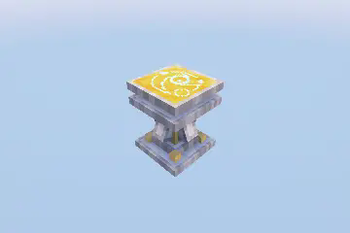
It all starts with the Infusion Table.

The Infusion Table, like the Enchanting Table, is a block used to infuse your items with the power of the elements!
To begin, pick a item you want to be infused with and click Infuse. This will cost 10 experience levels, so make sure you have enough!
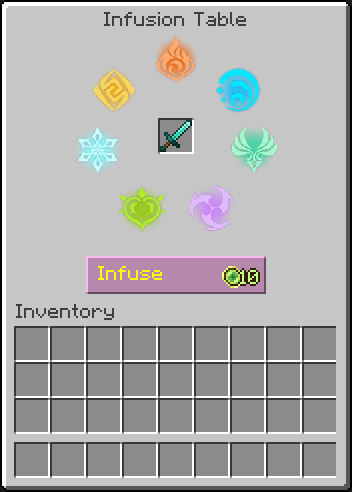
Once done, the selected item will be permanently infused with a random Element, and will now deal damage of that element!
Experiment with various elemental combos and master the elements to your advantage!
Alternatively, if you prefer a more direct approach, visit the wiki!
© All rights reserved by HoYoverse. Other properties belong to their respective owners.
THIS PROJECT IS NOT AFFILIATED WITH NEITHER HOYOVERSE NOR GENSHIN IMPACT.
Copyright © 2025 xrickastley (_xRickAstley). All Rights Reserved.
Special thanks to:
- YaBoiYin (yin_n_yang @ Discord) - Entity Models
- LW-Arqiu1shz - ZH-CN localization
Available Versions
How to Install Seven Elements on Your Server
Order Server
Order a Minecraft Java server with at least 3 GB RAM (4 GB recommended).
Set fabric Loader
In the panel under "Egg", select the fabric loader and matching Minecraft version (26.1.2).
Install Mod
Open the mod browser in the dashboard and search for "Seven Elements". Click "Install" – done! Alternatively, upload the .jar via SFTP to the /mods folder.
Compatibility
Mod Loaders
Minecraft Versions
26.1.2, 26.1.1, 26.1 (+14 more)
Server-side
✓ RequiredRecommended RAM
4 GB(min. 3 GB)Frequently Asked Questions
Seven Elements server crashes on startup – what to do?
Most common cause: wrong fabric version or insufficient RAM. Check the server log (latest.log) for "OutOfMemoryError" or "Mixin" errors. With Mado Hosting: ensure at least 3 GB RAM is allocated and the loader matches the mod version (26.1.2). You can switch loaders with one click in the panel.
Is Seven Elements compatible with fabric and forge?
Seven Elements officially supports fabric, forge for Minecraft 26.1.2, 26.1.1, 26.1. Note: Forge and Fabric mods are NOT cross-compatible – pick one loader and stick with it. The Mado dashboard automatically detects incompatible loader combinations.
Server lagging with Seven Elements – how to optimize performance?
Recommended RAM: 4 GB (per 8 players). Use /spark profiler to check if Seven Elements consumes the most tick time. Common fixes: reduce server view-distance to 8-10, install "performant" or "starlight" as supplementary mods on Forge. With Mado Hosting, your server runs on NVMe SSDs with dedicated CPU cores for minimal latency.
Similar Mods




Rent Modded Server
Install Seven Elements with just one click on your server.