
SGL (Super GUI Lib)
Super GUI Lib - A library for creating beautiful GUIs without assets.
Screenshots
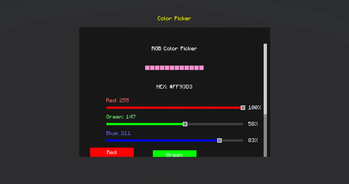
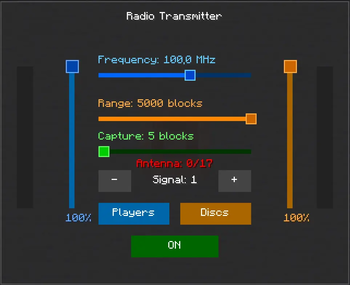
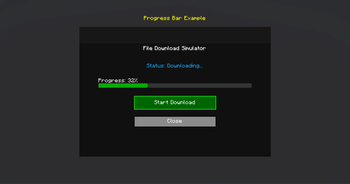
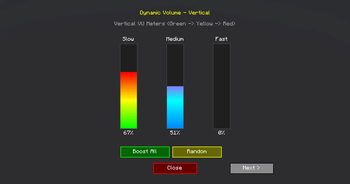
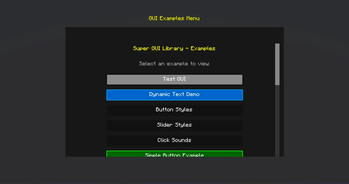
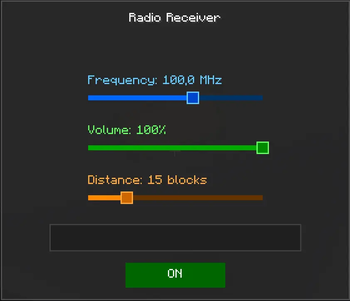
About this Mod
SuperGUILib V2 - Enhanced Minecraft GUI Library
A modern, easy-to-use GUI library for Minecraft 1.21.11 (Fabric) that makes creating beautiful user interfaces simple and fun!
🎮 What is SuperGUILib?
SuperGUILib is a powerful toolkit that helps Minecraft mod developers create stunning graphical user interfaces without dealing with complex rendering code. Think of it as a "GUI builder" that lets you create menus, settings screens, and interactive displays with just a few lines of code!
Perfect for:
- Settings menus
- Custom inventories
- Interactive displays
- Configuration screens
- In-game tools and utilities
✨ Key Features
- 🎨 Beautiful Pre-styled Components - Buttons, sliders, text fields, and more
- 🖱️ Interactive Elements - Click sounds, hover effects, cooldowns
- 📜 Auto-scrolling - Automatically handles content overflow
- 🎯 Item Display - Show Minecraft items with tooltips
- 🎵 Custom Sounds - Add audio feedback to your UI
- 📱 Responsive Design - Adapts to different screen sizes
- 🚀 Easy to Use - Simple builder pattern API
🚀 Quick Start
Try It In-Game
Run these commands to see examples:
/sgl-v2 testgui          - Enhanced examples menu with all features
/sgl testgui             - Original examples menu
Create Your First GUI
import org.stepan1411.super_gui_lib.client.api.GuiBuilder;
import net.minecraft.client.gui.screen.Screen;

public class MyFirstGUI {
    public static Screen create() {
        return GuiBuilder.create("My Settings")
            .panelSize(300, 200)

            .label("Welcome to My Mod!")
                .color(0xFFFFFF00)
                .add()

            .button("Click Me")
                .onPress(() -> System.out.println("Hello!"))
                .add()

            .slider("Volume")
                .value(0.7)
                .onChange(value -> setVolume(value))
                .add()

            .build();
    }
}
That's it! You just created a GUI with a label, button, and slider in under 20 lines of code!
📚 Code Examples
Example 1: Simple Settings Menu
Screen settingsGui = GuiBuilder.create("Game Settings")
    .panelSize(350, 250)

    .slider("Master Volume")
        .value(0.8)
        .fillColor(0xFF00FF00)
        .onChange(vol -> game.setVolume(vol))
        .add()

    .slider("Brightness")
        .value(0.5)
        .fillColor(0xFFFFAA00)
        .onChange(bright -> game.setBrightness(bright))
        .add()

    .button("Apply")
        .surface(Surface.DARK_PANEL)
        .onPress(() -> saveSettings())
        .add()

    .button("Cancel")
        .onPress(() -> closeScreen())
        .add()

    .build();
Example 2: Interactive Button with Cooldown
GuiBuilder.create("Combat Menu")
    .panelSize(300, 200)

    .button("Quick Attack")
        .cooldownSeconds(1.0)  // 1 second cooldown
        .onPress(() -> player.attack())
        .add()

    .button("Heavy Attack")
        .cooldownSeconds(3.0)  // 3 second cooldown
        .surface(Surface.flat(0xFF660000))
        .onPress(() -> player.heavyAttack())
        .add()

    .build();
Example 3: Text Input Form
GuiBuilder.create("Player Registration")
    .panelSize(350, 250)

    .label("Enter your name:").add()

    .textField()
        .placeholder("Name...")
        .textOnly()           // Only letters allowed
        .maxLength(20)
        .onChange(name -> playerName = name)
        .add()

    .label("Enter your age:").add()

    .textField()
        .placeholder("Age...")
        .numbersOnly()        // Only numbers allowed
        .maxLength(3)
        .onChange(age -> playerAge = age)
        .add()

    .button("Submit")
        .onPress(() -> registerPlayer())
        .add()

    .build();
Example 4: Custom Styled Menu
GuiBuilder.create("Styled Menu")
    .panelSize(400, 300)
    .panelSurface(Surface.flat(0xE0101010).and(Surface.outline(0xFF00AAFF)))

    .label("Super Cool Menu")
        .color(0xFF00FFFF)
        .scale(2.0f)
        .shadow(true)
        .add()

    .button("Neon Button")
        .size(250, 25)
        .surface(Surface.flat(0xFF003366).and(Surface.outline(0xFF00FF00)))
        .onPress(() -> doSomething())
        .add()

    .build();
🎨 Available Components
| Component | Description | Use Case |
|---|---|---|
| Button | Clickable button with cooldown support | Actions, navigation |
| Slider | Horizontal/vertical value selector | Volume, brightness, settings |
| Label | Text display with styling | Titles, descriptions |
| TextField | Text input with validation | User input, search |
| ItemDisplay | Show Minecraft items with tooltips | Inventories, showcases |
| VolumeMeter | VU-meter style indicator | Audio levels, progress |
| ScrollContainer | Auto-scrolling container | Long content lists |
🎯 Component Features
Buttons
- Custom colors and surfaces
- Click sounds
- Cooldown system
- Hover effects
- Dynamic text updates
Sliders
- Horizontal and vertical
- Custom colors (track, fill, handle)
- Value labels
- Real-time callbacks
- Smooth dragging
Text Fields
- Placeholder text
- Text-only or numbers-only validation
- Max length limits
- Custom colors
- Border styling
Item Display
- Show any Minecraft item
- Automatic tooltips
- Scalable size
- Custom backgrounds
- Dynamic updates
📦 Installation
For Mod Developers
- Download
SuperGUILib-*.jar - Add to your project's
libsfolder - Update
build.gradle:
dependencies {
    modImplementation files('libs/SuperGUILib-*.jar')
    include files('libs/SuperGUILib-*.jar')
}
Building from Source
./gradlew build
The compiled JAR will be in build/libs/
📖 Documentation
Full documentation available SGL-WIKI:
- Home - Overview and introduction
- Quick Start - Get started in 5 minutes
- Components Guide - All components explained
- Examples - Real-world code examples
- Advanced Features - Scrolling, cooldowns, styling
🎮 In-Game Commands
Test all features with these commands:
/sgl-v2 testgui              - Enhanced V2 menu (recommended!)
/sgl testgui                 - Original examples menu
🌈 Color Format
SuperGUILib uses ARGB (Alpha-Red-Green-Blue) format:
0xAARRGGBB
  ││││││└└─ Blue (00-FF)
  ││││└└─── Green (00-FF)
  ││└└───── Red (00-FF)
  └└─────── Alpha (00=transparent, FF=opaque)
Examples:
0xFFFF0000- Opaque red0x80FF0000- Semi-transparent red0xFF00FF00- Opaque green0x800033FF- Semi-transparent blue
Need help? Check the Wiki
Available Versions
How to Install SGL (Super GUI Lib) on Your Server
Order Server
Order a Minecraft Java server with at least 3 GB RAM (4 GB recommended).
Set fabric Loader
In the panel under "Egg", select the fabric loader and matching Minecraft version (1.21.11).
Install Mod
Open the mod browser in the dashboard and search for "SGL (Super GUI Lib)". Click "Install" – done! Alternatively, upload the .jar via SFTP to the /mods folder.
Compatibility
Mod Loaders
Minecraft Versions
1.21.11
Server-side
✗ UnsupportedRecommended RAM
4 GB(min. 3 GB)Frequently Asked Questions
SGL (Super GUI Lib) server crashes on startup – what to do?
Most common cause: wrong fabric version or insufficient RAM. Check the server log (latest.log) for "OutOfMemoryError" or "Mixin" errors. With Mado Hosting: ensure at least 3 GB RAM is allocated and the loader matches the mod version (1.21.11). You can switch loaders with one click in the panel.
Is SGL (Super GUI Lib) compatible with fabric?
SGL (Super GUI Lib) officially supports fabric for Minecraft 1.21.11. The Mado dashboard automatically detects incompatible loader combinations.
Server lagging with SGL (Super GUI Lib) – how to optimize performance?
Recommended RAM: 4 GB (per 8 players). Use /spark profiler to check if SGL (Super GUI Lib) consumes the most tick time. Common fixes: reduce server view-distance to 8-10, install "performant" or "starlight" as supplementary mods on Forge. With Mado Hosting, your server runs on NVMe SSDs with dedicated CPU cores for minimal latency.
Similar Mods



Rent Modded Server
Install SGL (Super GUI Lib) with just one click on your server.