
ShadowBorders
ShadowBorders is a powerful per-dimension world border system for Minecraft Fabric servers.
Screenshots

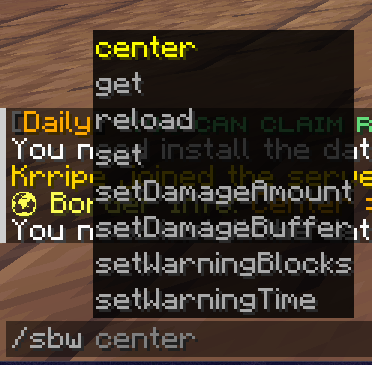
About this Mod
🌍 ShadowBorders
ShadowBorders is a powerful per-dimension world border system for Minecraft Fabric servers. It allows server administrators to configure independent borders in each dimension, block player actions outside the defined area, and enforce custom behavior across portals, collisions, entity interactions, and more.
✅ Features:
- Per-Dimension Borders – Each dimension (Overworld, Nether, End, custom) can have its own unique border size and center.
- Full Vanilla Compatibility – Integrates seamlessly with Minecraft's native world border mechanics.
- Persistent Borders – Borders are saved per dimension and persist across server restarts.
- Teleportation Adjustments – Portals and spawn points are automatically clamped within border limits.
- Safe Zone, Damage, and Warnings – Fully configurable damage behavior and warning zones per dimension.
- Permission-Based Commands – Full support for permission systems like
LuckPerms. - Reloadable Config – Update borders without restarting the server.
⚡ Commands:
/sbw set <size>
» Sets the border size in the current world./sbw center <x> <z>
» Sets the center of the world border./sbw get
» Displays information about the current world border./sbw reload
» Reload the config and resync for all worlds./sbw setDamageAmount <value>
» Damage per block when the player is out of bounds./sbw setDamageBuffer <value>
» Buffer distance without damage./sbw setWarningBlocks <blocks>
» Warning blocks before the border./sbw setWarningTime <seconds>
» Warning time before reaching the border.
🔒 Permissions:
shadowboarder.set» Allows /sbw setshadowboarder.center» Allows /sbw centershadowboarder.get» Allows /sbw getshadowboarder.reload» Allows /sbw reloadshadowboarder.set.damage» Allows /sbw setDamageAmountshadowboarder.set.buffer» Allows /sbw setDamageBuffershadowboarder.set.warnblocks» Allows /sbw setWarningBlocksshadowboarder.set.warntime» Allows /sbw setWarningTime
📁 Configuration Files:
- 📁
/config/shadowboarders/config.json– Main plugin settings and messages. - 📁
/config/shadowboarders/borders.json– Per-dimension border data storage.
Available Versions
How to Install ShadowBorders on Your Server
Order Server
Order a Minecraft Java server with at least 4 GB RAM (6 GB recommended).
Set fabric Loader
In the panel under "Egg", select the fabric loader and matching Minecraft version (1.21.8).
Install Mod
Open the mod browser in the dashboard and search for "ShadowBorders". Click "Install" – done! Alternatively, upload the .jar via SFTP to the /mods folder.
Compatibility
Mod Loaders
Minecraft Versions
1.21.8, 1.21.7, 1.21.6 (+6 more)
Server-side
✓ RequiredRecommended RAM
6 GB(min. 4 GB)Frequently Asked Questions
ShadowBorders server crashes on startup – what to do?
Most common cause: wrong fabric version or insufficient RAM. Check the server log (latest.log) for "OutOfMemoryError" or "Mixin" errors. With Mado Hosting: ensure at least 4 GB RAM is allocated and the loader matches the mod version (1.21.8). You can switch loaders with one click in the panel.
Is ShadowBorders compatible with fabric?
ShadowBorders officially supports fabric for Minecraft 1.21.8, 1.21.7, 1.21.6. The Mado dashboard automatically detects incompatible loader combinations.
Server lagging with ShadowBorders – how to optimize performance?
Recommended RAM: 6 GB (per 5 players). Use /spark profiler to check if ShadowBorders consumes the most tick time. Common fixes: reduce server view-distance to 8-10, install "performant" or "starlight" as supplementary mods on Forge. With Mado Hosting, your server runs on NVMe SSDs with dedicated CPU cores for minimal latency.
Similar Mods






Rent Modded Server
Install ShadowBorders with just one click on your server.