
ShadowKits
A simple Kits system designed for Minecraft Fabric servers Compatible whit any mod! EX: Cobblemon etc...
Screenshots
About this Mod
ShadowKits
ShadowKits is a fully customizable kit system designed for Minecraft Fabric servers. It allows server administrators to create, manage, and configure kits that players can claim based on cooldowns, permissions, and other settings.
📜 Features:
- ✅ Fully Configurable Kits - Define kits in JSON format, including items, enchantments, names, lore, commands, cooldowns, and more.
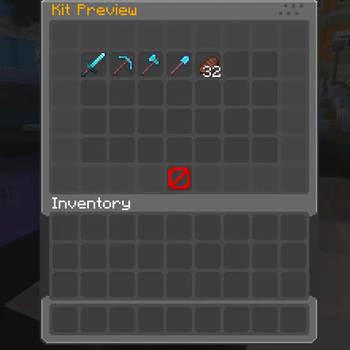
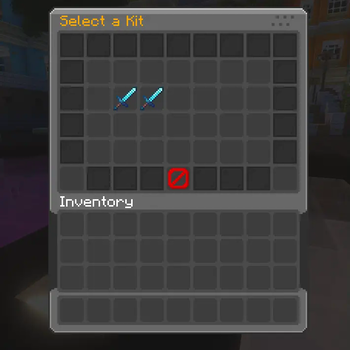
- ✅ Custom GUI Menus - Beautifully designed and configurable inventory GUIs for kit selection and previews.
- ✅ Custom Enchantment & NBT Support - Kits retain all item properties, including enchantments, custom model data, and NBT tags.
- ✅ Cooldown & Claim Limits - Set cooldowns and maximum claims per kit.
- ✅ Permission-Based Access - Restrict specific kits using LuckPerms or any permission plugin.
- ✅ Command Execution - Run custom commands when a player claims a kit.
- ✅ Custom Sounds - Play unique sounds when a kit is claimed or when it's on cooldown.
- ✅ Language & Message Customization - Edit all messages, GUI titles, and lore with full RGB color support.
- ✅ Player Data Storage - Track kit usage, cooldowns, and claims in individual player JSON files.
- ✅ Kits Privew on Blocks - Allow admins to set custom privew kits menu on custom blocks.
⚙️ Commands:
Spoiler
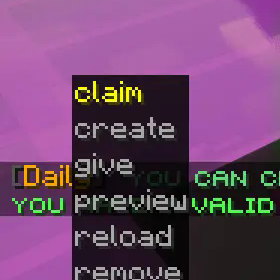
/kits- Opens the main kits GUI where players can browse and claim kits./kit claim <kit>- Claim a specific kit if available./kit give <kit> <player>- Admin command to give a kit to another player./kit remove <kit>- Deletes a kit from the configuration./kit create <kit>- Creates a new kit in kits folder./kit preview <kit>- Opens a GUI preview of a specific kit./kit reload- Reloads the kit configuration without restarting the server./kit block set <kit_name>- This command will transform the block you are looking at into a kit preview block, which you can interact with to preview the kit or claim it./kit block unset- With this command you will be able to transform the preview kit block back into a normal block.
🔒 Permissions:
Spoiler
kit.claim- Allows players to claim kits using /kit claimkits.view- Allows players to open the kits menu with /kitskit.preview- Allows players to preview a kit with /kit previewkit.create- Allows admins to create new kits using /kit createkit.give- Allows admins to give kits to players using /kit givekit.remove- Allows admins to remove kits using /kit removekit.reload- Allows admins to reload the kits configuration with /kit reloadkit.<kit_name>- Grants access to a specific kit by namekit.block.set- Allow admins to set the privew blockskit.block.unset- Allow admins to remove the privew blocks
📝 Configurable Menus:
- Kit Selection Menu - A GUI for browsing kits, with customizable slots, fill items, and pagination.
- Kit Preview Menu - A GUI that previews kit contents before claiming.
- Fully Customizable - All GUI elements (buttons, titles, filler blocks, navigation buttons) are fully configurable via menu.json and menu_preview.json.
📂 Configuration Files:
- 📁
/config/shadowkits/config.json- Stores general settings, cooldowns, and messages. - 📁
/config/shadowkits/kits/- Stores individual kit configurations in JSON format. - 📁
/config/shadowkits/menu.json- Configures the kit selection GUI. - 📁
/config/shadowkits/menu_preview.json- Configures the kit preview GUI.
📃 Config Ex:
Spoiler
{
  "name": "Starter",
  "onJoin": false,
  "firstTimeJoin": false,
  "cooldown": "1h",
  "claims": true,
  "maxClaims": 5,
  "permission": "kit.starter",
  "economyProvider": "auto",
  "currency": "money",
  "costMoney": false,
  "cost": 100,
  "claimSound": "minecraft:entity.player.levelup",
  "cooldownSound": "minecraft:entity.villager.no",
  "page": 1,
  "slotOnPage": 10,
  "displayItem": {
    "material": "minecraft:diamond_sword",
    "amount": 1,
    "displayname": "&bKit Starter",
    "lore": [
      "&7A powerful kit to begin your journey!",
      "&aIncludes enchanted tools and a food!"
    ],
    "cooldownLore": true,
    "enchantEffect": true,
    "unbreakable": false
  },
  "rewards": [
    {
      "type": "item",
      "material": "minecraft:iron_pickaxe",
      "amount": 1,
      "displayname": "&bIron Pickaxe",
      "lore": [
        "&7Handy starter tool"
      ],
      "enchants": [
        {
          "name": "minecraft:unbreaking",
          "level": 2
        }
      ],
      "enchantEffect": true
    },
    {
      "type": "command",
      "command": "give %player% minecraft:cooked_beef 16",
      "displayItem": {
        "material": "minecraft:cooked_beef",
        "amount": 16,
        "displayname": "&6Food Voucher",
        "lore": [
          "&7Runs a give-food command"
        ],
        "enchantEffect": false
      }
    },
    {
      "type": "item_pack",
      "displayname": "&aStarter Supplies",
      "lore": [
        "&7A small pack of basics"
      ],
      "pack": [
        {
          "material": "minecraft:oak_log",
          "amount": 32,
          "displayname": "&eOak Logs"
        },
        {
          "material": "minecraft:torch",
          "amount": 16,
          "displayname": "&eTorches"
        }
      ]
    },
    {
      "type": "command_pack",
      "displayItem": {
        "material": "minecraft:paper",
        "amount": 1,
        "displayname": "&dCommand Pack",
        "lore": [
          "&7Executes multiple commands"
        ],
        "enchantEffect": false
      },
      "pack": [
        {
          "amount": 1,
          "command": "effect give %player% minecraft:regeneration 5 1 true"
        },
        {
          "amount": 1,
          "command": "say ShadowKits: Command pack reward for %player%"
        }
      ]
    },
    {
      "type": "item_random",
      "displayname": "&eRandom Item",
      "lore": [
        "&7One random item from the list"
      ],
      "randomList": [
        {
          "weight": 1.0,
          "material": "minecraft:diamond",
          "amount": 1,
          "displayname": "&bDiamond"
        },
        {
          "weight": 3.0,
          "material": "minecraft:gold_ingot",
          "amount": 3,
          "displayname": "&6Gold Ingots"
        },
        {
          "weight": 6.0,
          "material": "minecraft:iron_ingot",
          "amount": 5,
          "displayname": "&fIron Ingots"
        }
      ]
    },
    {
      "type": "command_random",
      "displayItem": {
        "material": "minecraft:tripwire_hook",
        "amount": 1,
        "displayname": "&eRandom Command",
        "lore": [
          "&7Executes one random command"
        ],
        "enchantEffect": false
      },
      "randomList": [
        {
          "weight": 1.0,
          "amount": 1,
          "command": "effect give %player% minecraft:strength 60 1 true"
        },
        {
          "weight": 2.0,
          "amount": 1,
          "command": "effect give %player% minecraft:speed 60 1 true"
        },
        {
          "weight": 3.0,
          "amount": 1,
          "command": "say ShadowKits: Good luck, %player%!"
        }
      ]
    }
  ]
}
Available Versions
How to Install ShadowKits on Your Server
Order Server
Order a Minecraft Java server with at least 3 GB RAM (4 GB recommended).
Set fabric Loader
In the panel under "Egg", select the fabric loader and matching Minecraft version (1.21.3).
Install Mod
Open the mod browser in the dashboard and search for "ShadowKits". Click "Install" – done! Alternatively, upload the .jar via SFTP to the /mods folder.
Compatibility
Mod Loaders
Minecraft Versions
1.21.3, 1.21.2, 1.21.1 (+1 more)
Server-side
✓ RequiredRecommended RAM
4 GB(min. 3 GB)Frequently Asked Questions
ShadowKits server crashes on startup – what to do?
Most common cause: wrong fabric version or insufficient RAM. Check the server log (latest.log) for "OutOfMemoryError" or "Mixin" errors. With Mado Hosting: ensure at least 3 GB RAM is allocated and the loader matches the mod version (1.21.3). You can switch loaders with one click in the panel.
Is ShadowKits compatible with fabric?
ShadowKits officially supports fabric for Minecraft 1.21.3, 1.21.2, 1.21.1. The Mado dashboard automatically detects incompatible loader combinations.
Server lagging with ShadowKits – how to optimize performance?
Recommended RAM: 4 GB (per 8 players). Use /spark profiler to check if ShadowKits consumes the most tick time. Common fixes: reduce server view-distance to 8-10, install "performant" or "starlight" as supplementary mods on Forge. With Mado Hosting, your server runs on NVMe SSDs with dedicated CPU cores for minimal latency.
Similar Mods



![[TaCZ] Timeless and Classics Zero](https://cdn.modrinth.com/data/SzzJttH8/fd27766d2bb8390d284696b1dbd358f87e081439_96.webp)


Rent Modded Server
Install ShadowKits with just one click on your server.