
Sharkbite Tulips
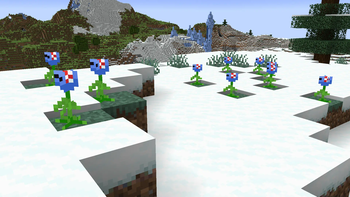
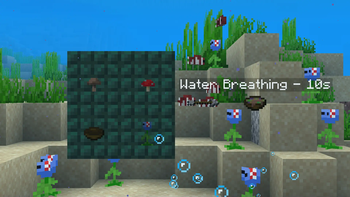
Adds shark-themed tulips! Great for shark and flower lovers!
Screenshots

About this Mod
Sharkbite Tulips
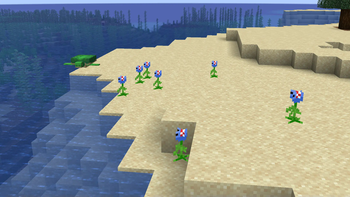
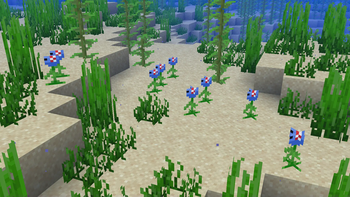
Sharkbite Tulips adds a special waterloggable flower that can be placed on land and underwater!
🌊 Where to Find Them
Sharkbite tulips generate in small patches in the following biomes:
- Snowy Plains & Beaches
- Beaches
- Rivers
- Oceans
- Warm Oceans
- Deep Oceans
- Lukewarm Oceans
- Deep Lukewarm Oceans
🌸 How They Work
They're more than just decorative flowers — they're full of features:
- Bi-directionality: The tulips can be placed to face both directions.
- Underwater bubbles: When submerged, they emit ambient bubble particles.
- Water Breathing: Standing in a sharkbite tulip grants Water Breathing to players.
- Hostile to mobs: Fish, mobs, and other underwater creatures take damage and trigger a chomping sound when standing in the flower during rain, thunderstorms, or while submerged.
- Player interaction sounds: A bubbling sound plays when players gain the water breathing effect.
- Creative Tab placement: It is now found in the Flowers section of the Natural Blocks creative tab (right next to the Wither Rose).
🧪 Utility & Crafting
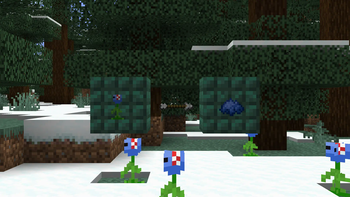
- Can be crafted into blue dye, like a cornflower.
- When used in a suspicious stew recipe, it gives Water Breathing.
- Can be placed in flower pots, just like any ordinary flower.
They're a cool flower that makes a great underwater decoration with tons of awesome features:)
Available Versions
How to Install Sharkbite Tulips on Your Server
Order Server
Order a Minecraft Java server with at least 4 GB RAM (6 GB recommended).
Set forge Loader
In the panel under "Egg", select the forge loader and matching Minecraft version (1.21.1).
Install Mod
Open the mod browser in the dashboard and search for "Sharkbite Tulips". Click "Install" – done! Alternatively, upload the .jar via SFTP to the /mods folder.
Compatibility
Mod Loaders
Minecraft Versions
1.21.1, 1.21, 1.20.1 (+1 more)
Server-side
✓ RequiredRecommended RAM
6 GB(min. 4 GB)Frequently Asked Questions
Sharkbite Tulips server crashes on startup – what to do?
Most common cause: wrong forge version or insufficient RAM. Check the server log (latest.log) for "OutOfMemoryError" or "Mixin" errors. With Mado Hosting: ensure at least 4 GB RAM is allocated and the loader matches the mod version (1.21.1). You can switch loaders with one click in the panel.
Is Sharkbite Tulips compatible with forge and neoforge?
Sharkbite Tulips officially supports forge, neoforge for Minecraft 1.21.1, 1.21, 1.20.1. The Mado dashboard automatically detects incompatible loader combinations.
Server lagging with Sharkbite Tulips – how to optimize performance?
Recommended RAM: 6 GB (per 5 players). Use /spark profiler to check if Sharkbite Tulips consumes the most tick time. Common fixes: reduce server view-distance to 8-10, install "performant" or "starlight" as supplementary mods on Forge. With Mado Hosting, your server runs on NVMe SSDs with dedicated CPU cores for minimal latency.
Similar Mods





Rent Modded Server
Install Sharkbite Tulips with just one click on your server.