
Shielding Swords
A light weight pack that adds the sword block mechanic, Similar to minecraft update 1.8, you can now block attacks using your sword and neglect part of the damage and knockback dealt to you. Brilliant!
Screenshots
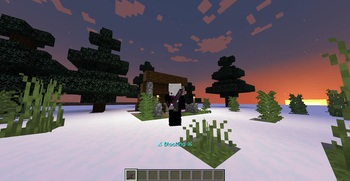
About this Mod
What does the pack have to offer?
It adds the ability to block using your sword - Similarly to version 1.8 - Neglecting part of the damage and knockback dealt to you.
Insight on the pack
Though the title and purpose of the datapack are self explanatory, There are stuff that should be noted. Any sword can be used to block attacks. While blocking, Your get 1 Extra Armor point, And the sum of the armor points you are wearing, Or in other words, Your armor effectiveness. Will be increased by 40%, Which typically causes you to reduce the amount of damage taken by 30% - 60% Depending on what armor you are wearing.
The knockback caused by the attack is also reduced, Blocking gives you 1+ Knockback resistance, As well as increasing the knockback resistance of your armor by 60%.
You also get a minor armor toughness boost, Which reduces the damage done by critical hits severely. Blocking doesn't grant any Armor toughness, But it multiplies your total armor toughness by 30%.
Not having armor doesn't mean your blocking will be useless, But it will be less effective. It is also worth mentioning that when holding shields, The ability to block using your sword will be disabled.
Over all, The sword shielding and blocking mechanic is a valuable addition that will add more depth into combat generally, And Server PvP exclusively.
Please Note that the mechanics of sword shielding could be changed if better ones were found. Also note that this project is still subject to new content, Like parrying mechanics. So stay on the lookout for those!
Available Versions
How to Install Shielding Swords on Your Server
Order Server
Order a Minecraft Java server with at least 3 GB RAM (4 GB recommended).
Set datapack Loader
In the panel under "Egg", select the datapack loader and matching Minecraft version (1.21.3).
Install Mod
Open the mod browser in the dashboard and search for "Shielding Swords". Click "Install" – done! Alternatively, upload the .jar via SFTP to the /mods folder.
Compatibility
Mod Loaders
Minecraft Versions
1.21.3, 1.21.2
Server-side
✓ RequiredRecommended RAM
4 GB(min. 3 GB)Frequently Asked Questions
Shielding Swords server crashes on startup – what to do?
Most common cause: wrong datapack version or insufficient RAM. Check the server log (latest.log) for "OutOfMemoryError" or "Mixin" errors. With Mado Hosting: ensure at least 3 GB RAM is allocated and the loader matches the mod version (1.21.3). You can switch loaders with one click in the panel.
Is Shielding Swords compatible with datapack and fabric and forge and neoforge and quilt?
Shielding Swords officially supports datapack, fabric, forge, neoforge, quilt for Minecraft 1.21.3, 1.21.2. Note: Forge and Fabric mods are NOT cross-compatible – pick one loader and stick with it. The Mado dashboard automatically detects incompatible loader combinations.
Server lagging with Shielding Swords – how to optimize performance?
Recommended RAM: 4 GB (per 8 players). Use /spark profiler to check if Shielding Swords consumes the most tick time. Common fixes: reduce server view-distance to 8-10, install "performant" or "starlight" as supplementary mods on Forge. With Mado Hosting, your server runs on NVMe SSDs with dedicated CPU cores for minimal latency.
Similar Mods




![[TaCZ] Timeless and Classics Zero](https://cdn.modrinth.com/data/SzzJttH8/fd27766d2bb8390d284696b1dbd358f87e081439_96.webp)

Rent Modded Server
Install Shielding Swords with just one click on your server.