
Shiru's Improvements
A client-side QoL mod for Minecraft 1.21 with Fullbright, Zoom, and a customizable HUD. Everything is toggleable!
Screenshots
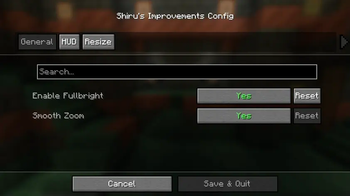
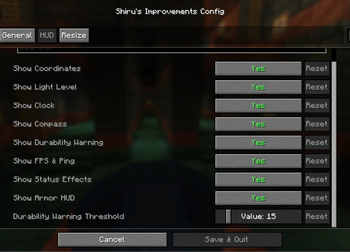
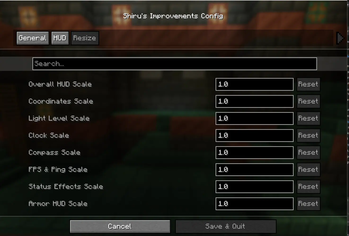
About this Mod
Overview
Shiru's Improvements is a Quality of Life (QoL) mod for Minecraft 1.21 (Fabric). It adds useful features like Fullbright, Zoom, and a customizable HUD, all in one lightweight package. Toggle features via the config screen (Mod Menu recommended).
Features
Fullbright: Brightens dark areas. Toggle with G.
Zoom: Zoom in to see distant objects. Hold C (adjustable zoom level using scroll).
HUD (Top-Left, Toggleable. Every single part of it):
Coordinates: Shows XYZ position (e.g., "XYZ: 100, 64, 200").
Compass: Displays facing direction (e.g., "Facing: North").
Clock: Shows in-game time (e.g., "Time: 06:00").
Status Effects: Lists active effects with timers (Basically a letter in a color with information).
Armor HUD: Shows equipped armor and durability.
FPS and Ping: Displays performance stats (e.g., "FPS: 120, Ping: 50ms").
Durability Warning: Warns when held item durability is low (a ! above your hotbar. Has a threshold to change when it shows the warning).
How to Use
Install: Requires Fabric API. Mod Menu optional for config. HIGHLY RECOMMENDED!
Keybinds: Fullbright (G), Zoom (C). Change in controls settings.
Config: Open via Mod Menu to toggle features and scroll to adjust Zoom level.
HUD: Appears in-game, not in menus. Customize in config.
Critical Information
Client-side mod, works in multiplayer (no cheats).
Lightweight, minimal performance impact.
Discord: https://discord.gg/jXpzxDCwrg
Available Versions
How to Install Shiru's Improvements on Your Server
Order Server
Order a Minecraft Java server with at least 3 GB RAM (4 GB recommended).
Set fabric Loader
In the panel under "Egg", select the fabric loader and matching Minecraft version (1.21).
Install Mod
Open the mod browser in the dashboard and search for "Shiru's Improvements". Click "Install" – done! Alternatively, upload the .jar via SFTP to the /mods folder.
Compatibility
Mod Loaders
Minecraft Versions
1.21
Server-side
~ OptionalRecommended RAM
4 GB(min. 3 GB)Frequently Asked Questions
Shiru's Improvements server crashes on startup – what to do?
Most common cause: wrong fabric version or insufficient RAM. Check the server log (latest.log) for "OutOfMemoryError" or "Mixin" errors. With Mado Hosting: ensure at least 3 GB RAM is allocated and the loader matches the mod version (1.21). You can switch loaders with one click in the panel.
Is Shiru's Improvements compatible with fabric?
Shiru's Improvements officially supports fabric for Minecraft 1.21. The Mado dashboard automatically detects incompatible loader combinations.
Server lagging with Shiru's Improvements – how to optimize performance?
Recommended RAM: 4 GB (per 8 players). Use /spark profiler to check if Shiru's Improvements consumes the most tick time. Common fixes: reduce server view-distance to 8-10, install "performant" or "starlight" as supplementary mods on Forge. With Mado Hosting, your server runs on NVMe SSDs with dedicated CPU cores for minimal latency.
Similar Mods






Rent Modded Server
Install Shiru's Improvements with just one click on your server.