Admin Shop
Adds a configurable shop players can buy and sell items, fluids, and power!
Screenshots
About this Mod
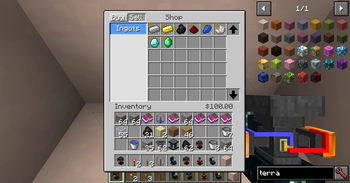
Admin Shop adds a configurable shop that players can use to buy and sell items, fluids, and power to and from the server.
The shop's contents can be edited though a csv file (Spreadsheet) in the config folder. The format for adding items and categories is displayed within the csv file itself. You can use the command "/adminshop reload" to reload the shop from the csv file in-game to see if your changes work, without restarting your game! The shop supports buying and selling items and fluids to and from the player. Forge energy is also supported, but only through the seller block, and the price of power is specified in a regular config file (feature can be disabled as well).
Blocks:
- Shop: Used to buy and sell items in a clear User Interface.
- ATM: Withdraw money from your account in the form of a check that can be given to other players. The player who right clicks the check will deposit the money into their account.
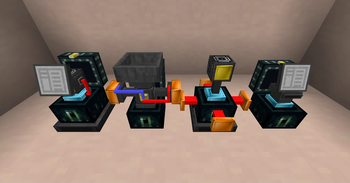
- Seller: Multi-purpose selling block. Manually insert or pipe in items, fluids, and forge energy to automatically sell for money.
- Buyer: Auto purchases items or fluids, and inserts them into the tank/inventory above. Can set rate of purchase and only active with a redstone signal.
Maximum of 6 categories for buying and selling each, with as many items per category as you want. Will create a category scrolling button in a future update.
If you want to use this in your mod pack, please go ahead! It would be nice if you were to let me know about its usage so I can check the pack out for myself, but it's not necessary.
Available Versions
How to Install Admin Shop on Your Server
Order Server
Order a Minecraft Java server with at least 3 GB RAM (4 GB recommended).
Set forge Loader
In the panel under "Egg", select the forge loader and matching Minecraft version (1.12.2).
Install Mod
Open the mod browser in the dashboard and search for "Admin Shop". Click "Install" – done! Alternatively, upload the .jar via SFTP to the /mods folder.
Compatibility
Mod Loaders
Minecraft Versions
1.12.2
Server-side
✓ RequiredRecommended RAM
4 GB(min. 3 GB)Frequently Asked Questions
Admin Shop server crashes on startup – what to do?
Most common cause: wrong forge version or insufficient RAM. Check the server log (latest.log) for "OutOfMemoryError" or "Mixin" errors. With Mado Hosting: ensure at least 3 GB RAM is allocated and the loader matches the mod version (1.12.2). You can switch loaders with one click in the panel.
Is Admin Shop compatible with forge?
Admin Shop officially supports forge for Minecraft 1.12.2. The Mado dashboard automatically detects incompatible loader combinations.
Server lagging with Admin Shop – how to optimize performance?
Recommended RAM: 4 GB (per 8 players). Use /spark profiler to check if Admin Shop consumes the most tick time. Common fixes: reduce server view-distance to 8-10, install "performant" or "starlight" as supplementary mods on Forge. With Mado Hosting, your server runs on NVMe SSDs with dedicated CPU cores for minimal latency.
Similar Mods




Rent Modded Server
Install Admin Shop with just one click on your server.