
ShowMySkin
Empower players with the ability to have personalized and precise control over armor display, transparency, and enchantment glow effects.
Screenshots
About this Mod
ZH_CN
简介
本模组专为《我的世界》1.21.1 版本基于 Neoforge 开发,旨在为玩家提供对盔甲显示的全方位个性化控制。借助此模组,玩家能够随心所欲地调整盔甲的各个方面,极大地丰富游戏的视觉体验。
主要功能
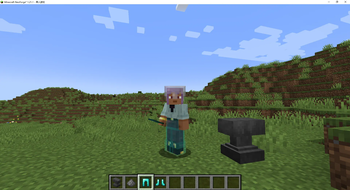
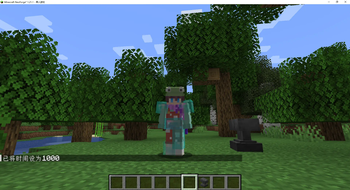
- 盔甲可见性控制:玩家可以独立开启或关闭头盔、胸甲、护腿和靴子的显示。无论是为了追求特定的外观造型,还是根据游戏情境的需要,都能轻松实现。
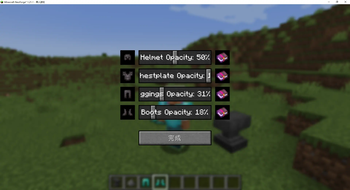
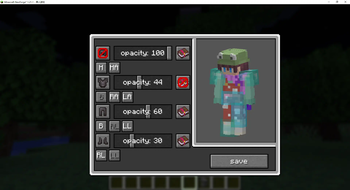
- 透明度调节:通过直观的滑动条,玩家能够精确控制盔甲的透明度,范围从完全不透明(0%)到完全透明(100%),为游戏增添独特的视觉效果。
- 附魔光效开关:模组允许玩家分别控制头盔、胸甲、护腿和靴子的附魔光效显示,可根据个人喜好开启或关闭,打造专属的盔甲外观。
适用范围
本模组适用于《我的世界》1.21.1 版本,并基于 Neoforge 平台运行。请确保你的游戏环境已正确安装 Neoforge,以保证模组的正常使用。
EN_US
Introduction
This mod is specifically developed for Minecraft version 1.21.1 based on Neoforge. Its purpose is to provide players with comprehensive and personalized control over armor display. With this mod, players can freely adjust various aspects of armor, greatly enhancing the visual experience of the game.
Key Features
- Armor Visibility Control: Players can independently turn on or off the display of helmets, chestplates, leggings, and boots. Whether it's for achieving a specific appearance or meeting the needs of different game scenarios, it can be easily accomplished.
- Transparency Adjustment: Through an intuitive slider, players can precisely control the transparency of the armor, ranging from completely opaque (0%) to completely transparent (100%), adding unique visual effects to the game.
- Enchantment Glow Effect Switch: The mod allows players to separately control the display of enchantment glow effects on helmets, chestplates, leggings, and boots. You can turn them on or off according to your personal preferences to create your own exclusive armor appearance.
Compatibility
This mod is designed for Minecraft version 1.21.1 and runs on the Neoforge platform. Please ensure that Neoforge is correctly installed in your game environment to ensure the normal operation of the mod.
Available Versions
How to Install ShowMySkin on Your Server
Order Server
Order a Minecraft Java server with at least 3 GB RAM (4 GB recommended).
Set neoforge Loader
In the panel under "Egg", select the neoforge loader and matching Minecraft version (1.21.1).
Install Mod
Open the mod browser in the dashboard and search for "ShowMySkin". Click "Install" – done! Alternatively, upload the .jar via SFTP to the /mods folder.
Compatibility
Mod Loaders
Minecraft Versions
1.21.1, 1.21
Server-side
✗ UnsupportedRecommended RAM
4 GB(min. 3 GB)Frequently Asked Questions
ShowMySkin server crashes on startup – what to do?
Most common cause: wrong neoforge version or insufficient RAM. Check the server log (latest.log) for "OutOfMemoryError" or "Mixin" errors. With Mado Hosting: ensure at least 3 GB RAM is allocated and the loader matches the mod version (1.21.1). You can switch loaders with one click in the panel.
Is ShowMySkin compatible with neoforge?
ShowMySkin officially supports neoforge for Minecraft 1.21.1, 1.21. The Mado dashboard automatically detects incompatible loader combinations.
Server lagging with ShowMySkin – how to optimize performance?
Recommended RAM: 4 GB (per 8 players). Use /spark profiler to check if ShowMySkin consumes the most tick time. Common fixes: reduce server view-distance to 8-10, install "performant" or "starlight" as supplementary mods on Forge. With Mado Hosting, your server runs on NVMe SSDs with dedicated CPU cores for minimal latency.
Similar Mods




![[TaCZ] Timeless and Classics Zero](https://cdn.modrinth.com/data/SzzJttH8/fd27766d2bb8390d284696b1dbd358f87e081439_96.webp)

Rent Modded Server
Install ShowMySkin with just one click on your server.