
ShulanlanMod
Some interesting lightweight mods ideas
Screenshots
About this Mod
介绍
里面有很多奇奇怪怪的模组想法
特点
方块蛇 🐍
介绍
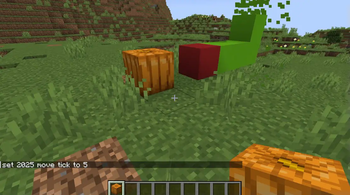
这是个由方块所构成的实体,如下称为蛇。这个蛇实体拥有基本的寻路功能,并且蛇更倾向于吃掉食物(方块),并增长自身长度。当然,这个蛇也倾向于攻击实体或者玩家,总之类似于存在于MC中的生物一样
使用方法
- 使用
/snake <name>来创建方块蛇 (block_snake) 实体。 - 使用
/snake <name> mod来修改蛇的行为模式,包括:ai,food_finder,attack_entity,attack_player,following_owner,no_brain,player_controlled。 - 使用
/snake <name> move_tick修改蛇的移动速度。 - 使用
/snake <name> max_length修改蛇的最大长度。 - 使用
/snake <name> food修改蛇的食物,默认是南瓜 (block)。 - 使用
/snake <name> body_block修改构成蛇的身体方块。 - 使用
/snake <name> head_block修改构成蛇的头部方块。 - 在
player_controlled模式下,使用/snake <name> move控制蛇的移动方向。 - 使用
/snake <name> attack_entity修改蛇的攻击对象。 - 使用
/snake <name> search_range修改蛇的索敌或食物范围。 - 使用
/snake <name> owner修改蛇的所有者。
Introduction
It contains a variety of strange and interesting mod ideas :D
Features
Block Snake 🐍
Description
This is an entity composed of blocks, referred to as a "Snake" below. This snake entity possesses basic pathfinding functionality and tends to prioritize consuming food (blocks) to increase its length. It also exhibits aggressive behavior, tending to attack other entities or players, functioning similarly to a creature that exists within Minecraft.
How to use
- Use
/snake <name>to create a block snake (block_snake) entity. - Use
/snake <name> modto modify the snake's behavior modes, including:ai,food_finder,attack_entity,attack_player,following_owner,no_brain,player_controlled. - Use
/snake <name> move_tickto adjust the snake's movement speed. - Use
/snake <name> max_lengthto set the snake's maximum length. - Use
/snake <name> foodto define the food block that increases the snake's length (default: pumpkin block). - Use
/snake <name> body_blockto change the block used for the snake's body. - Use
/snake <name> head_blockto change the block used for the snake's head. - In
player_controlledmode, use/snake <name> moveto direct the snake's movement. - Use
/snake <name> attack_entityto modify the entities the snake targets for attacks. - Use
/snake <name> search_rangeto adjust the snake's detection range for enemies or food. - Use
/snake <name> ownerto set the owner of the snake.
Available Versions
How to Install ShulanlanMod on Your Server
Order Server
Order a Minecraft Java server with at least 3 GB RAM (4 GB recommended).
Set fabric Loader
In the panel under "Egg", select the fabric loader and matching Minecraft version (1.21.4).
Install Mod
Open the mod browser in the dashboard and search for "ShulanlanMod". Click "Install" – done! Alternatively, upload the .jar via SFTP to the /mods folder.
Compatibility
Mod Loaders
Minecraft Versions
1.21.4
Server-side
✓ RequiredRecommended RAM
4 GB(min. 3 GB)Frequently Asked Questions
ShulanlanMod server crashes on startup – what to do?
Most common cause: wrong fabric version or insufficient RAM. Check the server log (latest.log) for "OutOfMemoryError" or "Mixin" errors. With Mado Hosting: ensure at least 3 GB RAM is allocated and the loader matches the mod version (1.21.4). You can switch loaders with one click in the panel.
Is ShulanlanMod compatible with fabric?
ShulanlanMod officially supports fabric for Minecraft 1.21.4. The Mado dashboard automatically detects incompatible loader combinations.
Server lagging with ShulanlanMod – how to optimize performance?
Recommended RAM: 4 GB (per 8 players). Use /spark profiler to check if ShulanlanMod consumes the most tick time. Common fixes: reduce server view-distance to 8-10, install "performant" or "starlight" as supplementary mods on Forge. With Mado Hosting, your server runs on NVMe SSDs with dedicated CPU cores for minimal latency.
Similar Mods




Rent Modded Server
Install ShulanlanMod with just one click on your server.