
Shulker Stalker
Warns the user when they leave their shulker box to despawn.
Screenshots
About this Mod
Description
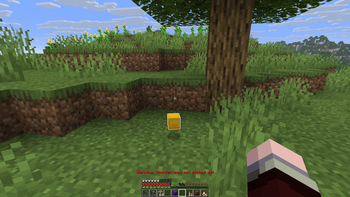
A mod that warns the user when they leave their shulker box to despawn. It works by detecting when the player breaks a shulker box, then tracking it with a timer that stops when you pick up its item. If you don't pick it up in time, a warning will be displayed.
Config
At the moment, the mod has the following config settings:
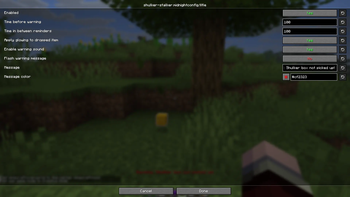
- Enabled: enables the mod. Simply disable so as not to have the mod do anything. On by default.
- Timer: determines the amount of time you have to pick up your shulkerbox after breaking it, before the mod sends its warning message. In ticks. The default is 100, which is 5 seconds.
- Apply glowing: Whether or not to make the shulkerbox you left glow when you leave it. On by default.
- Remind timer: determines the amount of time in between repetitions of warning messages after the first one. The default is 100 ticks, which is 5 seconds.
- Warning sound: toggles the warning sound. Enabled by default.
- Flash warning message: toggles whether or not the warning message should blink. Off by default
- Warning message: The message the game sends when the player leaves their shulkerbox. The default is "Warning: Shulker box not picked up!".
- Warning message color: The color of the warning message. The default is a dark red.
A special thanks to:
- NotchArrow, for making the mod icon, which once again rocks
- Mumbo Jumbo, for letting his shulker box despawn, inspiring me to counter a mistake I made many times myself
Available Versions
How to Install Shulker Stalker on Your Server
Order Server
Order a Minecraft Java server with at least 3 GB RAM (4 GB recommended).
Set fabric Loader
In the panel under "Egg", select the fabric loader and matching Minecraft version (26.1.2).
Install Mod
Open the mod browser in the dashboard and search for "Shulker Stalker". Click "Install" – done! Alternatively, upload the .jar via SFTP to the /mods folder.
Compatibility
Mod Loaders
Minecraft Versions
26.1.2, 26.1.1, 26.1
Server-side
✗ UnsupportedRecommended RAM
4 GB(min. 3 GB)Frequently Asked Questions
Shulker Stalker server crashes on startup – what to do?
Most common cause: wrong fabric version or insufficient RAM. Check the server log (latest.log) for "OutOfMemoryError" or "Mixin" errors. With Mado Hosting: ensure at least 3 GB RAM is allocated and the loader matches the mod version (26.1.2). You can switch loaders with one click in the panel.
Is Shulker Stalker compatible with fabric?
Shulker Stalker officially supports fabric for Minecraft 26.1.2, 26.1.1, 26.1. The Mado dashboard automatically detects incompatible loader combinations.
Server lagging with Shulker Stalker – how to optimize performance?
Recommended RAM: 4 GB (per 8 players). Use /spark profiler to check if Shulker Stalker consumes the most tick time. Common fixes: reduce server view-distance to 8-10, install "performant" or "starlight" as supplementary mods on Forge. With Mado Hosting, your server runs on NVMe SSDs with dedicated CPU cores for minimal latency.
Similar Mods


Rent Modded Server
Install Shulker Stalker with just one click on your server.