
Sightline
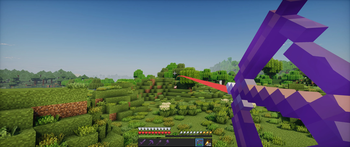
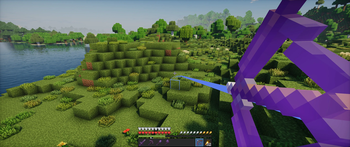
View your projectiles paths before shooting them.
Screenshots
About this Mod
Sightline
A client-side Fabric mod that allows you to view the path of your projectiles before you shoot them.


Features
- Calculates and renders the exact trajectory of your projectile.
- Dynamically highlights the predicted impact point (blue for blocks, red for entities).
- Optional Immersive Colors setting to color-match the trajectory line to the projectile (e.g., teal for tridents, green for ender pearls).
- Configurable Visibility Modes: Hold (default), Toggle or Always Show.
- Customizable trajectory line thickness and toggleable impact hitbox rendering.
- Supports bows, crossbows, tridents, snowballs, eggs, ender pearls and splash potions.
- Fully client-side; works perfectly on multiplayer servers.
Usage
By default, hold Left Alt while holding a projectile item to display its predicted path. You can change this behavior to "Toggle" or "Always" in the configuration menu.
The keybind can be changed in the Minecraft controls menu under the "Misc" category.
Configuration
Sightline supports ModMenu for in-game configuration. You can also manually edit the config/projectiles.json file.
Available settings:
- Immersive Colors: Color-matches the trajectory line to the projectile item.
- Visibility Mode: Choose how the trajectory is shown (Hold key, Toggle with key or Always).
- Show Hitboxes: Toggles the wireframe outline of the block or entity at the predicted impact point.
- Line Thickness: Adjust the thickness of the trajectory line (Thin, Normal, Thick).
Installation
- Install Fabric Loader for Minecraft 1.21.10.
- Download the Fabric API mod.
- Download the latest compiled
.jarfrom the Releases page. - Place both
.jarfiles into your.minecraft/modsfolder.
Requirements
- Minecraft 1.21.10
- Fabric Loader 0.19.2+
- Fabric API
- ModMenu (Optional, for in-game configuration)
License
This project is licensed under the GNU General Public License v3.0 (GPL-3.0).
Available Versions
How to Install Sightline on Your Server
Order Server
Order a Minecraft Java server with at least 3 GB RAM (4 GB recommended).
Set fabric Loader
In the panel under "Egg", select the fabric loader and matching Minecraft version (1.21.11).
Install Mod
Open the mod browser in the dashboard and search for "Sightline". Click "Install" – done! Alternatively, upload the .jar via SFTP to the /mods folder.
Compatibility
Mod Loaders
Minecraft Versions
1.21.11, 1.21.10
Server-side
✗ UnsupportedRecommended RAM
4 GB(min. 3 GB)Frequently Asked Questions
Sightline server crashes on startup – what to do?
Most common cause: wrong fabric version or insufficient RAM. Check the server log (latest.log) for "OutOfMemoryError" or "Mixin" errors. With Mado Hosting: ensure at least 3 GB RAM is allocated and the loader matches the mod version (1.21.11). You can switch loaders with one click in the panel.
Is Sightline compatible with fabric?
Sightline officially supports fabric for Minecraft 1.21.11, 1.21.10. The Mado dashboard automatically detects incompatible loader combinations.
Server lagging with Sightline – how to optimize performance?
Recommended RAM: 4 GB (per 8 players). Use /spark profiler to check if Sightline consumes the most tick time. Common fixes: reduce server view-distance to 8-10, install "performant" or "starlight" as supplementary mods on Forge. With Mado Hosting, your server runs on NVMe SSDs with dedicated CPU cores for minimal latency.
Similar Mods




![[TaCZ] Timeless and Classics Zero](https://cdn.modrinth.com/data/SzzJttH8/fd27766d2bb8390d284696b1dbd358f87e081439_96.webp)

Rent Modded Server
Install Sightline with just one click on your server.