
Simple Captcha
Funny captcha mod to prank your friends :)
Screenshots
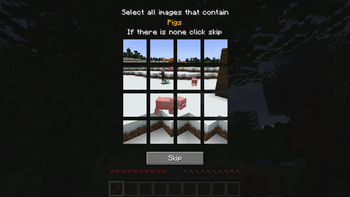
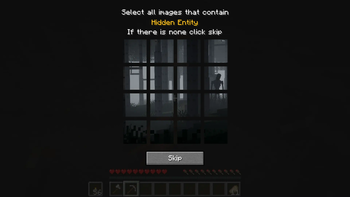
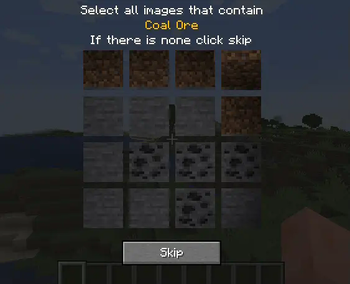
About this Mod
Simple Captcha Mod
SimpleCaptcha is a Minecraft mod designed for entertainment purposes, adding a playful twist to interactions by introducing captcha challenges as pranks. This mod is perfect for Minecraft players and server admins who want to inject a bit of fun and surprise into their gameplay.

Disclaimer
This mod is intended for joke purposes only and should not be used as a security measure. It is designed to add a fun and non-disruptive challenge for players, not to protect servers from bots or unauthorized access.
The mod was inspired by a video I saw on the SDMP server, I couldn’t find the mod so I assumed it was custom made and wanted to have it on my server so I recreated it.
The sounds were taken from The Graveyard Mod because idk where to get good sounds like that, if the owner would like me to remove please let me know.
Features
- Captcha Challenge: Pops up a captcha challenge that must be solved to continue. These captchas are meant to be fun and slightly challenging, ensuring a humorous interruption in gameplay.
Commands
SimpleCaptcha introduces two primary commands to control when and to whom captchas appear:
/captcha: Triggers a captcha challenge for the player executing the command. Ideal for self-induced pranks./captcha [player]: Triggers a captcha challenge to the specified player. This allows for an element of surprise to other players' gameplay.
Requirements
Installation
To install SimpleCaptcha, follow these simple steps:
- Download the SimpleCaptcha mod file from the releases section.
- Place the downloaded
.jarfile into your Minecraft'smodsfolder. - Ensure you are running a compatible version of Minecraft with the Fabric mod loader installed.
- Start your Minecraft client or server to see if the mod is loaded and ready for some prank action.
Usage
Initiating a Self-Challenge
To initiate a captcha challenge for yourself, type the following command in the game's chat:
/captcha
Sending a Challenge to Another Player
To send a captcha challenge to another player, use the command with their username:
/captcha username
Replace username with the actual player's name to surprise them with a captcha challenge.
Contributions
Feel free to contribute to SimpleCaptcha! If you have ideas for new types of captcha challenges or other humorous enhancements, fork the repository and submit a pull request with your changes.
Unless you explicitly state otherwise, any contribution intentionally submitted for inclusion in this project by you, as defined in the Apache-2.0 license, shall be dual licensed as above, without any additional terms or conditions.
License
SimpleCaptcha is released under the MIT License. See the LICENSE file in the repository for full details.
Contact
If you have any fun stories, questions, or feedback about using SimpleCaptcha, don't hesitate to open an issue on the GitHub repository or reach out through the community forums.
Available Versions
How to Install Simple Captcha on Your Server
Order Server
Order a Minecraft Java server with at least 3 GB RAM (4 GB recommended).
Set fabric Loader
In the panel under "Egg", select the fabric loader and matching Minecraft version (1.21.8).
Install Mod
Open the mod browser in the dashboard and search for "Simple Captcha". Click "Install" – done! Alternatively, upload the .jar via SFTP to the /mods folder.
Compatibility
Mod Loaders
Minecraft Versions
1.21.8, 1.21.1, 1.21 (+1 more)
Server-side
✓ RequiredRecommended RAM
4 GB(min. 3 GB)Frequently Asked Questions
Simple Captcha server crashes on startup – what to do?
Most common cause: wrong fabric version or insufficient RAM. Check the server log (latest.log) for "OutOfMemoryError" or "Mixin" errors. With Mado Hosting: ensure at least 3 GB RAM is allocated and the loader matches the mod version (1.21.8). You can switch loaders with one click in the panel.
Is Simple Captcha compatible with fabric and forge and neoforge?
Simple Captcha officially supports fabric, forge, neoforge for Minecraft 1.21.8, 1.21.1, 1.21. Note: Forge and Fabric mods are NOT cross-compatible – pick one loader and stick with it. The Mado dashboard automatically detects incompatible loader combinations.
Server lagging with Simple Captcha – how to optimize performance?
Recommended RAM: 4 GB (per 8 players). Use /spark profiler to check if Simple Captcha consumes the most tick time. Common fixes: reduce server view-distance to 8-10, install "performant" or "starlight" as supplementary mods on Forge. With Mado Hosting, your server runs on NVMe SSDs with dedicated CPU cores for minimal latency.
Similar Mods





Rent Modded Server
Install Simple Captcha with just one click on your server.