
Simple Crosshair Editor
Create and customize your own pixel-based crosshair in-game.
Screenshots
About this Mod
Simple Crosshair Editor-
is a lightweight and user friendly mod that lets you design your own custom crosshair directly in-game.
Instead of being stuck with the default crosshair, you can create your own style using a pixel editor with full control over shape, size, colour and more.
Some of the Features:
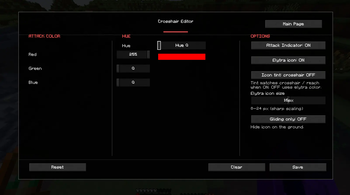
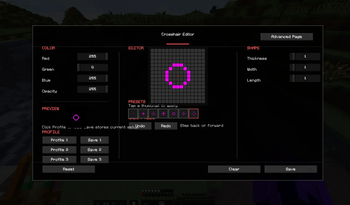
- Pixel-Based Crosshair editor
- Adjustable thickness, width, and length
- Custom color controls
- Elytra Equipped Indicator
- Multiple Presents and Profiles
- Adjustable Opacity New
- Player Attack Indicator New
- and more
🎮 How to Use:
Press '.' to open the crosshair editor or set a different keybind. You can change it to your liking in controls.
I recommend not using any other crosshair related mod with this but the Crosshair Addons public mod works with it and is the only one I tested. You can use it for even more features.
let me know through discord or github if there's any problems you are facing.
thanks for 3k downloads❤️
More features coming soon!
Available Versions
How to Install Simple Crosshair Editor on Your Server
Order Server
Order a Minecraft Java server with at least 3 GB RAM (4 GB recommended).
Set fabric Loader
In the panel under "Egg", select the fabric loader and matching Minecraft version (26.1.2).
Install Mod
Open the mod browser in the dashboard and search for "Simple Crosshair Editor". Click "Install" – done! Alternatively, upload the .jar via SFTP to the /mods folder.
Compatibility
Mod Loaders
Minecraft Versions
26.1.2, 26.1.1, 26.1 (+12 more)
Server-side
✗ UnsupportedRecommended RAM
4 GB(min. 3 GB)Frequently Asked Questions
Simple Crosshair Editor server crashes on startup – what to do?
Most common cause: wrong fabric version or insufficient RAM. Check the server log (latest.log) for "OutOfMemoryError" or "Mixin" errors. With Mado Hosting: ensure at least 3 GB RAM is allocated and the loader matches the mod version (26.1.2). You can switch loaders with one click in the panel.
Is Simple Crosshair Editor compatible with fabric?
Simple Crosshair Editor officially supports fabric for Minecraft 26.1.2, 26.1.1, 26.1. The Mado dashboard automatically detects incompatible loader combinations.
Server lagging with Simple Crosshair Editor – how to optimize performance?
Recommended RAM: 4 GB (per 8 players). Use /spark profiler to check if Simple Crosshair Editor consumes the most tick time. Common fixes: reduce server view-distance to 8-10, install "performant" or "starlight" as supplementary mods on Forge. With Mado Hosting, your server runs on NVMe SSDs with dedicated CPU cores for minimal latency.
Similar Mods




![[TaCZ] Timeless and Classics Zero](https://cdn.modrinth.com/data/SzzJttH8/fd27766d2bb8390d284696b1dbd358f87e081439_96.webp)

Rent Modded Server
Install Simple Crosshair Editor with just one click on your server.