
Simple Economy
This mod add a economy to your world!
Screenshots
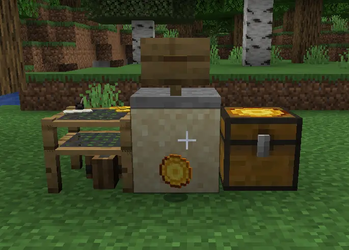
About this Mod
Simple Economy
Simple Economy adds a lightweight, server-friendly economy system for Minecraft (NeoForge) focused on trading blocks and simple player payments. It’s designed for multiplayer servers: minimal setup, intuitive UI, and no complex admin panels required.
Highlights
Player balances with coin-style gameplay support
Player Market block (shops players can stock and price)
Server Market mode (infinite stock, admin-managed pricing)
Payment Button block (quick “pay” interactions)
Sell Chest (drop items in, sell all instantly using a price list)
Features
Market (Shop Block)
A placeable shop block with a built-in UI:
Player shop: the owner sets prices and stocks items in the internal storage
Server shop: infinite stock (no storage consumption), perfect for server-run shops
Break protection for server shops (restricted to ops)
Server shop quality-of-life
Operators can buy from server shops normally
Operators can sneak (shift) while opening to access owner controls (price editing)
Payment Button
A configurable “pay action” block for quick transactions:
Choose a target player (or the server)
Set an amount and a custom label
Useful for:
donations
entry fees
simple services (“Pay 10 coins to enter”, etc.)
Sell Chest
A fast, no-nonsense selling block:
Put items inside
Press Sell to sell everything with a configured price list
Shows a total preview in the GUI
Plays a sound on successful sale
Configuration
Sell prices are controlled via a JSON price list (example file included in the project).
Intended to be easy to tweak for your server economy.
Compatibility
Minecraft: 1.21.1
Loader: NeoForge
Works in singleplayer and multiplayer
Recommended for servers
License
MIT
Notes / Tips for Server Owners
Use server shop mode for admin stores (infinite supply).
Use player shops for a player-driven economy.
Keep Sell Chest prices balanced to avoid inflation.
Available Versions
How to Install Simple Economy on Your Server
Order Server
Order a Minecraft Java server with at least 3 GB RAM (4 GB recommended).
Set neoforge Loader
In the panel under "Egg", select the neoforge loader and matching Minecraft version (1.21.1).
Install Mod
Open the mod browser in the dashboard and search for "Simple Economy". Click "Install" – done! Alternatively, upload the .jar via SFTP to the /mods folder.
Compatibility
Mod Loaders
Minecraft Versions
1.21.1
Server-side
✓ RequiredRecommended RAM
4 GB(min. 3 GB)Frequently Asked Questions
Simple Economy server crashes on startup – what to do?
Most common cause: wrong neoforge version or insufficient RAM. Check the server log (latest.log) for "OutOfMemoryError" or "Mixin" errors. With Mado Hosting: ensure at least 3 GB RAM is allocated and the loader matches the mod version (1.21.1). You can switch loaders with one click in the panel.
Is Simple Economy compatible with neoforge?
Simple Economy officially supports neoforge for Minecraft 1.21.1. The Mado dashboard automatically detects incompatible loader combinations.
Server lagging with Simple Economy – how to optimize performance?
Recommended RAM: 4 GB (per 8 players). Use /spark profiler to check if Simple Economy consumes the most tick time. Common fixes: reduce server view-distance to 8-10, install "performant" or "starlight" as supplementary mods on Forge. With Mado Hosting, your server runs on NVMe SSDs with dedicated CPU cores for minimal latency.
Similar Mods



![CobbleDollars [Cobblemon Addon]](https://cdn.modrinth.com/data/s7N7AsqL/684040a264fc1d7f9b856ec5d2da39767398c7ad.png)

Rent Modded Server
Install Simple Economy with just one click on your server.