
Simple HUD Utilities
A collection of small improvements to the Game's HUD
Screenshots
About this Mod
END OF LIFE
Consider using an Simple Hud Enhanced instead
Adding this notice as of commit 5420a64d12e2738df9669c51b035e47e34876068 for the mod linked above
This mod is unlikely to receive future changes and has pending unsolved issues I couldn't get around to fixing/adding.
The mod linked above has more features and lots of unsolved bugs are already fixed. UX is pretty much the same and any feature it has over this one are toggleable if you want a more minimal experience.
Simple HUD Utilities
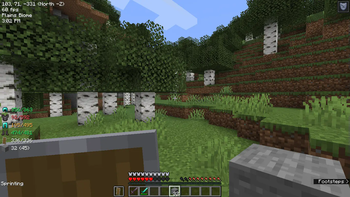
A Minecraft Mod that enhances the Game's HUD with some simple utilities like the following:
- HUD Features:
- Simplified coordinates that are available at all times on the screen (Example:
39, 64, 200asX, Y, Z) - Cardinal directions and which Coordinates are increasing/decreasing (Example:
(East X+)when looking East, where theXcoordinate is increasing) - Current armour and hand items and their durabilities, available at all times on the screen
- Different colors based on how low the durability is
- Current Game time in AM/PM format
- Current sprinting status
- Current framerate
- Current Biome the player is on
- Nether/overworld coordinates conversion
- Toggle key (editable in Controls screen, default is
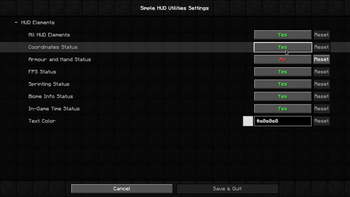
k) - Settings page and config file with Mod Menu
- Requires Mod Menu mod to open settings screen in-game
- Config file:
.minecraft/config/simple_utilities.toml(does not require Mod Menu mod to edit)
- Simplified coordinates that are available at all times on the screen (Example:
| In-game HUD | Settings page (Requires ModMenu Mod) |
|---|---|
 |
 |
Planned features
- Add configuration to move any specific HUD elements around the screen (drag-and-drop if possible)
- Add option for E counter (entities) and C counter (chunk sections) (possibly M/C counters as well (monsters/creatures))
- Add current status effects duration to HUD
- Add Sun/Moon icons to the current game time, so it's easier to notice if it's Day or Night
FAQ
Does this Mod work on versions below 1.15?
- No, it might work on 1.14 with some changes, but not anything below 1.14, since this Mod is made with Fabric, which only supports Minecraft 1.14 and above.
Will this Mod get me banned from X multiplayer server?
- Maybe, maybe not (but probably not), the Mod is entirely Client-sided and does not require it to be installed on the Server, and mostly shows things already available to you at all times like coordinates and Cardinal directions, like an extended but simplified F3 Menu, but it has some exceptions, like very specific Game time, so some servers may not allow it, do look into the Server's rules carefully before using it, do not create issues here asking about that, since I won't know.
Will you add 'X feature not present in the Planned Features section'?
- Maybe, and only if it fits with the other features of the mod, create an issue about it, I only work on this project on my spare time, but I'd be happy to add wanted features if I can get around to it.
Available Versions
How to Install Simple HUD Utilities on Your Server
Order Server
Order a Minecraft Java server with at least 3 GB RAM (4 GB recommended).
Set fabric Loader
In the panel under "Egg", select the fabric loader and matching Minecraft version (1.20.6).
Install Mod
Open the mod browser in the dashboard and search for "Simple HUD Utilities". Click "Install" – done! Alternatively, upload the .jar via SFTP to the /mods folder.
Compatibility
Mod Loaders
Minecraft Versions
1.20.6, 1.20.4, 1.20.1 (+5 more)
Server-side
✗ UnsupportedRecommended RAM
4 GB(min. 3 GB)Frequently Asked Questions
Simple HUD Utilities server crashes on startup – what to do?
Most common cause: wrong fabric version or insufficient RAM. Check the server log (latest.log) for "OutOfMemoryError" or "Mixin" errors. With Mado Hosting: ensure at least 3 GB RAM is allocated and the loader matches the mod version (1.20.6). You can switch loaders with one click in the panel.
Is Simple HUD Utilities compatible with fabric?
Simple HUD Utilities officially supports fabric for Minecraft 1.20.6, 1.20.4, 1.20.1. The Mado dashboard automatically detects incompatible loader combinations.
Server lagging with Simple HUD Utilities – how to optimize performance?
Recommended RAM: 4 GB (per 8 players). Use /spark profiler to check if Simple HUD Utilities consumes the most tick time. Common fixes: reduce server view-distance to 8-10, install "performant" or "starlight" as supplementary mods on Forge. With Mado Hosting, your server runs on NVMe SSDs with dedicated CPU cores for minimal latency.
Rent Modded Server
Install Simple HUD Utilities with just one click on your server.