
Simple In-Game Calculator
"A compact, easy-to-use in-game calculator for Fabric 1.21.4, accessible with a single keypress."
Screenshots
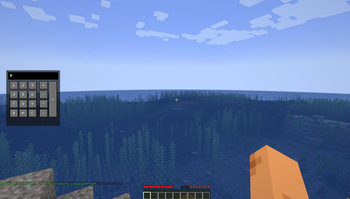
About this Mod
Конечно, для Modrinth лучше всего использовать английское описание, так как это привлечет пользователей со всего мира. Вот готовый текст для поля Description:
Simple In-Game Calculator
Simple In-Game Calculator is a lightweight and user-friendly mod for Fabric 1.21.4 that adds a fully functional calculator directly into the Minecraft interface. No more Alt-Tabbing or searching for your phone to calculate resources for your next big build or redstone farm.
Key Features:
Quick Access: Open and close the calculator instantly by pressing the K key (the keybinding can be customized in the controls menu).
Compact Design: The interface is specifically optimized for a standard scale (Scale 2), ensuring it doesn't block your entire view.
Smart Formatting: The mod automatically formats large numbers with dots (e.g., 1.000.000), making it much easier to read calculation results.
Full Functionality: Supports addition, subtraction, multiplication, and division. It includes a clear screen button (C) and a Backspace button to fix typing errors.
Native Look: The buttons and panels are designed to match the standard Minecraft UI style, blending perfectly with the game's atmosphere.
Requirements:
Game Version: 1.21.4
Modloader: Fabric
Dependency: Requires Fabric API to be installed.
How to upload your file:
Save the description and go to the Versions tab.
Click "Create new version".
Upload your calculatorfun-1.21.4.jar (14 KB) from the build/libs folder.
Select 1.21.4 as the game version and check the Fabric box.
Available Versions
How to Install Simple In-Game Calculator on Your Server
Order Server
Order a Minecraft Java server with at least 3 GB RAM (4 GB recommended).
Set fabric Loader
In the panel under "Egg", select the fabric loader and matching Minecraft version (1.21.4).
Install Mod
Open the mod browser in the dashboard and search for "Simple In-Game Calculator". Click "Install" – done! Alternatively, upload the .jar via SFTP to the /mods folder.
Compatibility
Mod Loaders
Minecraft Versions
1.21.4
Server-side
✗ UnsupportedRecommended RAM
4 GB(min. 3 GB)Frequently Asked Questions
Simple In-Game Calculator server crashes on startup – what to do?
Most common cause: wrong fabric version or insufficient RAM. Check the server log (latest.log) for "OutOfMemoryError" or "Mixin" errors. With Mado Hosting: ensure at least 3 GB RAM is allocated and the loader matches the mod version (1.21.4). You can switch loaders with one click in the panel.
Is Simple In-Game Calculator compatible with fabric?
Simple In-Game Calculator officially supports fabric for Minecraft 1.21.4. The Mado dashboard automatically detects incompatible loader combinations.
Server lagging with Simple In-Game Calculator – how to optimize performance?
Recommended RAM: 4 GB (per 8 players). Use /spark profiler to check if Simple In-Game Calculator consumes the most tick time. Common fixes: reduce server view-distance to 8-10, install "performant" or "starlight" as supplementary mods on Forge. With Mado Hosting, your server runs on NVMe SSDs with dedicated CPU cores for minimal latency.
Rent Modded Server
Install Simple In-Game Calculator with just one click on your server.