
Simple Mod Manager
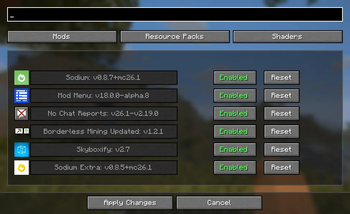
This is a lightweight mod that allows the user to toggle mods, shaders, and resource packs, all in one place.
Screenshots

About this Mod
Simple Mod Manager
Overview
Simple Mod Manager is a lightweight utility designed to help players easily enable, disable, and manage their mods without the hassle of manually moving files around.
Key Features
- Clean and intuitive interface
- Press F8 to open the mod manager screen in-game
- Enable or disable mods with a single click
- Automatically organizes and displays available mods
- Lightweight and optimized for performance
How It Works
- Launch your game with the Simple Mod Manager installed
- Press F8 at any time to open the mod manager screen
- Browse through your installed mods
- Enable or disable mods instantly without restarting the game
- Configurable Whitelist: Secure your mod list via the "Configure Whitelist" button. This feature allows you to define exactly which mods, resource packs, or shaders a user is permitted to enable or disable.
- Use case: This is highly beneficial for modpack developers who want to guarantee game stability by keeping essential dependency mods hidden and un-toggleable, while still offering flexibility for optional add-ons.
Why Use Simple Mod Manager?
- Managing mods manually can be frustrating.
- Simple Mod Manager streamlines the process, making it easy for players to customize their setup.
- With its simple design and quick access key, modding has never been easier.
Requirements
- Java installed on your system
- Fabric installed on game directory
- Place the Simple-Mod-Manager-1.1.0.jar in your mods folder (depending on your game setup)
- Important Upgrade Notice (v1.5.4): If you are upgrading from version 1.5.3 or earlier, you MUST delete the simplemodmanager_state.json file from your .minecraft/config folder before launching the game. Leaving the old file may cause configuration conflicts with the new whitelist features.
Controls
- F8 → Open the Mod Manager screen
Final Notes
- This tool is designed to keep modding simple, fast, and frustration-free.
- Enjoy full control of your mods with just one key press!
Usage Policy
- You may include this mod in modpacks, as long as the modpack is hosted on Modrinth.
- Please do not reupload this mod to other platforms or redistribute the jar directly.
Full Spectrum Realism
This mod was designed for the modpack Full Spectrum Realism which is a carefully crafted modpack that enhances Minecraft while staying true to its vanilla feel.
It adds depth, realism, and subtle improvements without slowing your game—running smoothly even on older or low-end PCs.
Developed with months of testing and tweaking, it aims to enrich your world while keeping gameplay fluid and accessible.
Perfect for players who want a richer experience without compromise.
Available Versions
How to Install Simple Mod Manager on Your Server
Order Server
Order a Minecraft Java server with at least 3 GB RAM (4 GB recommended).
Set fabric Loader
In the panel under "Egg", select the fabric loader and matching Minecraft version (26.1.2).
Install Mod
Open the mod browser in the dashboard and search for "Simple Mod Manager". Click "Install" – done! Alternatively, upload the .jar via SFTP to the /mods folder.
Compatibility
Mod Loaders
Minecraft Versions
26.1.2, 26.1.1, 26.1 (+6 more)
Server-side
✗ UnsupportedRecommended RAM
4 GB(min. 3 GB)Frequently Asked Questions
Simple Mod Manager server crashes on startup – what to do?
Most common cause: wrong fabric version or insufficient RAM. Check the server log (latest.log) for "OutOfMemoryError" or "Mixin" errors. With Mado Hosting: ensure at least 3 GB RAM is allocated and the loader matches the mod version (26.1.2). You can switch loaders with one click in the panel.
Is Simple Mod Manager compatible with fabric?
Simple Mod Manager officially supports fabric for Minecraft 26.1.2, 26.1.1, 26.1. The Mado dashboard automatically detects incompatible loader combinations.
Server lagging with Simple Mod Manager – how to optimize performance?
Recommended RAM: 4 GB (per 8 players). Use /spark profiler to check if Simple Mod Manager consumes the most tick time. Common fixes: reduce server view-distance to 8-10, install "performant" or "starlight" as supplementary mods on Forge. With Mado Hosting, your server runs on NVMe SSDs with dedicated CPU cores for minimal latency.
Similar Mods






Rent Modded Server
Install Simple Mod Manager with just one click on your server.