
Simple Player Badges
A simple Mod that allows you to create, assign and display Badges next to player names in Chat.
Screenshots
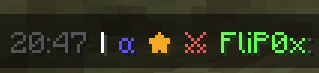

About this Mod
Simple Player Badges is a mod that enhances your in-game chat by allowing custom player badges to appear next to player names. This mod lets you assign various badges to players and adds a timestamp feature for better chat readability.
The timestamp functionality was inspired by Beautified Chat by Serilum. Thanks to Serilum for the inspiration, as some of their features were recreated into this mod.
Configuration:
To configure the badges, you'll need to create a badgenames.json file in the config folder of your Minecraft Server. The JSON configuration contains two primary sections:
players: This is where you assign badges to specific players by name.
badges: Here you define the properties of each badge, including its symbol, color, and hover text.
Here's an example configuration:
{
    "players": [
        {
            "name": "Player1",
            "badges": ["badge1", "badge2", "badge3"]
        },
        {
            "name": "Player2",
            "badges": ["badge2"]
        }
    ],
    "badges": {
        "badge1": {
            "symbol": "★",
            "color": "gold",
            "hover": "Badge1 Title"
        },
        "badge2": {
            "symbol": "α",
            "color": "blue",
            "hover": "Badge2 Title"
        },
        "badge3": {
            "symbol": "⚔",
            "color": "red",
            "hover": "Badge3 Title"
        }
    }
}
The configuration file should be saved in UTF-8 format to ensure special characters display correctly.
Operators can use /badges reload on runtime to update any changes made to badgenames.json.
Explanation of Fields:
Spoiler
players:
- name: The Minecraft username of the player.
- badges: A list of badge names assigned to the player. Each badge name refers to a badge defined in the badges section.
badges:
- symbol: The symbol or text that will be displayed as the badge next to the player's name in chat. This can include text and symbols.
- color: The color of the badge symbol. Use standard Minecraft color names (like gold, blue, red, etc.).
- hover: The text that appears when you hover over the badge in chat.
To-Do:
- Automatic Config Generation if Config doesn't already exist
- Creating and assigning badges with commands
- Option to enable and disable certain features
Available Versions
How to Install Simple Player Badges on Your Server
Order Server
Order a Minecraft Java server with at least 3 GB RAM (4 GB recommended).
Set fabric Loader
In the panel under "Egg", select the fabric loader and matching Minecraft version (1.21.3).
Install Mod
Open the mod browser in the dashboard and search for "Simple Player Badges". Click "Install" – done! Alternatively, upload the .jar via SFTP to the /mods folder.
Compatibility
Mod Loaders
Minecraft Versions
1.21.3
Server-side
✓ RequiredRecommended RAM
4 GB(min. 3 GB)Frequently Asked Questions
Simple Player Badges server crashes on startup – what to do?
Most common cause: wrong fabric version or insufficient RAM. Check the server log (latest.log) for "OutOfMemoryError" or "Mixin" errors. With Mado Hosting: ensure at least 3 GB RAM is allocated and the loader matches the mod version (1.21.3). You can switch loaders with one click in the panel.
Is Simple Player Badges compatible with fabric?
Simple Player Badges officially supports fabric for Minecraft 1.21.3. The Mado dashboard automatically detects incompatible loader combinations.
Server lagging with Simple Player Badges – how to optimize performance?
Recommended RAM: 4 GB (per 8 players). Use /spark profiler to check if Simple Player Badges consumes the most tick time. Common fixes: reduce server view-distance to 8-10, install "performant" or "starlight" as supplementary mods on Forge. With Mado Hosting, your server runs on NVMe SSDs with dedicated CPU cores for minimal latency.
Similar Mods






Rent Modded Server
Install Simple Player Badges with just one click on your server.