
Simple Player Trades
A simple server-side Fabric mod for player-to-player item trading.
Screenshots


About this Mod
Simple Player Trades
A simple server-side Fabric mod for player-to-player item trading. Players connect with a vanilla client, no mods required on their end.
Features
- Server-side only, vanilla clients work fine
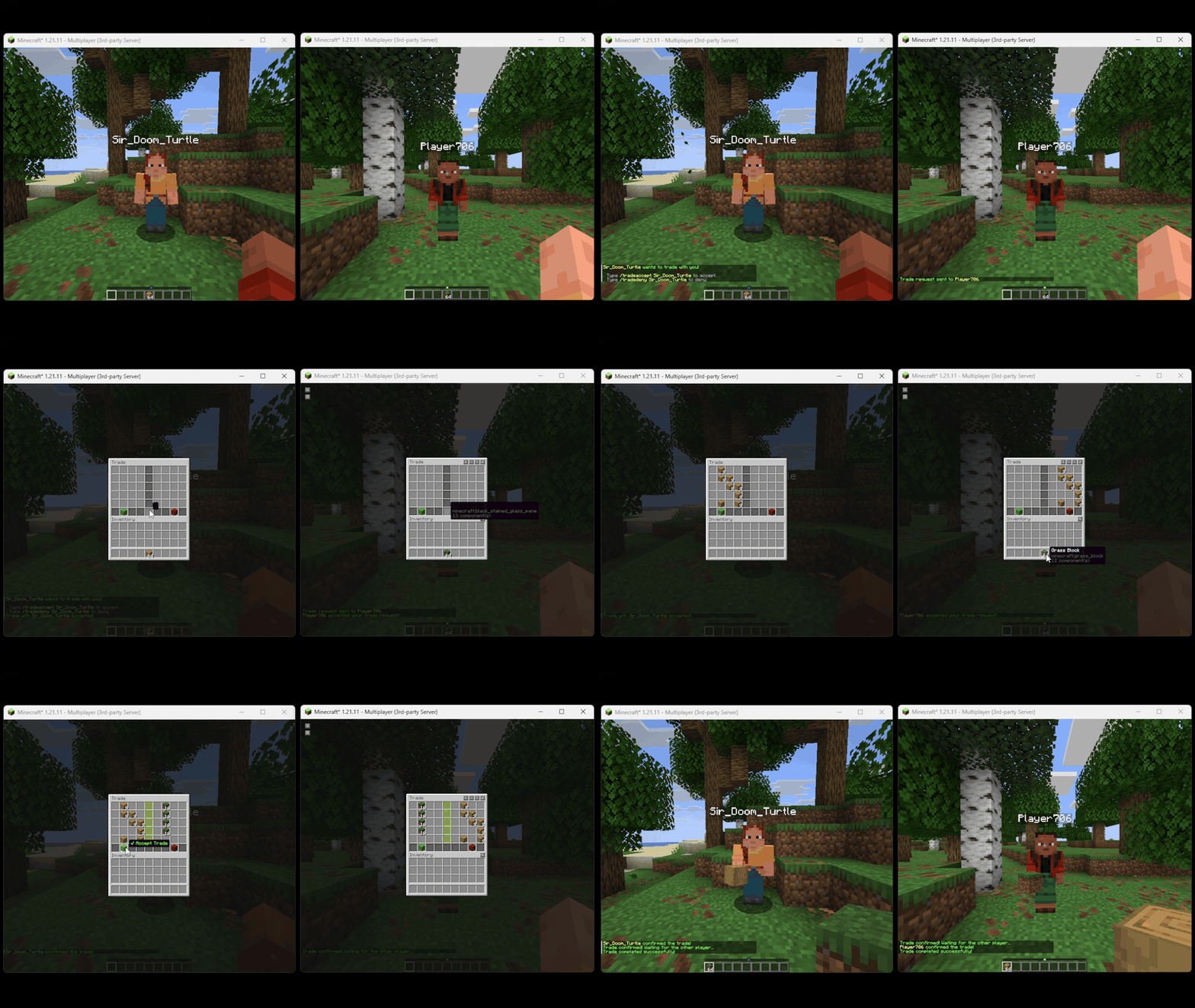
- Both players get a shared trade GUI with their own items on the left and the other player's items on the right
- Both players must click the accept button before anything is exchanged
- Moving items automatically resets your confirmation, so nothing goes through by accident
- The center divider turns green when a player confirms, and a sound notifies the other player
- If someone disconnects mid-trade, all items are returned to their owners
- Safe against inventory management client mods
- Full config file for tweaking settings
- Logging all trade interactions to file
- Trade request cooldowns/timeouts
- optional trade restriction to OPed players only
Commands
| Command | Description |
|---|---|
/trade <player> |
Send a trade request |
/tradeaccept <player> |
Accept an incoming request |
/tradedeny <player> |
Deny an incoming request |
/tradecancel |
Cancel your outgoing request or active trade |
How it works
- Type
/trade <playername>to send a request - The other player accepts with
/tradeaccept <yourname> - A shared GUI opens, place your items on your side
- When you are happy with the offer, click the green Accept button
- Once both players confirm, the trade goes through
Clicking the red Cancel button or closing the GUI at any point cancels the trade and returns all items immediately.
Available Versions
How to Install Simple Player Trades on Your Server
Order Server
Order a Minecraft Java server with at least 3 GB RAM (4 GB recommended).
Set fabric Loader
In the panel under "Egg", select the fabric loader and matching Minecraft version (1.21.11).
Install Mod
Open the mod browser in the dashboard and search for "Simple Player Trades". Click "Install" – done! Alternatively, upload the .jar via SFTP to the /mods folder.
Compatibility
Mod Loaders
Minecraft Versions
1.21.11
Server-side
✓ RequiredRecommended RAM
4 GB(min. 3 GB)Frequently Asked Questions
Simple Player Trades server crashes on startup – what to do?
Most common cause: wrong fabric version or insufficient RAM. Check the server log (latest.log) for "OutOfMemoryError" or "Mixin" errors. With Mado Hosting: ensure at least 3 GB RAM is allocated and the loader matches the mod version (1.21.11). You can switch loaders with one click in the panel.
Is Simple Player Trades compatible with fabric?
Simple Player Trades officially supports fabric for Minecraft 1.21.11. The Mado dashboard automatically detects incompatible loader combinations.
Server lagging with Simple Player Trades – how to optimize performance?
Recommended RAM: 4 GB (per 8 players). Use /spark profiler to check if Simple Player Trades consumes the most tick time. Common fixes: reduce server view-distance to 8-10, install "performant" or "starlight" as supplementary mods on Forge. With Mado Hosting, your server runs on NVMe SSDs with dedicated CPU cores for minimal latency.
Similar Mods



![CobbleDollars [Cobblemon Addon]](https://cdn.modrinth.com/data/s7N7AsqL/684040a264fc1d7f9b856ec5d2da39767398c7ad.png)

Rent Modded Server
Install Simple Player Trades with just one click on your server.