
Simple Voice Chat Group Player Names
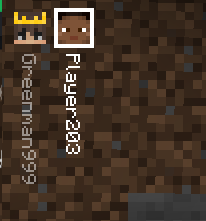
This mod displays the player names of the players in your voice chat group next to the player heads in the hud.
Screenshots

About this Mod
Simple Voice Chat Group Player Names
Simple Voice Chat Group Player Names is a Fabric mod that shows player names next to group player heads in the HUD for users of the Simple Voice Chat mod. It enhances visibility of who is in a voice group by rendering the display names beside the group icons.
Features
- Displays player names next to group player heads in the HUD
- Lightweight and unobtrusive
- Works alongside Simple Voice Chat to improve group identification
Requirements
- Fabric Loader (compatible version for your Minecraft instance)
- Fabric API
Simple Voice ChatmodCloth ConfigmodMod Menumod (optional for configuration GUI)- Java (as required by Fabric / Minecraft)
Installation
- Install Fabric Loader and Fabric API for your Minecraft version.
- Place the mod JAR into the
modsfolder of your Minecraft instance. - Ensure
Simple Voice ChatandCloth Configis also installed. - Launch Minecraft with the Fabric profile.
Building from source
- Build with Gradle:
- Linux / macOS:
./gradlew build - Windows (PowerShell):
.\gradlew.bat build
- Linux / macOS:
- The built JAR will be under
build/libsand can be copied to themodsfolder.
Configuration
- For configuration install
Cloth ConfigandMod Menumod. - You can access the configuration screen via the Mod Menu in-game.
- Options include only showing names for group members who are speaking.
License & Contributions
- Check the project repository for license details.
- Contributions and issues are welcome via the project's issue tracker and pull requests.
Support
- Ensure compatibility between Fabric Loader, Fabric API,
Simple Voice Chat, and this mod. - For bugs or feature requests, open an issue in the repository.
Available Versions
How to Install Simple Voice Chat Group Player Names on Your Server
Order Server
Order a Minecraft Java server with at least 3 GB RAM (4 GB recommended).
Set fabric Loader
In the panel under "Egg", select the fabric loader and matching Minecraft version (1.21.10).
Install Mod
Open the mod browser in the dashboard and search for "Simple Voice Chat Group Player Names". Click "Install" – done! Alternatively, upload the .jar via SFTP to the /mods folder.
Compatibility
Mod Loaders
Minecraft Versions
1.21.10, 1.21.9, 1.21.8
Server-side
✗ UnsupportedRecommended RAM
4 GB(min. 3 GB)Frequently Asked Questions
Simple Voice Chat Group Player Names server crashes on startup – what to do?
Most common cause: wrong fabric version or insufficient RAM. Check the server log (latest.log) for "OutOfMemoryError" or "Mixin" errors. With Mado Hosting: ensure at least 3 GB RAM is allocated and the loader matches the mod version (1.21.10). You can switch loaders with one click in the panel.
Is Simple Voice Chat Group Player Names compatible with fabric?
Simple Voice Chat Group Player Names officially supports fabric for Minecraft 1.21.10, 1.21.9, 1.21.8. The Mado dashboard automatically detects incompatible loader combinations.
Server lagging with Simple Voice Chat Group Player Names – how to optimize performance?
Recommended RAM: 4 GB (per 8 players). Use /spark profiler to check if Simple Voice Chat Group Player Names consumes the most tick time. Common fixes: reduce server view-distance to 8-10, install "performant" or "starlight" as supplementary mods on Forge. With Mado Hosting, your server runs on NVMe SSDs with dedicated CPU cores for minimal latency.
Similar Mods






Rent Modded Server
Install Simple Voice Chat Group Player Names with just one click on your server.