
SimpleChat (fork)
A small mod for a customizable chat, with the most simple settings. Integration with LuckPerms and FTB Teams.
Screenshots
About this Mod
SimpleChat (fork)




This fork was created because the main project is no longer maintained.
A simple chat mod for your server.
Works even in a single player game.
Just use !<message> for global chat or #<message> for world chat!

Features
FTB Teams integration (tested 2001.1.4)
LuckPerms integration (tested 5.4.25)
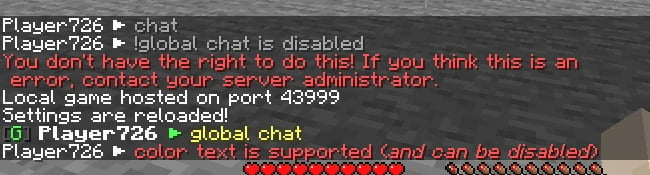
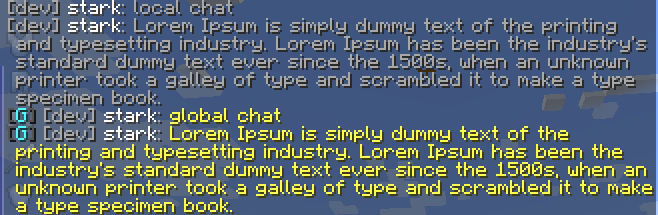
Global, world and local chat (you can turn it off)
Color chat (you can turn it off)
Reloading the configuration with the command
Support PlacehoderAPI (From 1.19.4)
Added support color tags (
Example For developers: Player chat event
Configuration
The configuration is located in <game or server directory>/config/simplechat.json.
| Name | Description | Type |
|---|---|---|
| enable_chat_mod | Enables (true) or disables (false) chat handling by the mod. | boolean |
| enable_global_chat | Enables (true) or disables (false) the global chat. | boolean |
| enable_world_chat | Enables (true) or disables (false) the world chat. | boolean |
| enable_chat_colors | Enables (true) or disables (false) the use of color codes in the chat. | boolean |
| local_chat_format | Defines the appearance of the local chat. | String |
| global_chat_format | Defines the appearance of the global chat. | String |
| no_players_nearby_text | Defines a message for local chat when there are no players nearby. | String |
| no_players_nearby_message | Enables (true) or disables (false) message. | boolean |
| no_players_nearby_action_bar | Enables (true) or disables (false) action bar message. | boolean |
| chat_range | Specifies the distance after which local chat messages will not be visible (if global chat is enabled). | int |
{
  "enable_chat_mod": true,
  "enable_global_chat": true,
  "enable_world_chat": false,
  "enable_chat_colors": false,
  "local_chat_format": "%player%&7:&r &7%message%",
  "global_chat_format": "&8[&2G&8] &r%player%&7:&r &e%message%",
  "world_chat_format": "&8[&9W&8] &r%player%&7:&r &e%message%",
  "no_players_nearby_text": "&fNo players nearby. Please use &e!<message> &ffor global chat.",
  "no_players_nearby_message": true,
  "no_players_nearby_action_bar": true,
  "chat_range": 100
}
You can use the placeholder %player% to specify the player's nickname and the placeholder %message% to specify their message in the chat.
%ftbteam%FTB Team integration - display your party in chat.%lp_group%LuckPerms - display player group.%lp_prefix%LuckPerms - display player prefix.%lp_suffix%LuckPerms - display player suffix.
You can reload the configuration without restarting the server or the game using the /simplechat command (requires 1 or more).
API
If you are a developer, you can use an event called when a player writes something to the chat.
Look me.vetustus.server.simplechat.api.event.PlayerChatCallback.
To control the behavior, use the ChatMessage subclass, which can be used to cancel sending a message or change it.
Example:
/**
 * Prohibits players from writing messages by canceling an event.
 */
PlayerChatCallback.EVENT.register((player, message) -> {
  PlayerChatCallback.ChatMessage chatMessage = new PlayerChatCallback.ChatMessage(player, message);
  chatMessage.setCancelled(true);
  return chatMessage;
});
License
The MIT license is used.
Available Versions
How to Install SimpleChat (fork) on Your Server
Order Server
Order a Minecraft Java server with at least 3 GB RAM (4 GB recommended).
Set fabric Loader
In the panel under "Egg", select the fabric loader and matching Minecraft version (1.20.1).
Install Mod
Open the mod browser in the dashboard and search for "SimpleChat (fork)". Click "Install" – done! Alternatively, upload the .jar via SFTP to the /mods folder.
Compatibility
Mod Loaders
Minecraft Versions
1.20.1, 1.20, 1.19.4 (+4 more)
Server-side
✓ RequiredRecommended RAM
4 GB(min. 3 GB)Frequently Asked Questions
SimpleChat (fork) server crashes on startup – what to do?
Most common cause: wrong fabric version or insufficient RAM. Check the server log (latest.log) for "OutOfMemoryError" or "Mixin" errors. With Mado Hosting: ensure at least 3 GB RAM is allocated and the loader matches the mod version (1.20.1). You can switch loaders with one click in the panel.
Is SimpleChat (fork) compatible with fabric?
SimpleChat (fork) officially supports fabric for Minecraft 1.20.1, 1.20, 1.19.4. The Mado dashboard automatically detects incompatible loader combinations.
Server lagging with SimpleChat (fork) – how to optimize performance?
Recommended RAM: 4 GB (per 8 players). Use /spark profiler to check if SimpleChat (fork) consumes the most tick time. Common fixes: reduce server view-distance to 8-10, install "performant" or "starlight" as supplementary mods on Forge. With Mado Hosting, your server runs on NVMe SSDs with dedicated CPU cores for minimal latency.
Similar Mods



Rent Modded Server
Install SimpleChat (fork) with just one click on your server.