
Simply Coffee
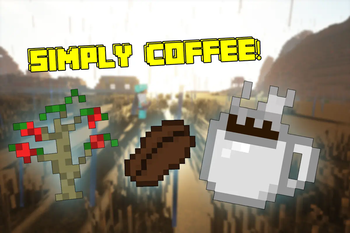
Simply adding the best drink to Minecraft... Coffee!
Screenshots
About this Mod
The Simply Coffee Mod is back!
Finally! We get what we have always wanted, Coffee, now Minecraft is complete!
This mod adds Coffee plants, a white mug, a glass mug, and paper cups to drink your Java.
Who doesn't want Coffee?
The first step is to find a Coffee Fruit, which is obtained by finding a Coffee plant in a Jungle biome.
This fruit can be used to plant a Coffee plant or to make a cup of coffee.
Coffee is planted on grass or dirt and is ready for harvest when the red berries are visible. When right-click and it will drop 4 Coffee Fruit.
By placing a Coffee Fruit into the crafting grid, it will produce two Raw Coffee Beans.
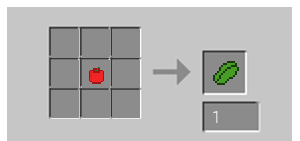
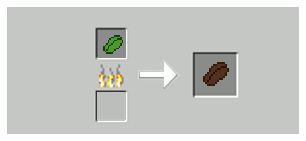
Now it needs to be roasted, place it into the furnace to get a Roasted Coffee Bean.
Now we need a Mortar and Pestle to grind the Beans
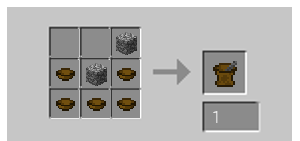
Now we will grind the roasted beans but don't worry, the Mortar and Pestle will not get consumed.
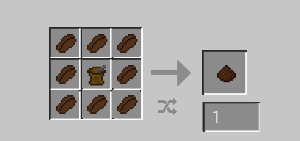
Now we need to make a Ceramic Mug.
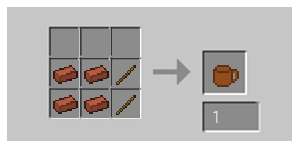
Smelting Quartz in a furnace will make Melted Quartz, and using the recipe below will make a Ceramic Mug ready for coffee!
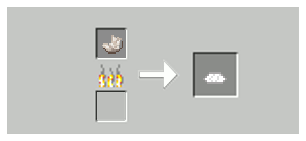
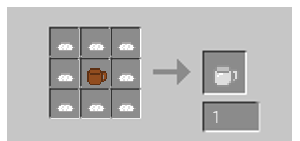
Or you could make a Glass mug that functions exactly like a Ceramic Mug.
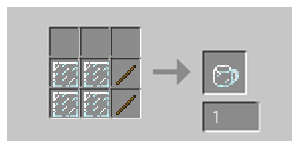
With an empty mug in hand, right-click a water block to fill it like a bottle.
In the crafting table, add grounds to the Mug with Water to make "Unbrewed Coffee".
Place the "Unbrewed" Coffee into the furnace to get Black Coffee that you can drink.
Keep in mind that a Glass mug uses the same recipes.
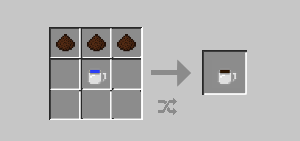
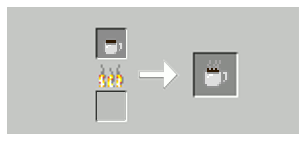
Now you can drink Coffee!! You will get your cup back after drinking, so don't worry :)
Place the Black Coffee in the Crafting grid with Milk, and/or Sugar in any order to make the following:
(In any order, meaning you can make Coffee with Sugar first, then add Milk to that to make Coffee, Milk, and Sugar or add Milk and Sugar to Hot Coffee to make it as well)
Coffee with Milk
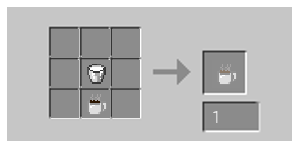
Coffee with Sugar
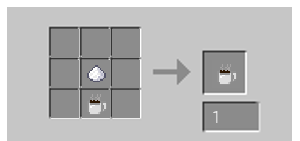
Coffee, Milk, and Sugar
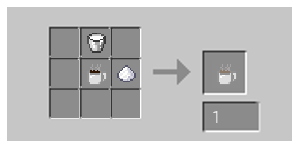
You can also add Sugar to Coffee with Milk to get this
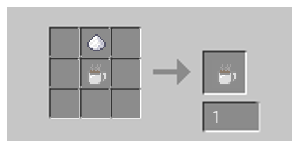
Espresso,
is made using four ground coffee, and then brewed in the furnace. The effects of Espresso last longer than Black Coffee.
You can only drink Espresso from mugs
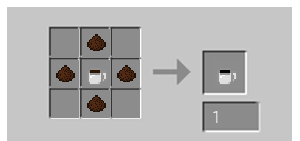
Double Shot Espresso is made with 8 coffee grounds instead of 4 and then brewed in the furnace.
Double Shot Espresso has a longer duration effect than Espresso.
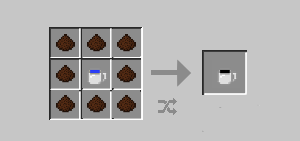
**You can only drink Espresso from mugs
**
Cappuccino is made from Espresso, Frothed Milk, and Sugar. (Note: Glass mugs can be used as well)
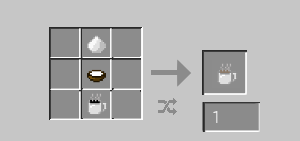
To make frothed milk, you will have to make a milk frother.
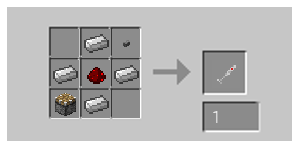
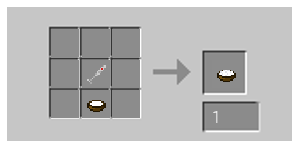
Next, you have to put milk into a bowl. (Note: This will not consume your bucket)
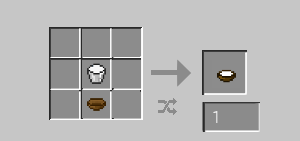
Now make the frothed milk.
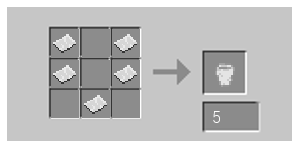
Paper Cups are less expensive than Ceramic Mugs and aren't reusable. Paper cups use five pieces of paper and make five paper cups.
To use a paper cup, right-click with it in hand and Brewed Black Coffee in your inventory to fill it.
You will get your mug back.
You can now add milk and sugar to it, just as if it were a mug.
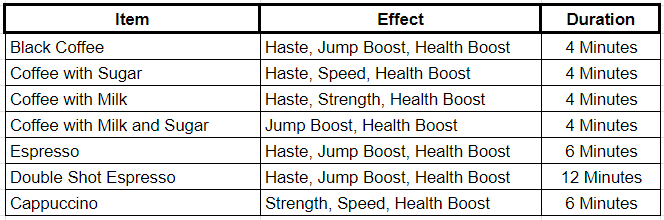
Each Drink has a Potion Effect! See below
This Mod and all textures made for this mod, are made by me, the author of this mod, and are not to be reproduced, re-posted, sold, or used in any other mod without permission. Use of mod in modpacks is welcomed!
Credit to MCreator, in which this mod was made.
Available Versions
How to Install Simply Coffee on Your Server
Order Server
Order a Minecraft Java server with at least 3 GB RAM (4 GB recommended).
Set forge Loader
In the panel under "Egg", select the forge loader and matching Minecraft version (1.19.2).
Install Mod
Open the mod browser in the dashboard and search for "Simply Coffee". Click "Install" – done! Alternatively, upload the .jar via SFTP to the /mods folder.
Compatibility
Mod Loaders
Minecraft Versions
1.19.2
Server-side
✓ RequiredRecommended RAM
4 GB(min. 3 GB)Frequently Asked Questions
Simply Coffee server crashes on startup – what to do?
Most common cause: wrong forge version or insufficient RAM. Check the server log (latest.log) for "OutOfMemoryError" or "Mixin" errors. With Mado Hosting: ensure at least 3 GB RAM is allocated and the loader matches the mod version (1.19.2). You can switch loaders with one click in the panel.
Is Simply Coffee compatible with forge?
Simply Coffee officially supports forge for Minecraft 1.19.2. The Mado dashboard automatically detects incompatible loader combinations.
Server lagging with Simply Coffee – how to optimize performance?
Recommended RAM: 4 GB (per 8 players). Use /spark profiler to check if Simply Coffee consumes the most tick time. Common fixes: reduce server view-distance to 8-10, install "performant" or "starlight" as supplementary mods on Forge. With Mado Hosting, your server runs on NVMe SSDs with dedicated CPU cores for minimal latency.
Similar Mods



Rent Modded Server
Install Simply Coffee with just one click on your server.