
Simulated Addition
A small add-on for Create: Simulated and Create: Aeronautics. It adds highly requested features for players.
Screenshots
About this Mod
Simulated Addition
A small add-on for Create: Simulated and Create: Aeronautics. It adds highly requested features for players.
Features currently included
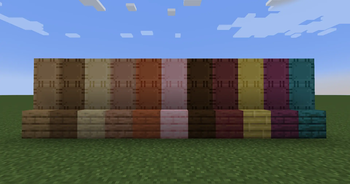
Wooden Sails / Wooden Symmetric Sail
- A sail with half the air resistance, lift, and thrust.
- Since you can craft four at once and don't need wool, it can be used as a low-cost sail.
- Not only can it be used as a low-cost sail, but it can also be used to improve the appearance or when the thrust is too strong for the size of the propeller.
Directional Propeller Bearing
- Propeller Bearings that can change the direction of thrust
- This is useful for turning airships during high-speed flight.
Directional Gyroscopic Propeller Bearing
- Gyroscopic Propeller Bearings that can change the direction of thrust
- It is useful for helicopters and other similar vehicles.
Floatite
- It has extremely strong buoyancy, allowing even very heavy contraptions to float on the water's surface.
- Even if you destroy it, you can recover it as an item.
Ballasite
- It's very heavy and can be used to sink contraptions or adjust the center of gravity.
Features to be added in the future
Phantom Sail
- A sail with double the air resistance, lift, and thrust.
Contra Rotating Propeller Bearing
- Propeller Bearing allows two propellers to rotate in opposite directions.
Analog Torsion Spring
- A block integrating the Torsion Spring and Directional Gearshift.
- Unlike standard torsion springs, the angle can be adjusted precisely.
Available Versions
How to Install Simulated Addition on Your Server
Order Server
Order a Minecraft Java server with at least 3 GB RAM (4 GB recommended).
Set neoforge Loader
In the panel under "Egg", select the neoforge loader and matching Minecraft version (1.21.1).
Install Mod
Open the mod browser in the dashboard and search for "Simulated Addition". Click "Install" – done! Alternatively, upload the .jar via SFTP to the /mods folder.
Compatibility
Mod Loaders
Minecraft Versions
1.21.1
Server-side
✓ RequiredRecommended RAM
4 GB(min. 3 GB)Frequently Asked Questions
Simulated Addition server crashes on startup – what to do?
Most common cause: wrong neoforge version or insufficient RAM. Check the server log (latest.log) for "OutOfMemoryError" or "Mixin" errors. With Mado Hosting: ensure at least 3 GB RAM is allocated and the loader matches the mod version (1.21.1). You can switch loaders with one click in the panel.
Is Simulated Addition compatible with neoforge?
Simulated Addition officially supports neoforge for Minecraft 1.21.1. The Mado dashboard automatically detects incompatible loader combinations.
Server lagging with Simulated Addition – how to optimize performance?
Recommended RAM: 4 GB (per 8 players). Use /spark profiler to check if Simulated Addition consumes the most tick time. Common fixes: reduce server view-distance to 8-10, install "performant" or "starlight" as supplementary mods on Forge. With Mado Hosting, your server runs on NVMe SSDs with dedicated CPU cores for minimal latency.
Similar Mods


Rent Modded Server
Install Simulated Addition with just one click on your server.