
Singleplayer Anticheat 1.21.11
A self-enforcing anticheat for singleplayer hardcore worlds. The mod generates a hidden structure that kills you if it's removed — making cheating impossible without destroying your world.
Screenshots
About this Mod
Singleplayer Anticheat: Commandlock
Overview
A self-enforcing anticheat mod for singleplayer hardcore and survival worlds. Permanently locks your world against cheating by detecting and eliminating command usage, creative mode, and mod tampering.
The Problem
In singleplayer, there's no way to verify if a hardcore or survival world was played legitimately. Open to LAN allows enabling cheats, and even if you remove this mod, the blocks remain — creating an undetectable loophole.
The Solution
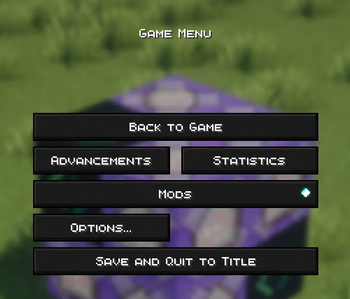
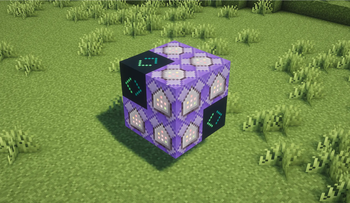
Commandlock generates a hidden self-healing structure at world spawn containing 6 repeating command blocks and a unique verification block. If the mod is removed:
- The verification block disappears
- Command blocks instantly detect this
- You are killed, ending the run
Even if cheats are enabled through mods like Axiom, the kill command executes and your world ends.
How It Works
- Removes the "Open to LAN" button entirely
- Intercepts all command attempts on the client side
- Auto-kills players in creative mode
- Self-healing barrier structure that regenerates constantly
- Force-loads its chunk to always monitor your world
⚠️ Important
Do not open worlds created with this mod without it installed. The verification block won't exist and you will be killed instantly.
Works on Minecraft 1.21.11 with Fabric Loader 0.15.0+
Available Versions
How to Install Singleplayer Anticheat 1.21.11 on Your Server
Order Server
Order a Minecraft Java server with at least 4 GB RAM (6 GB recommended).
Set fabric Loader
In the panel under "Egg", select the fabric loader and matching Minecraft version (1.21.11).
Install Mod
Open the mod browser in the dashboard and search for "Singleplayer Anticheat 1.21.11". Click "Install" – done! Alternatively, upload the .jar via SFTP to the /mods folder.
Compatibility
Mod Loaders
Minecraft Versions
1.21.11
Server-side
✓ RequiredRecommended RAM
6 GB(min. 4 GB)Frequently Asked Questions
Singleplayer Anticheat 1.21.11 server crashes on startup – what to do?
Most common cause: wrong fabric version or insufficient RAM. Check the server log (latest.log) for "OutOfMemoryError" or "Mixin" errors. With Mado Hosting: ensure at least 4 GB RAM is allocated and the loader matches the mod version (1.21.11). You can switch loaders with one click in the panel.
Is Singleplayer Anticheat 1.21.11 compatible with fabric?
Singleplayer Anticheat 1.21.11 officially supports fabric for Minecraft 1.21.11. The Mado dashboard automatically detects incompatible loader combinations.
Server lagging with Singleplayer Anticheat 1.21.11 – how to optimize performance?
Recommended RAM: 6 GB (per 5 players). Use /spark profiler to check if Singleplayer Anticheat 1.21.11 consumes the most tick time. Common fixes: reduce server view-distance to 8-10, install "performant" or "starlight" as supplementary mods on Forge. With Mado Hosting, your server runs on NVMe SSDs with dedicated CPU cores for minimal latency.
Similar Mods





Rent Modded Server
Install Singleplayer Anticheat 1.21.11 with just one click on your server.