
Skyblock Itemtracker
This mod adds a system that tracks every time you get an item in Hypixel Skyblock for the first time.
Screenshots


About this Mod
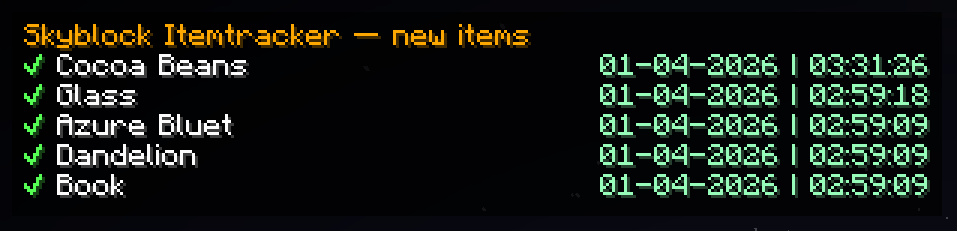
This mod makes it so you get a toast on screen and a ding sound when you get an item for the first time in Hypixel Skyblock, be aware that this only works when the item goes into your inventory, doesn't work for Sacks or Stash.
It logs the name of the item and the exact date when you get it up to minutes and seconds.
It also includes an item list from Firmament that includes all items in the game so you can aim to get every single item atleast once. By default it opens pressing the "." button but you can change it in options. You need to have the Firmament mod installed for this to work.
It also includes a HUD that shows the last 5 items that were added to your item list, this HUD is off by default but you can open it by pressing "," but you can change it in options.
The mod also has a backup system and works with different Skyblock profiles, the mod will ask you to do /profileid the first time you use it on a single profile account or if you use a mod to block the message that shows your profile ID in chat when you log in.
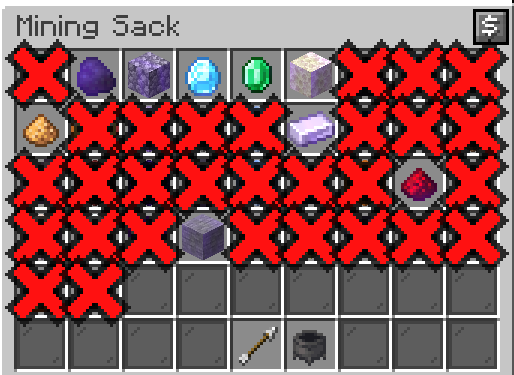
It also makes any item you haven't obtained yet appear as a massive red X in any shop or crafting window you open so its impossible to miss an item but the main idea was to use it in my Bronzeman playthrough.
Available Versions
How to Install Skyblock Itemtracker on Your Server
Order Server
Order a Minecraft Java server with at least 3 GB RAM (4 GB recommended).
Set fabric Loader
In the panel under "Egg", select the fabric loader and matching Minecraft version (26.1).
Install Mod
Open the mod browser in the dashboard and search for "Skyblock Itemtracker". Click "Install" – done! Alternatively, upload the .jar via SFTP to the /mods folder.
Compatibility
Mod Loaders
Minecraft Versions
26.1, 1.21.11
Server-side
✗ UnsupportedRecommended RAM
4 GB(min. 3 GB)Frequently Asked Questions
Skyblock Itemtracker server crashes on startup – what to do?
Most common cause: wrong fabric version or insufficient RAM. Check the server log (latest.log) for "OutOfMemoryError" or "Mixin" errors. With Mado Hosting: ensure at least 3 GB RAM is allocated and the loader matches the mod version (26.1). You can switch loaders with one click in the panel.
Is Skyblock Itemtracker compatible with fabric?
Skyblock Itemtracker officially supports fabric for Minecraft 26.1, 1.21.11. The Mado dashboard automatically detects incompatible loader combinations.
Server lagging with Skyblock Itemtracker – how to optimize performance?
Recommended RAM: 4 GB (per 8 players). Use /spark profiler to check if Skyblock Itemtracker consumes the most tick time. Common fixes: reduce server view-distance to 8-10, install "performant" or "starlight" as supplementary mods on Forge. With Mado Hosting, your server runs on NVMe SSDs with dedicated CPU cores for minimal latency.
Similar Mods



Rent Modded Server
Install Skyblock Itemtracker with just one click on your server.