SkyCubed
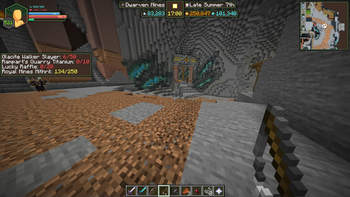
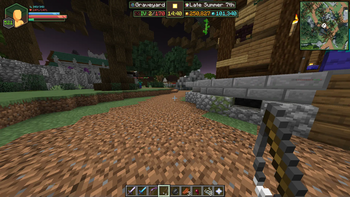
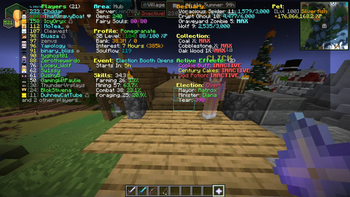
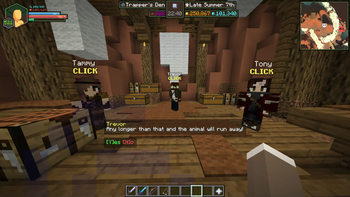
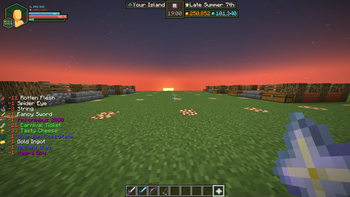
SkyCubed is a Hypixel SkyBlock UI overhaul mod, changing all aspects of the UI in-game to be more inline into it looking like its own game
Screenshots
About this Mod
SkyCubed
SkyCubed is a Hypixel SkyBlock UI overhaul mod, changing all aspects of the UI in-game to be more inline into it looking like its own game
Installation Guide
- Prerequisites: Fabric Language Kotlin
- Download into your favourite launcher or into your mods folder directly
- Recommended mods to go with it
Preview
- To check out the features you can go to the features below.
- If you would like to see how it looks check out the gallery
Credits
- ThatGravyBoat - Main Developer
- j10a1n15 - Main Contributor
- meowora - Main Contributor
- SkyGuide/DeDiamondPro - Map Data
- Alychemist - Info Display, RPG HUD, and general palette textures
- CallMeBell - Various little info icons.
- M1lkys - Emotional Support
Features
General Config
- Hidden Actionbar Widgets
- Hidden HUD Elements
- Quick Access to other SkyCubed configs
- Minecraft Keybinds Screen
- SkyCubed Notifications
- SkyCubed SackHud Edit Screen
Overlay Config
- Info Overlay
- Shows generalised information about your current location centered at the top of the screen.
- RPG Overlay
- RPG style display with health, mana, (skyblock) xp, and air (if in water).
- Text Overlay
- Movable text overlays for health, mana, defense and speed.
- Tablist Overlay
- A compact tablist with player sorting options.
- Sack Overlay
- Displays specified items from your sacks with their amounts.
- You can customize the items shown using
/skycubed sackhud.
- Trophy Fish Overlay
- Displays the amount of each trophy fish you have caught.
- Has different toggles to show not unlocked ones, a checkmark or cross for caught/not caught, and more.
- Best used with the SkyBlock Profile Viewer mod to update your data when out of sync.
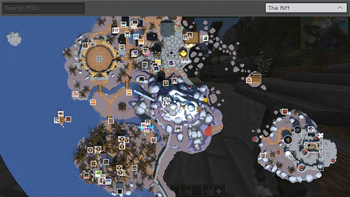
- Map Overlay
- Displays a map of the current area you are in.
- Highlights NPCs and other important locations.
- Can be toggled to show a minimap or a full screen map.
- Also has a rounded shape option as well as an option to rotate the minimap in the players looking direction.
- Dungeon Map Overlay
- Displays the current Dungeon map on your screen.
- With customizable colors.
- Pickup Log Overlay
- Displays the items you have picked up or dropped on screen.
- Has an option for a compact view, sack items, and more.
- Commissions Overlay
- Displays your current commissions and their progress on screen.
- NPC Overlay
- Displays NPC messages on screen like in other games.
- Cold Overlay
- When freezing in the Glacite Tunnels or Mineshafts, the vanilla freezing overlay appears on your screen.
- Bossbar Hider
- Hides the vanilla bossbar with or without the bossbar title.
- Movable Hotbar
- Wind Overlay
Screens Config
- Show Equipment
- Like armor, equipment will show up next to your player in the inventory.
- Wardrobe Overlay
- In the wardrobe, your armor will be displayed on a player for a better view.
Items Config
- Item Bars
- Adds durability bars to items like drill to show fuel percentage and for snowballs in snow launchers.
- Cooldowns
- Applies the vanilla cooldown effect to items with cooldowns, like the Grappling Hook.
Chat Config
- Modify Hypixel Commands
- Adds Tab completion to various Hypixel commands.
- Chat Colors
- Changes the color of the tab next to chat messages based on their type, such as private messages, guild messages, system messages, and public messages.
- Compact Chat
- Compacts certain chat messages to reduce clutter, such as Hypixel experience gains, cooldowns, and pickaxe abilities.
- Messages to clean
- Allows you to write your own filters using regular expressions to remove unwanted chat messages.
Notifications Config
- Notifications
- Customizable notifications for various events, actions, and general time sensitive messages.
- Will show up as a toast notification in the top right corner of the screen.
- You can view all notifications in the SkyCubed Notifications screen, which can be found on the top right of the escape menu.
Rendering Config
- Show own Nametag
- While in f3, displays your own nametag above your player.
Available Versions
How to Install SkyCubed on Your Server
Order Server
Order a Minecraft Java server with at least 3 GB RAM (4 GB recommended).
Set fabric Loader
In the panel under "Egg", select the fabric loader and matching Minecraft version (26.1.2).
Install Mod
Open the mod browser in the dashboard and search for "SkyCubed". Click "Install" – done! Alternatively, upload the .jar via SFTP to the /mods folder.
Compatibility
Mod Loaders
Minecraft Versions
26.1.2, 26.1.1, 26.1 (+9 more)
Server-side
✗ UnsupportedRecommended RAM
4 GB(min. 3 GB)Frequently Asked Questions
SkyCubed server crashes on startup – what to do?
Most common cause: wrong fabric version or insufficient RAM. Check the server log (latest.log) for "OutOfMemoryError" or "Mixin" errors. With Mado Hosting: ensure at least 3 GB RAM is allocated and the loader matches the mod version (26.1.2). You can switch loaders with one click in the panel.
Is SkyCubed compatible with fabric?
SkyCubed officially supports fabric for Minecraft 26.1.2, 26.1.1, 26.1. The Mado dashboard automatically detects incompatible loader combinations.
Server lagging with SkyCubed – how to optimize performance?
Recommended RAM: 4 GB (per 8 players). Use /spark profiler to check if SkyCubed consumes the most tick time. Common fixes: reduce server view-distance to 8-10, install "performant" or "starlight" as supplementary mods on Forge. With Mado Hosting, your server runs on NVMe SSDs with dedicated CPU cores for minimal latency.
Similar Mods




Rent Modded Server
Install SkyCubed with just one click on your server.